Using Form.vue
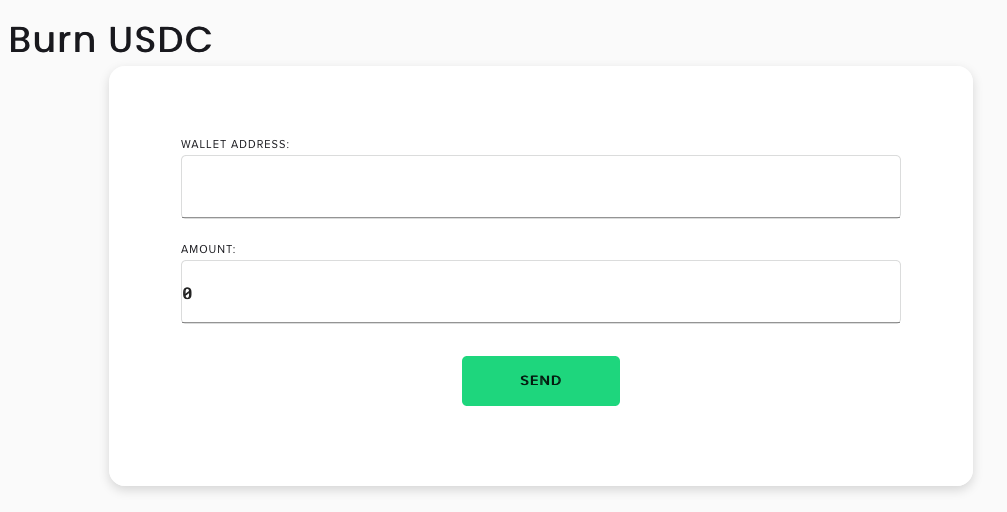
Form.vue is a reusable form component designed specifically for this project. Its intentions are to provide a common interface that caters to how forms are used for the dashboard; it only contains text fields and a submit button.
A Form element contains the following props:
-
title- The string that is displayed to the upper-right of the form. This is the title of the form (eg. 'Mint USDC'). -
schema- representation of the text fields of the form, in the order that they are displayed. It is represented as an array of object literals that contain the following fields:-
label- the label displayed inside the text field -
defaultValue- the initial value of the value within the text field (eg.0). This field is optional and defaults to''
-
For an example, see #Examples.
Each Form element emits the following events:
-
submit- this is emitted when the user presses on thesubmitbutton. The values of each text field are passed into the event in the corresponding order of the schema.Two-way bindings in
vueare now deprecated, so instead of using thev-modeldirective of input elements, we leveraged this abstraction layer to escape the two-way binding pattern for the more recommended emitter pattern. Internally,Formwill create its own bindings that are passed into eachinputelement and emit the values of those bindings.
Example 1 (Mint USDC)
<Form
  :title="'Mint USDC'"
  :schema="[
    {
      label: 'Wallet Address:',
    },
    {
      label: 'To Address:',
    },
    {
      label: 'Amount:',
      defaultValue: 0
    }
  ]"
  @submit="function (walletAddress, toAddress, amount) { ... }"
/>
Example 2 (Burn USDC)
<Form
  :title="'Burn USDC'"
  :schema="[
    {
      label: 'Wallet Address:',
    },
    {
      label: 'Amount:',
      defaultValue: 0
    }
  ]"
  @submit="function (walletAddress, amount) { ... }"
/>