ASP.NET Handler
It seems that setting up http handlers in IIS on Windows 7 and Windows 10 machines is quite different to what I knew long time ago.
First of all, the application pool that a web application uses can run in either the integrated pipeline mode or the classic pipeline mode, and the settings for http handlers in these two situations are quite different:
- integrated mode: all we need to do is to add an entry to the system.webServer/handlers section:
<add name="eee" path="*.eee" verb="*"
type="MyHandlerTest.MyHandler, MyHandlerTest" preCondition="integratedMode"  />
where MyHandlerTest.dll resides in the bin sub-folder of the application folder and MyHandlerTest.MyHandler is a handler class there. This setting can be done through IIS Manager as well: select the application, then choose "Handler Mappings" pane, then click "Add Managed Handler...". In the popup window there, remember to click the "Request Restrictions..." button, and uncheck "Invoke handler only if request is mapped to:".
- classic mode: we need to add an entry to the system.web/httpHandlers section:
<add path="*.eee" verb="*" type="MyHandlerTest.MyHandler, MyHandlerTest" />as well as a module mapping (similar to the Url mapping in the old time) in system.webServer/handlers section:
<add name="eeemapping" path="*.eee" verb="*" modules="IsapiModule"
scriptProcessor="C:\Windows\Microsoft.NET\Framework64\v4.0.30319\aspnet_isapi.dll"
resourceType="Unspecified" preCondition="classicMode,runtimeVersionv4.0,bitness64" />
The module mapping part can also be done in IIS Manager: select the application, then choose "Handler Mappings" pane, then click "Add Module Mapping...".
The assembly that contains http handlers can reside in the bin sub-folder of the applicationfolder, or in GAC: just specify the full name of the assembly including Version, Culture, and PublicKeyToken, in the type attribute.
gacutil /i C:\MyHandlerTest.dll
Once we sign a dll and add it to GAC, we can find its PublicKeyToken by inspecting its folder name in GAC. For example, the folder name v4.0_1.0.0.0__a2ee9f6a81c095ab in C:\Windows\Microsoft.NET\assembly\GAC_MSIL\MyHandlerTest means the Version is 1.0.0.0 and the PublicKeyToken is a2ee9f6a81c095ab.
The setting discussed above can be added to the web.config file in the application folder, or to the web.config file in the web server root folder (normally C:\inetpub\wwwroot). We can add entries for both pipeline modes in that single file to support a web server having applications running in different pipeline mode as long as having the following line in the system.webServer section:
<validation validateIntegratedModeConfiguration="false" />We can also add these entries to the machine level: the entries to support integrated mode should go to the C:\Windows\System32\inetsrv\config\applicationHost.config file, and the entries to support classic mode should go to the C:\Windows\Microsoft.NET\Framework64\v4.0.30319\Config\web.config file. To make sure the handler set there is being used, better to add them to the top of the handler list.
Notice that although the settings in web server root folder are inherited by each web application, the bin sub-folder of the web server root folder does not have special meaning in the sense that we cannot put handler there and use it in every web application.
For additional details, see How To Create an ASP.NET HTTP Handler by Using Visual C# .NET .
The approach above is not enough for ASP.NET MVC applications, see the discussion https://stackoverflow.com/questions/15261346/why-is-the-httphandler-not-running and https://forums.asp.net/t/1994102.aspx?Problems+using+Custom+HTTPHandler+in+MVC. The reason is "MVC routing engine tries to map all requests to a controller". We can make our example to work in a MVC application by add the following line in the RegisterRoutes method in Global.asax.cs:
routes.IgnoreRoute("*.eee");If we want to map a handler to a path ending with .axd in an application running in the classic mode, then there is no need to add a module mapping since it already exists in machine level at C:\Windows\System32\inetsrv\config\web.config:
<add name="AXD-ISAPI-4.0_64bit" path="*.axd" verb="GET,HEAD,POST,DEBUG" modules="IsapiModule"
scriptProcessor="C:\Windows\Microsoft.NET\Framework64\v4.0.30319\aspnet_isapi.dll"
preCondition="classicMode,runtimeVersionv4.0,bitness64" responseBufferLimit="0" />
Moreover in normal situation that is no need to modify the RegisterRoutes method in MVC application for the .axd path, because the Global.asax.cs file generated by VS template already contains the following line there:
routes.IgnoreRoute("{resource}.axd/{*pathInfo}");In the ASP.NET architecture, the http handler class is the class that is responsible for handling a http request, and generating response. It is a class that implements the IHttpHandler interface.
public interface System.Web.IHttpHandler {
      void ProcessRequest(HttpContext context);
      bool IsReusable { get; }
}
System.Web.UI.Page is just one such class. The following is a simple example:
// HelloHandler.cs
using System.Web;

public class HelloHandler : IHttpHandler {
    public void ProcessRequest (HttpContext context) {
        string name = context.Request["Name"];
        context.Response.Write("Hello, " + name);
    }

    public bool IsReusable {
        get { return true;}
    }
}
There needs a linkage between a client request and the handler class. The following is one such linkage (built in the web.config of the web application) (assuming the code above is compiled into a HandlerTest.dll in the \bin subfolder of the application folder:
<httpHandlers>
	<add verb="*" path="Hello.aspx" type="HelloHandler, HandlerTest"/>
</httpHandlers>
Once we have this linkage, a user can just send the following request in a web browser:
http://localhost/Test/Hello.aspx?Name=John
and the browser would receive and show the response
Hello, John
A handler class does not need to implement IHttpHandler interface directly. It can as well extend an existing implementation of IHttpHandler, such as the Page class. The Page class builds structure to the response stream for html content, therefore is suitable for complex web page. If we build the handler based on the Page class, we can utilize the Page's control tree and all the ASP.NET controls we are familiar with. The only thing lost is the web form and its designer support.
using System;
using System.Collections;
using System.Web;
using System.Web.UI;
using System.Web.UI.WebControls;
using System.Web.UI.HtmlControls;

public class Page1 : Page {
    protected HtmlForm form1;
    protected Label lblMessage;

    public Page1() {
        Load+= new System.EventHandler(Page_Load);
    }

    protected override void FrameworkInitialize() {
        form1 = new HtmlForm();
        form1.ID = "form1";

        lblMessage = new Label();
        lblMessage.ID = "lblMessage";

        IParserAccessor accessor;
        accessor = this;
        accessor.AddParsedSubObject(new LiteralControl("     "));
        accessor.AddParsedSubObject(form1);
        accessor.AddParsedSubObject(new LiteralControl("   "));

        accessor = form1;
        accessor.AddParsedSubObject(new LiteralControl("\r\n "));
        accessor.AddParsedSubObject(lblMessage);
        accessor.AddParsedSubObject(new LiteralControl("\r\n "));
    }

    private void Page_Load(object sender, EventArgs e) {
        lblMessage.Text = "Hello World";
    }
}
A more interesting example is to display a dynamic-generated image. A static image requested directly as in
http://localhost/Test/HelloWorld.gif
may happen be to a "Hello John" image. If we want this image be dynamically generated, then we may build a handler class that generates and sends the image as a byte array as follows:
using System;
using System.Web;
using System.Drawing;
using System.Drawing.Imaging;

public class HelloImageHandler : IHttpHandler {
    public void ProcessRequest (HttpContext context) {
        string name = context.Request["Name"];
        Bitmap bitmap = new Bitmap (160,40, PixelFormat.Format32bppArgb);
        Graphics g = Graphics.FromImage (bitmap);
        SolidBrush bkBrush = new SolidBrush (Color.White);
        g.FillRectangle (bkBrush, 0, 0, 160, 40);
        Font drawFont = new Font("Arial", 16);
        SolidBrush drawBrush = new SolidBrush(Color.Black);
        g.DrawString("Hello " + name, drawFont, drawBrush, 15.0F, 5.0F);
        context.Response.ContentType = "image/gif";
        bitmap.Save (context.Response.OutputStream, ImageFormat.Gif);
    }

    public bool IsReusable {
        get { return true; }
    }
}
Then we compile it to a dll in the \bin subfolder:
csc /target:library /out:bin\HandlerTest.dll HelloImage.cs
and finally create a linkage in the web.config:
<httpHandlers>
	<add verb="*" path="HelloImage.aspx" type="HelloImageHandler, HandlerTest"/>
</httpHandlers>
then we can request this image as follows:
http://localhost/Test/HelloImage.aspx?name=John
How can a client request reach a compiled class? There are two physical boundaries: the web server (IIS) and the process that hosts the class (the ASP.NET worker process), i.e. the web server has to pass the request to the ASP.NET worker process, and the worker process has to pass the request to the class.
A client sends a request to the server by specifying a virtual path, say it is
/Test/HelloImage.aspx
Based on the file extension mapping setting for the virtual directory, IIS finds which ISAPI extension should it passes the request to. In order for the request to go to the ASP.NET worker process, the file extension has to be mapped to the ISAPI extension for ASP.NET (aspnet_isapi.dll)
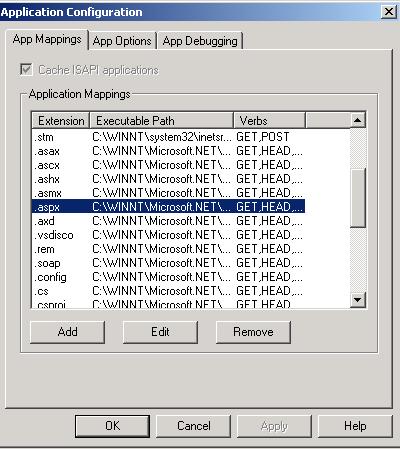
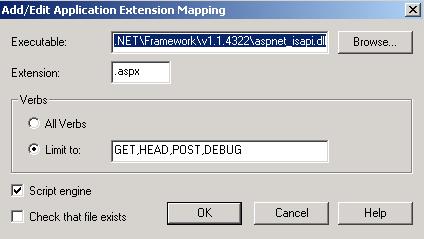
Under the default setting, the file extensions .asax, .ascx, .ashx, .asmx, .aspx, .axd, .config, .cs, .config, .java, .jsl, .licx, .rem, .resources, .resx, .soap, .vb, .vbproj, .vjsproj, .vsdisco, and .webinfo are mapped to the ISAPI extension for ASP.NET. Once the ASP.NET worker process gets the request. It would find a managed class that is either a http handler or a http handler factory to handle it based on the handler mapping in some configuration file. The mappings we showed above build the link from the path to the handler.
In summary, in general the linkage between the request and the http handler class is built in two stages:
- The mapping from the virtual path to aspnet_isapi.dll based on the file extension
- The mapping from the virtual path to the handler class in a configuration file
The first step is relatively generic since it depends solely on the file extension, and it may be omitted if such mapping for the file extension exists in the default setting (such as .aspx and .ashx) on the web server level.
In the mapping inside the configuration file, a virtual path can be mapped to either a http handler or a http handler factory. A http handler factory is a class that can generate http handler instance. To be accurate, a http handler factory is a class that implements the IHttpHandlerFactory interface:
public interface System.Web.IHttpHandlerFactory {
    IHttpHandler GetHandler(HttpContext context, string requestType,
        string url, string pathTranslated);
    void ReleaseHandler(IHttpHandler handler);
}
A http handler class (in the compiled form) has a disadvantage that we need to set a handler mapping to a URL explicitly in the configuration file. An alternative approach that does not have such disadvantage is to set the mapping for the http handler factory (in the compiled form) to a URL group (say all virtual paths with certain file extension). Why a handler factory is better than a handler for this purpose? Why can't we just let a handler do whatever the handler factory does? Yes, the interface of the handler factory really has no fundamental difference over a handler, but the important thing is if the handler is found by the handler factory, then the handler class does not even need to be exist. The handler factor can create a handler class and instantiate it when the factory needs a handler. ASP.NET framework already provides a few such generic handler factory classes, and we can introduce more.
Since the introduction of the handler factory frees the requirement of the existence of the handler class in compiled form, a handler can be persistent in many ways, such as
- in a source code
- in some script format that can be translated to source code
and it is naturally to have such persistent files to be associated to the URL. File extensions .ashx and .aspx represent two such persistent format.
Under the default setting in machine.config, a request for an .aspx or an .ashx file would be handled by the PageHandlerFactory class and the SimpleHandlerFactory class, respectively:
<configuration>
  <system.web>
    <httpHandlers>
      <add verb="*" path="*.aspx" type="System.Web.UI.PageHandlerFactory"/>
      <add verb="*" path="*.ashx" type="System.Web.UI.SimpleHandlerFactory"/>
      ...
    </httpHandlers>
    ...
  </system.web>
  ...
</configuration>
The IIS can transfer a virtual path to a physical path, but that physical path does not need to be exist in the file system, since this information is only used by the handler or the handler factory, and it is the handler or the handler factory who decides how to handle the request. But when PageHandlerFactory or SimpleHandlerFactory handles the request, the .aspx file or the .ashx file has to exist as a text file on the server. When the handler factory class gets the request for one such file, it would convert it to some IHttpHandler class and compile it, then passes the request to the newly generated class for its handling. Therefore the usual behavior (such as the run-time compilation) of aspx/ashx files is really just the behavior of their handler factories. Of course, if the dynamic-compilation feature is good is a different story.
We call an .aspx file a web form file, and an .ashx file a web handler file. They are not handler class, but they are transferred to handler class by certain handler factory class. We can think them as handler template files. The web handler file format is just a thin wrapper to the handler class source code. The only addition is a @ WebHandler directive at the top of the file informing the handler factory SimpleHandlerFactory of the language the source code is written and the name of the handler class (since there can be several classes in this file and they are not necessarily all handler classes), then the client can request this file directly and we do not even need to compile web handler file, just like we do to a web form file. When a client requests this file, the request goes to IIS, then to the ISAPI extension for ASP.NET, then to the ASP.NET worker process, then to the HttpRuntime class, then to the HttpApplicationFactory class, then to the HttpApplication class, and finally to the SimpleHandlerFactory class. SimpleHandlerFactory would find this .ashx file, compile the codes inside this file, and then call the ProcessRequest method of the http handler class in the compiled assembly.
The web form file format goes further. It contains server-side control tags in a format similar to the html markup format. Therefore the ASP.NET runtime has to translate the markup tags to the source code before compiling it. Nevertheless it makes the creation of the handler easier, since its content can be specified in a format that is closer to the format it will produce: HTML.
Here is an example of the web handler file (rewritten from the previous example):
// Hello.ashx
<%@ WebHandler Language="C#" Class="Hello" %>
using System.Web;

public class Hello : IHttpHandler {
    public void ProcessRequest (HttpContext context) {
        string name = context.Request["Name"];
        context.Response.Write("Hello, " + name);
    }

    public bool IsReusable {
        get { return true;}
    }
}
A client can just send the following request through a web browser:
http://localhost/Test/Hello.ashx?Name=John
and the server would return the response
Hello, John
Comparing to the original approach, we do not need the mapping setting anymore (since the mapping setting for web handler file is machine-wide) and no need to compile code, but the cost is we have to have the code wrapped in a web handler file and VS.NET 2002/2003 IDE has no special support to this file extension (i.e. it would open such file in a text editor instead of a code editor). But things can be better as we will see later.
Another nice feature of web handler file (or to be more accurate, of SimpleHandlerFactory) is we can have additional source code file be to compiled with the web handler file together at run time.
<%@ WebHandler Language="C#" Class="Hello" %>
<%@ Assembly SRC="SecondFile.cs" %>

public class Hello : IHttpHandler { ...}
In the code above, the secondFile.cs would also be compiled to the same assembly with the web handler file automatically. To the extreme, we can move the whole handler class source code out of the web handler file and put in a separate class file, as of follows:
// Hello.ashx
<%@ WebHandler Language="C#" Class="Hello" %>
<%@ Assembly SRC="HelloHandler.cs" %>

// HelloHandler.cs
using System.Web;

public class Hello : IHttpHandler { ...}
In this way, we separate the web handler file (which becomes dummy file) from the handler class, so we have the handler class in its original source code file, and also get the VS.NET IDE support to the handler class back, and still have the runtime compilation feature. The overhead is a dummy web handler file, and we need one such file for each handler class.
We can create our own handlers or handler factories. There are few decisions we have to make:
- Do we want to create the handler as a text file or as a compiled class? If text file, then it needs an associated compiled handler factory class
- For handler in text format, should we let it be the physical path corresponding to the virtual path of the request? It does not need to be that way, but it is better to be this way since it helps to simplify the understanding a little, and is the case for both .aspx and .ashx
- Which file extension to choose, since we need IIS to map this extension to aspnet_isapi.dll? If we use the existing file extensions associated with aspnet_isapi.dll, then we have to alter the common usage for such file extension. If we choose a new file extension, then we have to map this file extension to aspnet_isapi.dll in IIS
The following is an example of settings in the configuration (can be the web.config in a web application) for a handler in compiled form:
<httpHandlers>
    <add verb="GET" path="MyPage.MyExt" type="MyNameSpace.MyClass, MyDll"/>
</httpHandlers>
This setting assures that if the ASP.NET worker process gets a request for MyPage.MyExt, it would call the MyNameSpace.MyClass class in the MyDll assembly, where MyNameSpace.MyClass implements either the IHttpHandler interface or the IHttpHandlerFactory interface, and MyPage.MyExt is a virtual page the web client can request for, and need not necessarily correspond to a physical file on the web server. We also have to map the file extension .MyExt to aspnet_isapi.dll in IIS.
We can also reuse the file extension associated with aspnet_isapi.dll in IIS already. Let's use .aspx as an example. Although the default behavior is the request is passed to System.Web.UI.PageHandlerFactory that would dynamically compile the file requested and pass the request to it, we can override the default setting in the configuration file to let our http handler to handle the request:
<httpHandlers>
    <add verb="*" path="*.aspx" type="SqlWebTest.RequestHandler, SqlWebTest"/>
</httpHandlers>
Then whenever a client requests an .aspx file, which does not exist on the server at all, our http handler can handle the request, and give the client the illusion that there exists such .aspx file on the server. In this way, we can have one handler to be the back-end for many "virtual" files that can be requested.
As we have seen, web pages are really handlers on the server side. Often a large web site has many pages that share common parts and styles. It is natural that we would imagine that on the sever side we can abstract the common page features into a base handler, then the handler for each concrete page can be a derived class for that base class. The following is one such example. In this example, we assume this web sites has many pages that have common top and left pane, and only the content in the right pane is different.
using System;
using System.Web;
using System.Drawing;

public abstract class BaseHandler : IHttpHandler {
    public void ProcessRequest (HttpContext context) {
        HttpResponse response = context.Response;
        response.Write("<table border=1 width=90% cellpadding=10 cellspacing=10 ><tr><td colspan=2>");
        SendTop(response);
        response.Write("</td></tr><tr><td>");
        SendLeft(response);
        response.Write("</td><td>");
        SendRight(response);
        response.Write("</td></tr></table>");
    }

    public bool IsReusable {
        get { return true;}
    }

    protected virtual void SendTop(HttpResponse response) {
        response.Write("<H2>Test Inheritance</H2>");
    }

    protected virtual void SendLeft(HttpResponse response ) {
        response.Write("<UL><LI>Item 1</LI><LI>Item 2</LI></UL>");
    }

    protected abstract void SendRight(HttpResponse response );

}

public class DerivedHandler1 : BaseHandler {
    protected override void SendRight(HttpResponse response ) {
        response.Write("This is derived page 1<BR>");
        response.Write("<A HREF='Derived2.aspx'>Go to the derived page 2</A>");
    }
}

public class DerivedHandler2 : BaseHandler {
    protected override void SendRight(HttpResponse response ) {
        response.Write("This is derived page 2<BR>");
        response.Write("<A HREF='Derived1.aspx'>Go to the derived page 1</A>");
    }
}
Although this approach follows OOP philosophy well, it has two disadvantages:
- The VS IDE does not have design-time support for arbitrary handlers except aspx and ascx files. The best we can do is to have the design-time support for the common parts by wrapping them into ASP.NET user controls (.ascx files)
- Such inheritance only exists on the server. The similarity of the web pages rendered to clients are not utilized on the client side. For example, when we switch from one page to another page, the browser would load the whole page, although the common part are the same and has no need to reload. The browser is not smart enough to avoiding reloading be examining the content of the new page and comparing with the old page. the browser would simply discard the old page, and load the new page. In order to use the similarity of pages on the client side, we need to rely on DOM and XMLHTTPRequest
IIS maps a URL to a web server file path based on the virtual path to physical path mapping of a web application. ASP engine uses this mapping and does not allow an asp application to customize it. Therefore if a URL maps to a physical path with an .asp extension, that path has to be a physical asp file. This fact has a few bad consequences. Firstly it partially exposes the web server's file structure. Secondly it forces the asp application to have one asp file for one web page. In ASP.NET, the file mapping is not used by the ASP.NET worker process directly. A http request is passed to a http handler and such mapping can be controlled by individual ASP.NET application. Therefore we can have one http handler to handle many different URLs. This is very important feature of ASP.NET technology and has been utilized by dotnetnuke and ajax.net.
Let us consider a database-driven web application. Usually there is one html file on the server with static content for one URL. The counterpart for dynamic web page is the asp page. The main purpose of a html file is to hold data, while asp file contains only a database connection since the data are stored in database. Such connection is generic enough and is not page level feature. But the limitation of asp engine forces us to have one asp page for each URL. This is a deficiency the using of asp for database-driven web site has.
We can see this fact more clearly when comparing with a static non-database-driven web site. Such site would contain many html files, each for one web page. Furthermore a html file can be replaced with a xml file to hold data and a xsl file to hold page layout. Since the layout is independent to the data, several xml files can share one xsl file. In this way, each web page is derived from a xml file (such data is page-specific) and a layout file, which is shared by web pages with the similar style. Now let us consider their counterparts in a dynamic database-driven web site. The xml file becomes asp file. The asp file contains the information of what data to fetch and how they are fetched, but only the first part is page-specific and moreover it is just a query or a stored procedure. Therefore except the query/stored procedure information, nothing else on the asp file should be page-specific. A much better solution using ASP.NET technology is
- has many xml files, one for each web page, to store data-related (query/stored procedure) information
- has much fewer xsl files to specific page layout
- has much fewer handler classes to fetch data based on the xml file
When a request comes to the server, a handler gets executed. The execution of the handler produces http content in the xml format that contains data, and it is sent with a xsl file. On the client side, these two files are merged to a html file to be displayed as a web page.
ASP.NET worker process is one layer above the web server. The http handler is just the familiar ISAPI concept elevated to this layer:
| ASP.NET Worker Process | Web Server (IIS) |
|---|---|
| Http Handler | ISAPI Extension |
| Http Module | ISAPI Filter |
| ASP.NET | Java |
|---|---|
| Web Handler | Servlet |
| Web Form | Java Server Page (JSP) |
- Jeff Prosise, Wicked Code -- Code Your Way to ASP.NET Excellence. MSDN, August 2002
- KB308001: shows the hard way of not creating http handler without using the .ashx extension