Hi, I am sorry if this type of question is not appreciated on here. Feel free to remove/close it if it is inappropriate.
Goal: I wish to display deck.gl layers on top of a non-cartographic map. For starters, I want to create a layer of polygons.
The map is just a .png image. What I want is a layer on top of this with polygons drawn from coordinates based on pixel location. To try things out, I attempted to just modify the without-map example with the core PolygonLayer layer, but the polygons I tested with are not showing up.
I specified the width and height for the viewport, as well as Identity as the coordinate system for the layer.
Here's the app.js code:
/* global window,document,fetch */
import React, {Component} from 'react';
import {render} from 'react-dom';
import DeckGL, {PolygonLayer, COORDINATE_SYSTEM} from 'deck.gl';

class Root extends Component {

  constructor(props) {
    super(props);
    this.state = {
      viewport: {
        x: 0,
        y: 0,
        width: 1024,
        height: 1024
      },
      width: 1024,
      height: 1024,
      data: [
        {
          "polygon": [[370, 700], [500, 700], [500, 400], [370, 400], [370, 700]],
          "fillColor": [27, 25, 25],
          "elevation": 0
        },
        {
          "polygon": [[100, 100], [150, 100], [150, 50], [100, 50], [100, 100]],
          "fillColor": [229, 19, 19],
          "elevation": 0
        }
      ]
    };
  }

  componentDidMount() {
    window.addEventListener('resize', this._resize.bind(this));
    this._resize();
  }

  _resize() {
    this.setState({
      width: window.innerWidth,
      height: window.innerHeight
    });
  }

  render() {
    const {viewport, width, height, data} = this.state;

    return (
      <DeckGL
        {...viewport}
        width={width}
        height={height}
        debug
        layers={[
          new PolygonLayer({
            id: 'polygon-layer',
            data,
            stroked: true,
            filled: true,
            extruded: false,
            coordinateSystem: COORDINATE_SYSTEM.IDENTITY
          })
        ]} />
    );
  }
}

render(<Root />, document.body.appendChild(document.createElement('div')));
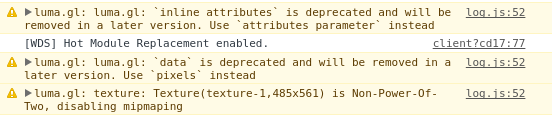
There are three warnings given, but none of those should be the reason I believe:
Is the PolygonLayer simply incompatible for non-cartographic data, or am I missing something else?
Cheers

Hi, I am sorry if this type of question is not appreciated on here. Feel free to remove/close it if it is inappropriate.
Goal: I wish to display deck.gl layers on top of a non-cartographic map. For starters, I want to create a layer of polygons.
The map is just a .png image. What I want is a layer on top of this with polygons drawn from coordinates based on pixel location. To try things out, I attempted to just modify the without-map example with the core PolygonLayer layer, but the polygons I tested with are not showing up.
I specified the width and height for the viewport, as well as Identity as the coordinate system for the layer.
Here's the app.js code:
There are three warnings given, but none of those should be the reason I believe:
Is the PolygonLayer simply incompatible for non-cartographic data, or am I missing something else?
Cheers