Set up Python 2.7.x
Mac: python 2.7.10 comes with Mac Sierra: try $ python
Windows: download and install from https://www.python.org/downloads/windows/, make sure to include the following option during the installation:
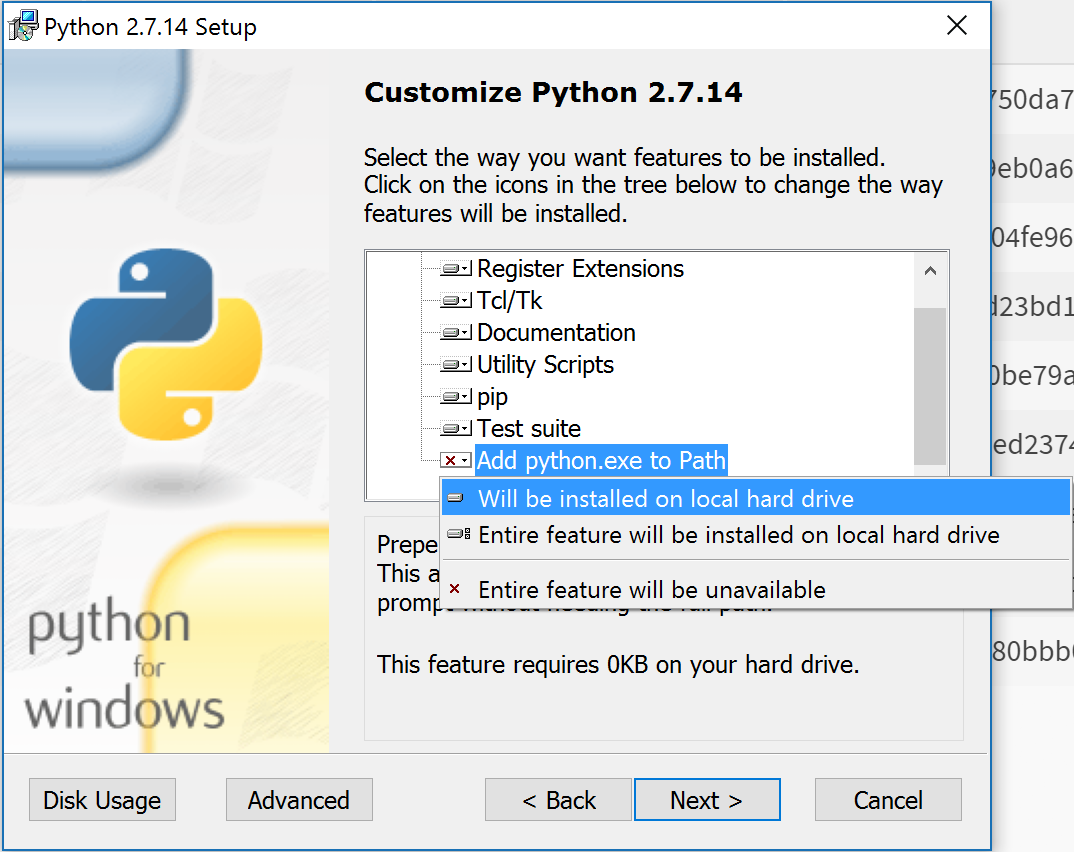
Mac: install pip: $ sudo easy_install pip
Windows: pip should already be installed above
it's a good idea to create isolated Python environments using virtualenv (https://virtualenv.pypa.io/en/stable/)
$ sudo pip install virtualenv
To create a virtual environment:
- go to the folder of the project, such as /datamining
- generate a venv folder for the virtual environment:
$ virtualenv venv - activate the environment:
$ source venv/bin/activate - install packages only in the newly created environment (if a requirement file is used):
$ pip install -r requirements.txt - quit virtual environment:
$ deactivate
$ pip install virtualenv
To create a virtual environment:
- go to the folder of the project, such as /datamining
- generate a venv folder for the virtual environment:
$ virtualenv venv - activate the environment:
> venv\Scripts\activate - install packages only in the newly created environment (if a requirement file is used):
$ pip install -r requirements.txt - quit virtual environment:
$ deactivate
- Install Atom
- Install packages:
pep8 linter: https://atom.io/packages/linter-pep8