2. Aggregate Migration
Using the following as a guide, we will walk you through the setup of BullFrog. To make it smoother, we record terminal sessions and share them on the web.
This tutorial assumes you have a current version of Docker installed on your machine. If you do not have Docker installed, choose your preferred operating system below to download Docker:
After you installed Docker, you can issue a command to pull our docker image and start a container:
# Pulls Docker image and run it on your local machine.
$ docker run --rm -it -d  --name bullfrog gangliao/bullfrog:agg_migration bash

# Output:
#
# Unable to find image 'gangliao/bullfrog:agg_migration' locally
# latest: Pulling from gangliao/bullfrog
# ......: Pull complete
# ......: Pull complete
# ......: Pull complete
# Digest: sha256:......
# Status: Downloaded newer image for gangliao/bullfrog:agg_migration

# Enters the container.
$ docker exec -u postgres -it bullfrog bash

# Output:
#
# postgres@968c58c4b04d:/$-
Rebooting a DB instance:
# Deploys the postgres backend
$ cd /home/postgres/BullFrog && ./deploy.sh

# Output:
#
# +++ case $- in
# +++ return
# ++ rm -rf /home/postgres/BullFrog/build/data
# ++ initdb -D /home/postgres/BullFrog/build/data
# The files belonging to this database system will be owned by user "postgres".
# This user must also own the server process.
#
# The database cluster will be initialized with locale "C".
# The default database encoding has accordingly been set to "SQL_ASCII".
# The default text search configuration will be set to "english".
#
# Data page checksums are disabled.
#
# creating directory /home/postgres/BullFrog/build/data ... ok
# creating subdirectories ... ok
# selecting default max_connections ... 100
# selecting default shared_buffers ... 128MB
# selecting dynamic shared memory implementation ... posix
# creating configuration files ... ok
# running bootstrap script ... Shared Global Bitmap created!
# ok
# performing post-bootstrap initialization ... ok
# syncing data to disk ... ok
#
# WARNING: enabling "trust" authentication for local connections
# You can change this by editing pg_hba.conf or using the option -A, or
# --auth-local and --auth-host, the next time you run initdb.
#
# Success. You can now start the database server using:
#
#     pg_ctl -D /home/postgres/BullFrog/build/data -l logfile start
#
# ++ cp /home/postgres/postgresql.conf /home/postgres/BullFrog/build/data/
# ++ pg_ctl -D /home/postgres/BullFrog/build/data -o '-F -p 5433' start
-
Run a TPC-C Benchmark where data is already loaded into the database.
- Please re-execute all commands in step 2 if the benchmark fails to run.
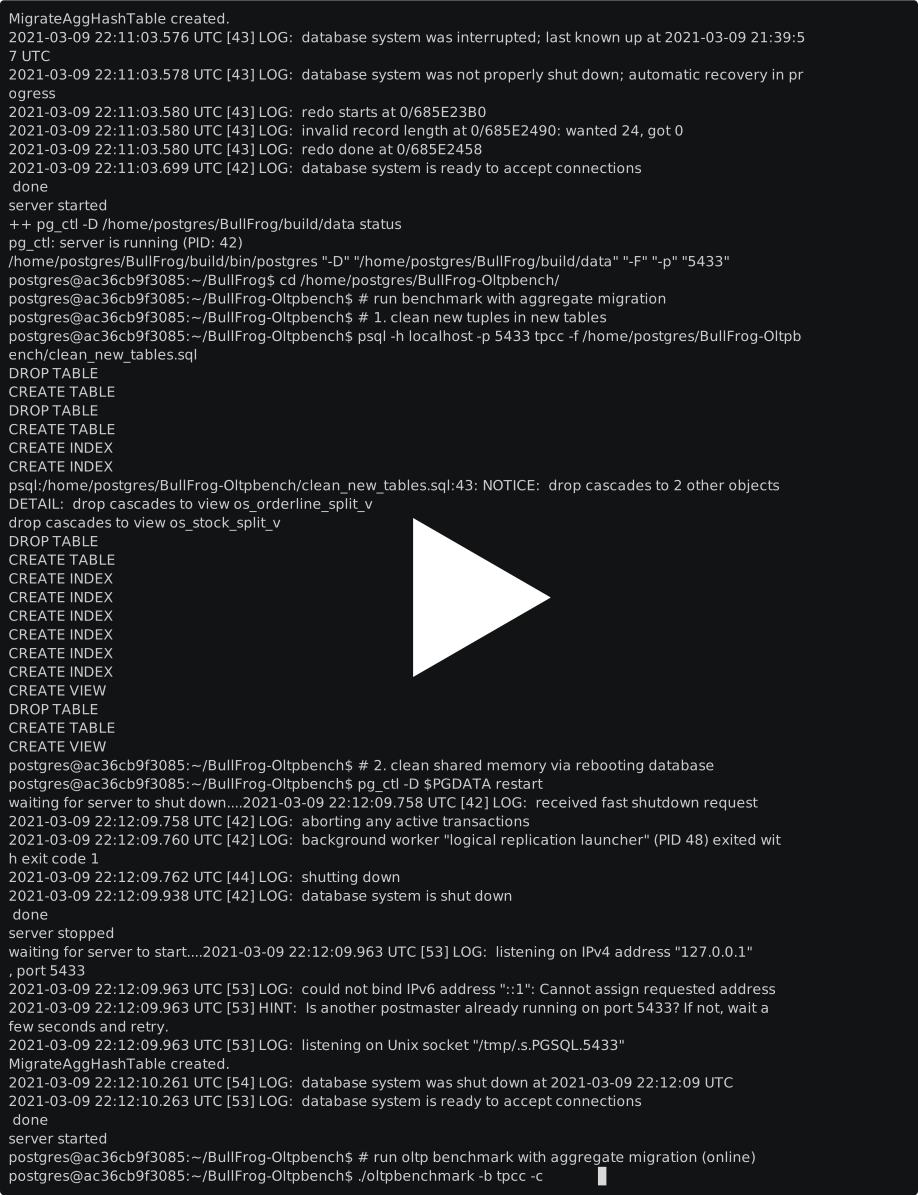
$ cd /home/postgres/BullFrog-Oltpbench

# Clean tuples in new tables with new schemas
$ psql -h localhost -p 5433 tpcc -f /home/postgres/BullFrog-Oltpbench/clean_new_tables.sql

# Output:
#
# DROP TABLE
# CREATE TABLE
# DROP TABLE
# ...

# Clean shared memory via restarting the database
$ pg_ctl -D $PGDATA restart

# Output:
#
# waiting for the server to shut down...
# 2021-02-15 05:22:27.763 UTC [1208] LOG:  background worker "logical replication launcher" (PID 1214) exited with exit code 1
# 2021-02-15 05:22:27.964 UTC [1210] LOG:  shutting down
# 2021-02-15 05:22:28.557 UTC [1208] LOG:  database system is shut down
#  done
# server stopped
# waiting for server to start.....2021-02-15 05:22:29.579 UTC [1275] LOG:  listening on IPv4 address "127.0.0.1", port 5433
# 2021-02-15 05:22:29.579 UTC [1275] LOG:  could not bind IPv6 address "::1": Cannot assign requested address
# 2021-02-15 05:22:29.579 UTC [1275] HINT:  Is another postmaster already running on port 5433? If not, wait a few seconds and retry.
# 2021-02-15 05:22:29.579 UTC [1275] LOG:  listening on Unix socket "/tmp/.s.PGSQL.5433"
# Shared Global Bitmap created!
# 2021-02-15 05:22:29.863 UTC [1276] LOG:  database system was shut down at 2021-02-15 05:22:28 UTC
# 2021-02-15 05:22:29.865 UTC [1275] LOG:  database system is ready to accept connections
#  done
# server started

# run benchmark
$ ./oltpbenchmark -b tpcc -c config/pgtpcc_lazy_agg.xml  --execute=true -s 1 -o lazy_agg --port=5433 --bgthread=agg

# Output:
# ...
# 05:37:19,860 (ThreadBench.java:473) INFO  - TERMINATE :: Waiting for all terminals to finish...
# 05:37:20,010 (ThreadBench.java:534) INFO  - Attempting to stop worker threads and collect measurements
# 05:37:20,012 (ThreadBench.java:255) INFO  - Starting WatchDogThread
# 05:37:20,059 (DBWorkload.java:886) INFO  - ======================================================================
# 05:37:20,059 (DBWorkload.java:887) INFO  - Rate limited reqs/s: Results(nanoSeconds=60000173489, measuredRequests=25774) = 429.56542458540093 requests/sec
# 05:37:20,071 (DBWorkload.java:708) INFO  - Upload Results URL: com.oltpbenchmark.util.ResultUploader@4690b489
# 05:37:20,073 (DBWorkload.java:741) INFO  - Output Raw data into file: results/lazy_agg.csv
# 05:37:20,597 (DBWorkload.java:760) INFO  - Output summary data into file: results/lazy_agg.summary
# 05:37:20,625 (DBWorkload.java:767) INFO  - Output DBMS parameters into file: results/lazy_agg.params
# 05:37:20,647 (DBWorkload.java:774) INFO  - Output DBMS metrics into file: results/lazy_agg.metrics
# 05:37:20,720 (DBWorkload.java:781) INFO  - Output experiment config into file: results/lazy_agg.expconfig
# 05:37:20,806 (DBWorkload.java:798) INFO  - Output throughput samples into file: results/lazy_agg.res
# 05:37:20,806 (DBWorkload.java:801) INFO  - Grouped into Buckets of 1 seconds
Experiment Results
-
Note: We have simplified the experimental environment and dataset size, so the results may be different from the paper. Since Docker for Mac runs in a LinuxKit VM, to get the best performance, please run the experiment on bare metal machines.
time(sec), throughput(req/sec), avg_lat(ms), min_lat(ms), 25th_lat(ms), median_lat(ms), 75th_lat(ms), 90th_lat(ms), 95th_lat(ms), 99th_lat(ms), max_lat(ms), tp (req/s) scaled
0,703.000,567.236,48.356,288.208,631.163,809.461,883.747,897.133,916.206,939.322,0.002
1,700.000,1186.603,891.498,1079.190,1229.371,1290.633,1339.588,1354.735,1376.786,1413.117,0.001
2,700.000,1580.025,1367.139,1465.333,1599.338,1687.643,1734.623,1747.866,1762.310,1823.082,0.001
3,700.000,1984.205,1744.758,1851.683,1995.220,2080.572,2204.822,2249.271,2297.549,2344.743,0.001
4,697.000,2790.005,2288.597,2610.537,2805.101,2994.475,3085.032,3114.238,3139.704,3270.503,0.000
5,702.000,3487.050,3128.390,3320.478,3489.728,3635.206,3763.407,3804.651,3841.401,3878.865,0.000
6,701.000,4266.926,3834.137,4078.667,4228.226,4447.249,4637.534,4696.270,4734.510,4767.614,0.000
7,701.000,5196.806,4721.632,5013.677,5188.999,5429.335,5495.346,5559.186,5600.280,5650.858,0.000
8,699.000,6031.437,5588.385,5831.448,6017.438,6260.145,6344.837,6383.132,6415.254,6497.282,0.000
9,700.000,6689.976,6404.762,6552.657,6663.618,6838.409,6910.132,6952.766,6983.795,6997.281,0.000
10,700.000,7189.765,6971.182,7108.471,7180.923,7294.047,7354.496,7363.554,7384.473,7415.198,0.000
11,700.000,7719.569,7391.137,7568.020,7735.833,7892.023,7969.620,7985.476,8008.626,8033.143,0.000
12,700.000,8264.443,7995.203,8151.959,8266.073,8394.457,8456.613,8485.976,8518.819,8543.866,0.000
13,700.000,9077.374,8506.848,8864.948,9148.430,9287.316,9464.136,9495.443,9521.382,9604.393,0.000
14,700.000,9865.010,9505.634,9701.155,9863.599,10059.485,10129.288,10152.698,10174.521,10196.208,0.000
15,700.000,10446.052,10157.651,10333.245,10427.093,10563.899,10696.446,10722.458,10766.852,10830.085,0.000
16,700.000,11082.282,10755.297,10926.789,11091.534,11235.870,11322.889,11331.442,11351.535,11362.457,0.000
17,700.000,11630.857,11333.427,11497.252,11626.764,11742.312,11873.663,11909.292,11930.613,12007.471,0.000
18,700.000,12366.658,11918.859,12177.592,12405.311,12571.013,12660.996,12690.413,12717.903,12750.988,0.000
19,700.000,13071.007,12705.388,12880.537,13086.677,13254.056,13340.196,13358.603,13380.913,13402.314,0.000
20,700.000,13595.736,13363.839,13454.953,13612.296,13715.077,13775.229,13806.493,13824.204,13877.604,0.000
21,627.000,14119.128,13821.363,13996.715,14126.925,14280.411,14300.791,14310.167,14335.099,14405.553,0.000
22,515.000,14298.398,14264.931,14289.440,14293.226,14305.323,14313.365,14317.839,14359.176,14369.695,0.000
23,441.000,14302.004,14276.858,14289.750,14297.182,14307.029,14319.275,14341.177,14370.347,14422.287,0.000
24,364.000,14306.729,14285.678,14291.891,14300.796,14318.697,14328.494,14336.535,14388.297,14421.678,0.000
25,350.000,14306.714,14287.097,14291.950,14300.051,14315.090,14328.958,14339.135,14396.323,14413.425,0.000
26,461.000,14301.421,14283.081,14290.228,14296.394,14308.350,14318.733,14328.252,14363.100,14415.396,0.000
27,478.000,14300.705,14285.582,14289.886,14294.100,14308.693,14316.866,14324.117,14360.336,14413.091,0.000
28,522.000,14299.140,14284.278,14289.375,14293.159,14305.447,14314.185,14320.199,14361.611,14368.999,0.000
29,456.000,14300.654,14277.117,14289.234,14295.022,14307.603,14319.777,14326.323,14367.990,14441.023,0.000
30,353.000,14307.035,14286.143,14292.299,14300.727,14316.210,14330.765,14337.598,14412.383,14425.868,0.000
31,533.000,14298.960,14283.157,14289.653,14293.812,14305.431,14313.115,14317.168,14355.603,14362.299,0.000
32,479.000,14300.149,14269.062,14289.806,14296.918,14308.270,14315.199,14323.729,14358.874,14364.549,0.000
33,479.000,14300.196,14282.527,14289.619,14296.218,14307.625,14315.617,14323.624,14355.646,14365.062,0.000
34,518.000,14299.226,14282.262,14289.462,14294.754,14305.439,14312.778,14318.250,14364.067,14368.612,0.000
35,504.000,14299.741,14282.831,14289.913,14297.365,14307.355,14313.882,14319.479,14338.192,14375.158,0.000
36,519.000,14298.961,14282.865,14289.520,14294.222,14305.938,14312.853,14320.823,14357.028,14375.502,0.000
37,482.000,14300.101,14273.919,14289.732,14295.805,14307.490,14315.389,14324.167,14353.323,14357.838,0.000
38,509.000,14298.758,14275.374,14289.156,14293.762,14306.577,14313.373,14318.809,14358.073,14363.492,0.000
39,500.000,14299.806,14285.569,14289.631,14295.828,14306.336,14313.226,14318.729,14378.238,14439.320,0.000
40,486.000,14300.121,14274.975,14289.748,14296.346,14308.499,14315.959,14320.692,14355.940,14392.985,0.000
41,508.000,14299.114,14281.641,14289.181,14294.276,14306.639,14313.847,14320.218,14356.594,14395.930,0.000
42,391.000,14304.501,14282.303,14290.865,14297.955,14312.236,14325.894,14336.250,14396.863,14440.340,0.000
43,443.000,14301.593,14282.198,14290.028,14295.715,14309.165,14319.808,14325.623,14390.341,14396.157,0.000
44,467.000,14300.962,14280.425,14289.625,14295.932,14308.599,14315.887,14325.672,14380.889,14415.724,0.000
45,363.000,14298.934,14284.639,14289.618,14293.662,14305.275,14313.000,14320.022,14376.691,14397.790,0.000
-
You may want to shut down the database for any reason:
$ cd /home/postgres/BullFrog && ./shutdown.sh

# Output:
#
# ++ source /home/postgres/.bashrc
# +++ case $- in
# +++ return
# ++ pg_ctl -D /home/postgres/BullFrog/build/data stop
# waiting for server to shut down.... done
# server stopped
# ++ pg_ctl -D /home/postgres/BullFrog/build/data status
# pg_ctl: no server running
-
You may stop a running container when you finish the tutorial:
$ docker stop bullfrog