
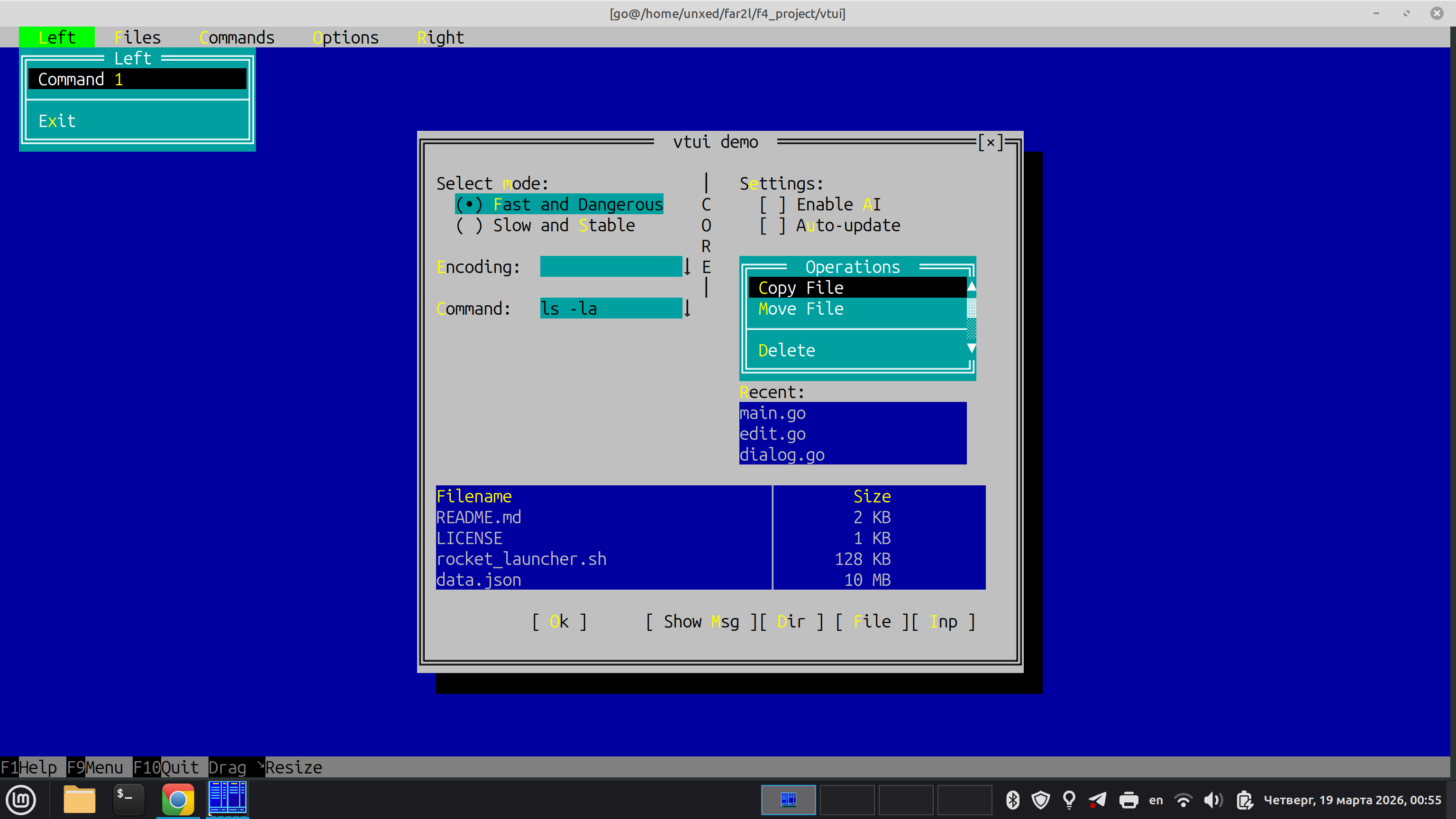
A Stateful, Desktop-Class TUI Framework for Go
vtui is a modern, cross-platform Terminal User Interface (TUI) framework for Go. It is heavily inspired by classic desktop UI paradigms—specifically Turbo Vision (Borland) and the Far Manager internal UI kit.
Unlike modern web-inspired TUI libraries that use Flexbox or Grid layouts, vtui is designed from the ground up for building complex, stateful applications: file managers, database clients, IDEs, and heavy-duty text editors.
While tcell is an excellent low-level terminal driver and tview is a great high-level component library, vtui is built with a fundamentally different philosophy:
| Feature | tcell + tview / cview | vtui (this project) |
|---|---|---|
| Abstractions | Driver + Widgets. Low-level canvas with Flexbox-like layout containers. | Application Framework. Full-featured OOP hierarchy (Dialogs, Menus, Focus cycles). |
| Layout Mode | Flexbox/Grid. Modern web-like proportions. | GrowMode (Turbo Vision style). "Rubber" layout with anchors, perfect for pixel-perfect TUI dialogs. |
| Input | Standard Terminfo-based mapping. | vtinput integration. Native support for Kitty/Win32 protocols (distinguishes Ctrl+Enter, Shift+Tab, etc.). |
| Rendering | Full-widget declarative redraw. | ScreenBuf + ShadowBuf. Bitwise diffing. Only changed cells are sent via minimal ANSI sequences. |
| Memory/GC | Standard Go allocations during redraws. | Zero-allocation rendering. Designed to stay GC-silent during the Flush() cycle to eliminate micro-stutters. |
| Input Lag | Standard parsing (can be sensitive to fast bursts). | Event Draining. Optimized for "instant" feel and bracketed paste without flickering. |
- You are building a heavy-duty tool where the user spends hours (File Manager, Spreadsheet, Hex Editor).
- You need perfect keyboard support (all modifiers, key-up/key-down events).
- You want the classic UX of Far Manager or Turbo Vision (Movable Windows, Modal Dialogs, Dropdown Menus).
- You need an application architecture that manages Z-ordering and focus cycles automatically.
At the lowest level, vtui uses a strict double-buffering approach.
- The application logic draws to a logical grid of
CharInfocells (which hold 24-bit TrueColor attributes and Unicode characters). - When
Flush()is called,vtuicompares the logical buffer with a "shadow" buffer representing the physical terminal state. - It generates and writes the absolute minimum ANSI escape sequences needed to transition the terminal to the new state. This step is allocation-free.
The heart of vtui. It manages a stack (Z-order) of Frame objects.
- Desktop: The bottom layer.
- Panels/Windows: User-defined workspaces.
- Dialogs: Modal popups that trap focus.
- Menus: Context menus or dropdowns that automatically close when losing focus.
The
FrameManagerroutesvtinput.InputEvents to the top-most active frame, handles background repainting viaSaveScreen(saving the content under a dialog to restore them instantly when it closes), and manages global components like theMenuBarandStatusLine.
Instead of containers and flex-ratios, widgets within a Dialog are positioned using absolute coordinates and GrowMode flags.
If a dialog is resized, a widget can:
GrowNone: Stay exactly where it is.GrowHiX: Stretch its right edge (e.g., anEditfield expanding to fill width).GrowLoX | GrowHiX | GrowLoY | GrowHiY: Keep its relative distance from the bottom-right corner (e.g., an "OK" button anchored to the bottom).
vtui comes with a standard library of controls that look and feel exactly like Far Manager:
Dialog,BorderedFrame(Single/Double line Win32-style boxes)Button,Checkbox,RadioButtonEdit(Single-line input with scrolling, history, password masking, and text selection)ListBox,ComboBoxTable(Multi-column list with alignment and scrollbars)VMenu(Context menus),MenuBar(Top-level dropdown menus)KeyBar(F1-F12 function key hints at the bottom),StatusLine- Common Dialogs:
ShowMessage,InputBox,SelectFileDialog,SelectDirDialog
package main

import (
	"os"
	"github.com/unxed/vtinput"
	"github.com/unxed/vtui"
	"golang.org/x/term"
)

func main() {
	// 1. Enable advanced terminal input
	restore, _ := vtinput.Enable()
	defer restore()

	// 2. Initialize the Screen Buffer
	width, height, _ := term.GetSize(int(os.Stdin.Fd()))
	scr := vtui.NewScreenBuf()
	scr.AllocBuf(width, height)

	// 3. Boot the Frame Manager
	vtui.FrameManager.Init(scr)
	vtui.FrameManager.Push(vtui.NewDesktop())

	// 4. Create a Dialog
	dlg := vtui.NewDialog(0, 0, 40, 10, " Hello vtui ")
	dlg.Center(width, height)
	dlg.ShowClose = true

	// Add an Edit field
	edit := vtui.NewEdit(dlg.X1+2, dlg.Y1+3, 36, "Type here...")
	dlg.AddItem(vtui.NewLabel(dlg.X1+2, dlg.Y1+2, "&Name:", edit))
	dlg.AddItem(edit)

	// Add an OK button
	btn := vtui.NewButton(dlg.X1+16, dlg.Y1+7, "&Ok")
	btn.OnClick = func() {
		vtui.ShowMessage(" Result ", "You typed:\n"+edit.GetText(), []string{"&Close"})
	}
	dlg.AddItem(btn)

	vtui.FrameManager.Push(dlg)

	// 5. Start the event loop
	vtui.FrameManager.Run()
}The repository includes a demo app:
go run ./cmd/test-app