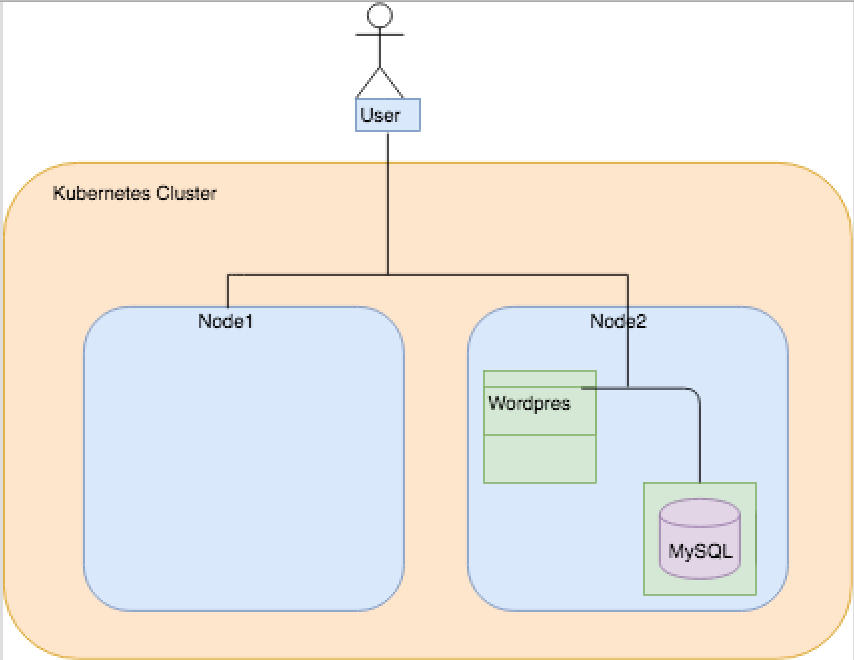
This is a custom built setup for Wordpress in Kubernetes. When I say custom built, it means that I am not using Wordpress images available in Docker hub. I have written a docker file to install LAMP stack and Wordpress in it.
Below are the components those are being used:
- Docker image for Wordpress. This is being built locally.
- Docker image for MySQL. I am pulling it from Docker hub.
- Kubernetes cluster. For testing use Minikube.
- Kubectl to access and manage your resources.
Optional:
- CI/CD Pipleline using Jenkins
I will discuss below one by one:
- Docker file for Wordpress
- Deployment of Wordpress and Mysql in Kubernetes Cluster
- CI/CD Pipeline (Optional)
In order to install Wordpress, we need a LAMP stack. So, the docker file inside wordpress directory takes care of all the setup and gives you an image for Wordpress. This image can be used in the kubernetes cluster.
Two ways to import this image in Kuberenets Cluster:
- Build the docker image in the Kubernetes node. This will make the image locally available inside Kubernetes. You can pass below in the deployment.yml file
- image: wordpress-utshav-demo:latest
  imagePullPolicy: IfNotPresent  # This will not pull the image from docker hub if the image is present locally.
name: wordpress- Other way is to build the docker image in your local machine and push it to the docker hub repository. You can then refer it in the deployment.yml and the image will be pulled.
How to build the image:
$ cd wordpress
$ docker build -t wordpress-custom .
$ docker images | grep wordpress-custom # This is to verify if the image was built successfully
It takes DB_HOST, DB_PASSWORD, DB_NAME and DB_USER as environment variables. This is for connecting to MySQL server.
For a Wordpress install to work, we need LAMP + Wordpress + MySQL in the Kubernetes cluster. LAMP stack and Wordpress install is taken care in the wordpress-custom image. However, we need a persistent volume for Wordpress when we run the Docker container in Kubernetes.
For MySQL, we will pull the image from Docker hub. We will need a persistent volume for MySQL too. Once this is up in the cluster, Worpress will be able to connect to the database.
Inside the 'minikube' directory, I have kept below YAML files:
- local-volumes.yaml
This creates two persistent volumes with 20GB. This is on the HOST but we can use different options( NFS, Google, AWS ) to ceate these volumes. We need two persistent volumes, one for Wordpress and one for MySQL.
$cd minikube
$kubectl create -f local-volumes.yaml- mysql-deployment.yaml
It creates a pod 'wordpress-mysql' running MySQL server. It claims the persistent volume that we created in step one. It exposes its port 3306 to listen for connections from Wordpress. We provide the environment variables in it:
env:
- name: MYSQL_DATABASE
  value: wordpress
- name: MYSQL_USER
  value: wpuser
- name: MYSQL_PASSWORD
  value: 1qazXSW2
- name: MYSQL_ROOT_PASSWORD
  value: 1qazXSW2

#can be passed as secret from secretKeyRef
#- valueFrom:
#     secretKeyRef:
#        name: mysql-pass
#        key: password

#Genretating a secret in Kuberenetes:
$kubectl create secret generic mysql-pass --from-literal=name=‘mysql-pass’ --from-literal=password=‘1qazXSW2’
$cd minikube
$kubectl create -f mysql-deployment.yaml- wordpress-deployment.yaml
It creates a pod 'wordpress' with connectivity to the MySQL server. We need to pass correct environment variable in order to make the Wordpress install work.
env:
- name: DB_HOST
  value: wordpress-mysql
- name: DB_NAME
  value: wordpress
- name: DB_USER
  value: wpuser
- name: DB_PASSWORD
  value: 1qazXSW2

#can be passed as secret from secretKeyRef
#- valueFrom:
#     secretKeyRef:
#        name: mysql-pass
#        key: password
$cd minikube
$kubectl create -f wordpress-deployment.yamlIn order to make life easier I have added deployment srcipts inside minikube directory. You dont need to run each deployment manually and use these scripts to create and delete the deployments.
#To deploy
$cd minikube
$./deploy.sh

#To delete
$cd minikube
$./delete.sh