Repository navigation
Stable Release v4.8.2
中文 · Home · Download v4.8.2
4.8.2 is the current release of the 4.8 series. This page covers what changed since 4.6, which the wiki described last. Original notes: 4.8.2 · 4.8.1 · 4.8.0 · 4.7.0.
-
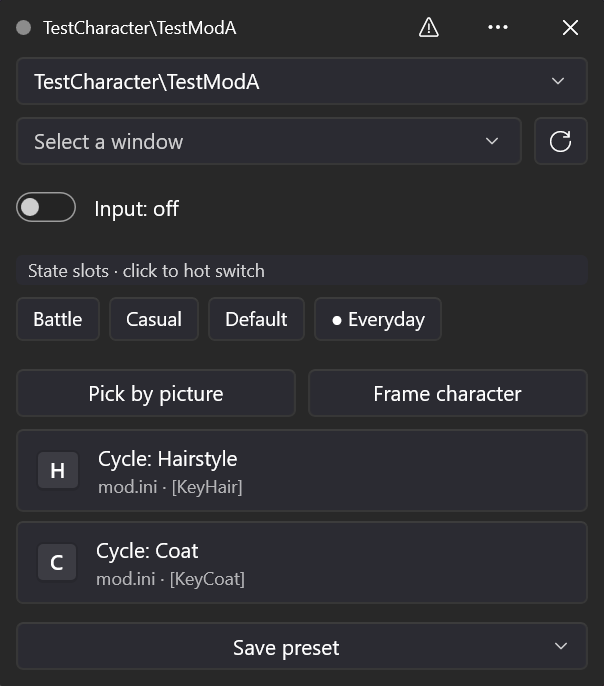
A redesigned in-game overlay:
- It has its own title bar, which you drag to move it. The title bar shows a status dot (green while keys are sent, amber when a window is chosen but sending is off, grey with no window), the current Mod's name, a status icon, the ⋯ menu and ✕.
- You choose the target window and turn sending on or off in the overlay itself. Keys are key caps that send with a click. Save preset ▾ holds the combination and single-Mod presets.
- The height follows the content, and you can drag the edges to resize it. Its place is remembered for each display, and it snaps to screen edges.
- Compact view, its text size, click-through, opacity and Reload INI are in the ⋯ menu. It follows the app's light or dark theme.
- How keys and F10 are sent, the hotkey, click-through, automatic contrast, slot switching and preset saving are unchanged.
- Likes: the heart button in a Mod's details on the Online page opens its GameBanana page inside the manager, where you can sign in and like or unlike it. The sign-in is saved only on this computer; Settings → Clear GameBanana sign-in removes it.
- Settings: opening a card no longer moves its group to the other column. What's New and the release notes have Join the Discord server.
- Faster page switching: pages stay in the window after they are first shown. Going back to the Online page draws its first frame in 53–73 ms instead of 141–188 ms (measured with live data).
- 4.8.1: GameBanana categories and subcategories on the Online page; sorting across pages by likes, downloads and last updated; fixes for an Online reload loop and a black area after drag-to-maximize.
- 4.8.0: every page redesigned: a navigation pane with title-bar search (Ctrl+K), the Dashboard and Settings as cards, a Mod workspace with a command bar and resizable columns, an Online page with a details drawer, an Updates page in three views, Shortcuts as one column of cards, and clearer dialogs. It also fixes five problems in 4.7.3 and earlier that could delete the wrong files or leave broken links.
- 4.7: preset pictures and switching by picture, overlay looks, click-through and automatic contrast, sharing a preset without Mod files, a language and game choice on first install, a Default slot for every Mod, and batch actions. 4.7.1–4.7.3 added a .NET 8 updater, more reliable online character lists and a Russian interface.
- Download
Integrated_Mod_Manager-v4.8.2.zipand the matching.sha256from the release page. Fully extract it, keepWinUI3, and run the rootIntegratedModManager.exe. Requires Windows 10 1809 or later, x64 and the .NET 8 x64 runtime. - 4.x stable releases update in the app (Settings → app updates), or you can extract the new release to a new folder and copy
WinUI3/config.iniandWinUI3/beta-shell.json. Back up the app folder, the target Mods folder and the loader's actived3dx_user.inifirst. - After the update the What's New dialog shows once.
- The new overlay was checked with a test window and synthetic data only. Not yet checked in a real game: dragging, resizing and snapping over a borderless game, the place on two displays, click-through, choosing the real game window, sending from key caps, F10 slot switching, saving both presets, automatic contrast in the light theme, changing the theme with the overlay open, and the compact text sizes.
- Likes were checked with offline sample pages only. A real sign-in (with two-factor codes and the human check), liking and unliking, staying signed in and clearing the sign-in were not verified with a real account.
- Other real-game checks are listed in the 4.8.0 notes.
Verification record · Changelog
The package as a whole is AGPL-3.0-only; see Licensing.