
Here I will consider the rubric points individually and describe how I addressed each point in my implementation.
1. Provide a Writeup / README that includes all the rubric points and how you addressed each one. You can submit your writeup as markdown or pdf.
You're reading it!
1. Run the functions provided in the notebook on test images (first with the test data provided, next on data you have recorded). Add/modify functions to allow for color selection of obstacles and rock samples.
The main functions that I added from the base system were the obstacle threshold, the rock sample threshold and the rover_coords_close_enough function.
The obstacle threshold function is just the opposite of the navigable threshold.
The rock sample uses the cv2 library for finding a threshold and has a lower and upper bound but still the same as navigable.
The rover_coords_close_enough function looks at each pixel in relation to the rover and eliminates ones that are "too far away." I realized that the closer to the camera the more accurate we were so I limit how far we trust those pixels.
Other than that the other functions are all straight from the lecture.
2. Populate the process_image() function with the appropriate analysis steps to map pixels identifying navigable terrain, obstacles and rock samples into a worldmap. Run process_image() on your test data using the moviepy functions provided to create video output of your result.
I actually skipped the Notebook Analysis at first and went right to the Rover because I was having a difficult time with the math and numpy. It helped when I was able to control the Rover to see what is going on. I then took my perception.py and pushed it back to the notebook. I then created a bunch of images you can see below:

This shows you the normal vision, the navigation thresholding, the obstacle thresholding, the sample threshholding, the combined vision and finaly how it works on the map.
This example is set up to you a path I recorded in the simulation, but it would work with the test data also.
1. Fill in the perception_step() (at the bottom of the perception.py script) and decision_step() (in decision.py) functions in the autonomous mapping scripts and an explanation is provided in the writeup of how and why these functions were modified as they were.
Here was my thought process:
For perception step, I made it not only check out the vision and the thresholding, but do a little deciding. Instead of just throwing all the data over to decision_step through the Rover class, I had it do basic decisions also. Including when to determine if we were stuck or if we were looking at a rock. If I had unlimited time I would split these parts out, but alas, it is how it naturally came to be in the time limit.
For the decision steps I tried to follow a if / else if style block of the different "states" that the rover is in. Here are the States my rover could be in:
- Initializing - The start of the system
- Finding Wall - Looking for the first wall to follow
- Wall Holding - Moving along the wall to find samples
- Picking Up Sample - Picking up a rock sample
- Going Home - After finding all 6 samples start looking for home position
- At Home! - When the Rover has all 6 samples and is back home
- UnStucking - The Rover has determined it hasn't moved and needs to get unstuck.
The normal flow of the states is:
Initializing -> Finding Wall -> (Wall Holding -> Picking up Sample) x 6 -> Going Home -> At Home!
The only time it would deviate is if it determines to be stuck or finds a sample before it finds the first wall.
2. Launching in autonomous mode your rover can navigate and map autonomously. Explain your results and how you might improve them in your writeup.
Here's my Rover succesfully completeing the full mission:
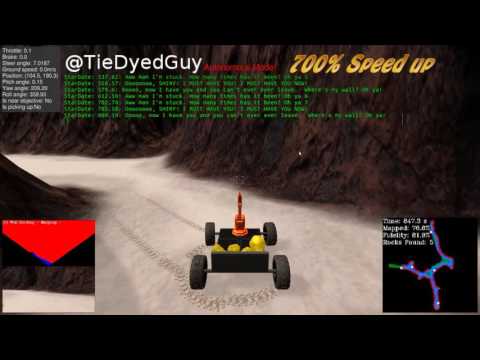
The settings used are 1920 x 1080 windows mode on "Good" quality with an average FPS of 15. It was ran on Ubuntu 16.04 64bit.
The Rover works, but "slow" and "clunky." What I mean is that I have the max velocity set low to keep it from missing things but it just moves slower. There is a sweet spot between speed and not missing things that requires experimentation.
The "clunky" part is also just a changing of variables that need experiemented out. There are variable which represent how far away from the wall it should be and what angles to use. Plus how much it should look in front of it. Changing these will all make it act smoother.
Lastly, my function of the rover going to a goal, weither it is a sample or the home, is pretty bad. It wavers around and takes a lot longer to reach the goal than my classmates. I had this same issue while making Turtles move in ROS. I'm hoping that by the end of the class this is no longer a challenge.