Repository navigation
Home
VanillaBP applies hexagonal architecture to business process applications. You write your business code against one small Java API, never against the API of a workflow engine. So your business logic does not depend on the engine underneath, and you can exchange that engine later.
Do you want to start coding right away? Pick the page of your platform (Spring Boot or Quarkus) and add the adapter of your BPMS (business process management system). Then follow that page from top to bottom. The chapters below explain what you did there and what else VanillaBP offers.
-
To read before you start coding with VanillaBP
The concepts this wiki uses, each with the page which explains it. Ten minutes of reading now save you the question "what is all this for?" later. -
Coming from VanillaBP 1?
What an application on version 1 has to change, and what it can leave as it is. -
Why a rule is what it is
Where the reasons behind a rule are written down, and why the link to them keeps working. -
Glossary
The words this wiki uses for the concepts above, and what it means by them.
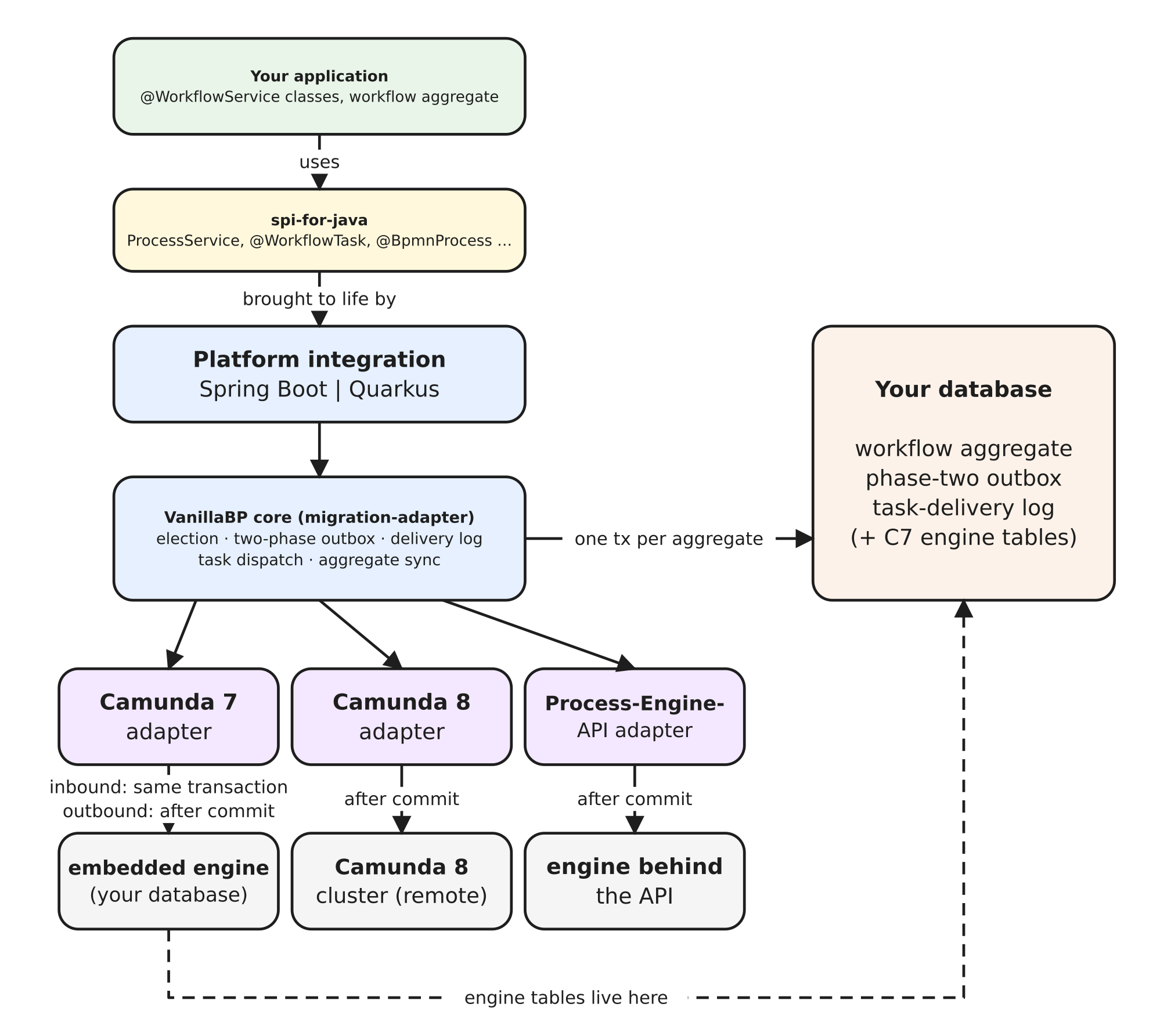
The picture shows the layers which the rest of this wiki talks about. Your application uses the SPI. A platform integration makes the SPI work on your platform. The VanillaBP core does the work which is the same on every BPMS. One adapter per BPMS talks to the engine. Your database holds the workflow aggregate and the four tables VanillaBP owns. With Camunda 7, the engine's tables are in your database as well.
VanillaBP introduces a small set of concepts which make your business application simpler. Learn them first, and you get the most out of VanillaBP.
-
Process versus Workflow:
In VanillaBP, process means the BPMN model itself (e.g. customer onboarding). Workflow means one run of that process (e.g. onboarding the customer John Doe). -
SPI for Java:
The Java API of interfaces, annotations and enums (SPI = Service Provider Interface). Your business applications use VanillaBP through it. Learn more... -
Platform-specific integrations:
The SPI is the same everywhere. Platform integrations add the parts which depend on the platform you run on. These platforms are supported today:- Spring Boot: Learn more...
- Quarkus: Learn more...
-
BPMS adapters:
Each BPMS has its own adapter, which connects VanillaBP to it. You can exchange adapters, and you can even use several side by side. The adapter's own wiki documents everything specific to its BPMS: how to wire the BPMN, the configuration keys and the transaction behavior. Learn more...
You do not have a BPMS yet? Then read choosing a BPMS. It compares what each adapter can tell VanillaBP and what each engine needs from your application.- Camunda 7: Learn more...
- Camunda 8: Learn more...
- bpm-crafters Process-Engine-API: Learn more...
-
Workflow modules:
For each use case, the BPMN model and its implementation form one unit, called a workflow module. It is separate from every other workflow module. It also gives its own scope, so names do not clash (e.g. BPMN process IDs or message names). This works even if the BPMS has no scoping of its own (e.g. multi-tenancy). Learn more... -
Workflow aggregates:
VanillaBP keeps the data of a workflow in an aggregate, one type per process. You store that aggregate where you like. Depending on the platform, ready-made implementations exist. Learn more... -
Starting workflows:
Your application starts a workflow by handing the workflow aggregate to VanillaBP. Sometimes the BPMS starts a workflow on its own, by a timer, a signal or a conditional start event. Then a method of your workflow service returns the aggregate, and that aggregate names the workflow. Learn more... -
Workflow tasks:
Methods annotated with@WorkflowTaskdo the work of the BPMN tasks. VanillaBP loads the workflow aggregate, runs the method in a transaction and saves the aggregate. Errors and retries work the same way on every BPMS. Learn more... -
Timers:
A BPMN timer makes a workflow wait, and the engine does the waiting. This page covers the three forms of a timer, how a deadline gets from your workflow aggregate into the model, and how exactly the timer fires. Learn more... -
Event subprocesses:
A part of a process which no sequence flow leads into. The interrupting kind ends what it interrupts, and VanillaBP reports it as a completed workflow. The non-interrupting kind runs next to the rest and writes your aggregate a second time. Learn more... -
Compensation:
Undoing something the workflow has already done. The model says when this happens. The handler is a@WorkflowTasklike any other. The engine decides the order in which the handlers run, not VanillaBP. Learn more... -
Viewing workflows:
You get the BPMN diagram of a workflow and its history through the same API on every BPMS. That is all a BPMN viewer needs to show users where a workflow stands. Learn more... -
Observability:
VanillaBP counts and measures every task delivery. The BPMS adapters report what they know about their BPMS to your health endpoint. Every log line your handler writes names the workflow it belongs to. Learn more... -
More than one node:
Several instances of your application need no configuration and no leader. A shared election cache is your choice, not a requirement. One page explains what each node knows and what an empty cache costs. It also names the one case where an empty cache costs more than time. Learn more... -
BPMS migration:
You can configure several BPMS side by side, in order of priority. New workflows start in the BPMS with the first priority. Operations on existing workflows go to the BPMS which holds them. So moving to another BPMS is a change of configuration. This holds when you move from on-prem to SaaS, upgrade the engine or change the vendor. Learn more... -
What VanillaBP is sized for:
The kind of business process VanillaBP was built for, and the kind it was not built for on purpose. Read it before you decide, not in the middle of the introduction. Learn more... -
Extensions:
An extension is deployed next to the adapter of your BPMS. It brings its own annotations, which you put on methods of your workflow service. The page explains which of your methods an event of the extension reaches, what the start checks about them, and what such a method may do to your workflow aggregate. Learn more... -
Integration SPI:
VanillaBP answers a few questions itself, most of all where an aggregate is stored. If its answer does not fit your application, you replace it with your own through the integration SPI. An application on a supported persistence never needs it. Learn more...
Your business code stays as it is. That is the promise of the SPI. What changes are dependencies, configuration and a few behaviors: Migrating from VanillaBP 1 to 2.
Some rules on these pages have a (why) link. It points to a numbered entry in a decision log. That entry decided the rule. The decision log is in the repository which owns the rule: the SPI, the platform or the adapter (Camunda 7, Camunda 8, Process-Engine-API). An entry says what was decided, why, and what was rejected on the way. So it answers the question which a rule leaves open. Each number is given out once and never used again. A decision which was overturned keeps its entry, and the entry names the decision which replaced it. So a link stays valid.
The words this wiki uses for the concepts above, and what it means by them. Where a term has its own page, that page gives the long answer.
| Term | What it means here |
|---|---|
| process | the BPMN model, for instance customer onboarding |
| workflow | one run of that model, for instance onboarding John Doe. The two words are never swapped |
| workflow module | one or more BPMN models plus the code which implements them, for one use case, packaged as its own artifact. Its id comes from the marker file META-INF/workflow-module. It is the scope which keeps its identifiers apart from those of other modules |
| workflow aggregate | the entity which holds the data of one workflow. Your application stores it. Its ID identifies the workflow from the start on |
| shared values | the part of the aggregate which the BPMS gets to see. @SyncWithBPMS and @NoSyncWithBPMS decide which part that is. BPMN expressions read these values, never the aggregate itself |
| BPMS adapter | the component which connects VanillaBP to one BPMS. Your business code never depends on it. To write one for a BPMS which has none yet, read ADAPTER-AUTHORS.md, the guide for adapter authors |
| adapter id | the name of one BPMS instance in your configuration, below vanillabp.adapters.<id>. VanillaBP stores it with everything which belongs to that BPMS. That is why you never rename it
|
| BPMS election | VanillaBP asks the configured adapters, in order of priority, which of them holds a workflow. New workflows always start in the adapter with the first priority. Every other operation goes to the BPMS which holds the workflow |
| cluster | several instances of your application on one database and one BPMS. You do not have to configure anything for it. What changes is what each instance knows |
| election cache | what VanillaBP remembers about a successful election. It is a hint, never an answer. If it is lost, VanillaBP has to ask again, but the result is still correct |
| migration adapter | the part of VanillaBP which knows all configured adapters and chooses between them. You never configure it. It is the reason why several BPMS can run side by side |
| two-phase start | an operation is planned in your transaction and carried out after your commit. Phase one is your transaction. Phase two is the moment after its commit. So the names say when work runs, not who runs it. The work before the commit only asks questions. So an error which guides you still arrives at the place where you made the call |
| phase-two outbox | the store which carries the work planned for that moment across the commit, and across a crash. That can be a call to a BPMS or an operation which an extension planned for itself. It sends each operation at least once, so an operation has to be safe to repeat |
| delivery log | the record VanillaBP writes for every task delivery it processed. When the same delivery comes again, VanillaBP answers from this record and does not run your handler again |
| extension | something besides the adapter which takes part in deploying your workflow modules, for instance the Business Cockpit. You add its dependency and configure it as its own documentation says. The VanillaBP core calls it an extension. Its own documentation calls it an adapter, one which sits next to the BPMS adapter that runs your workflows. It is the same thing seen from two sides |
| integration SPI | the interfaces an application implements to replace what VanillaBP answers by default, most of all aggregate persistence: io.vanillabp:vanillabp-integration-spi. You rarely need it. The API your code calls is the SPI for Java instead |
| platform integration | the layer which brings VanillaBP to Spring Boot or to Quarkus. On Spring Boot, the adapter for your BPMS brings it along. On Quarkus, it is an extension of its own |
