A CLI and interactive GUI for AWS cost tracking.
- AWS cost tracking using Cost Explorer API with authentication
- Complete cost visibility - entire account and per-service usage analysis
- Intelligent caching - persistent file-based caching with 1 hour duration (customizable) to minimize API costs
- Flexible time ranges - 7, 14, 30, 90 days, current month, previous month, custom month, specific day
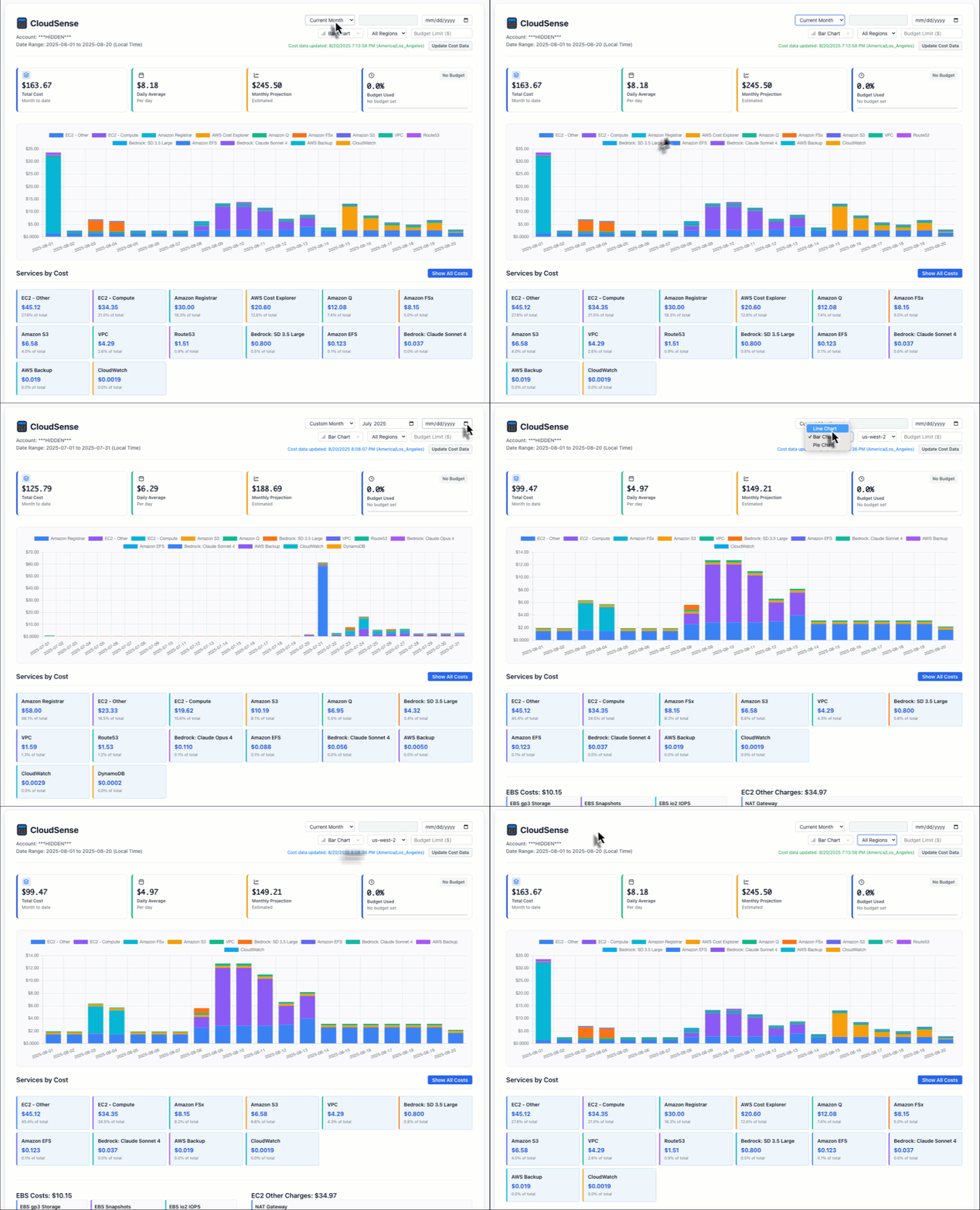
- Interactive visualizations - daily cost trends with dynamic charts
- Detailed breakdowns - service-by-service cost analysis
- Performance optimized - AWS session caching and efficient API usage
- Enterprise features - rate limiting, input validation, security headers
- Health monitoring - built-in health check endpoint for monitoring
- Logging levels and debug mode - structured logging with configurable levels
AWS Cost Explorer API calls are $.01 for each call.
- CloudSense caches cost data for 1 hour (default, configurable) to reduce AWS API costs
- Persistent file-based caching stored in
~/.cloudsense-cache/ - Cross-session persistence - cache survives CLI restarts
- Cache status displayed in CLI and web interface with last update timestamp
- Click "Update Cost Data" button or use
--force-refreshto bypass cache - CLI and GUI use the same caching system and share cached data
- Second call to same data (within cache timeout) uses cache instead of AWS API
Practical Impact:
# With persistent cache (by default 1 hour)
cloudsense --days 7           # API cost ($0.01)
cloudsense --days 7           # Same parameters, will uses cache with no API call (free)
Cost Optimization Tips - Avoid Cost Explorer API calls when you can
- Use same time range for multiple queries to benefit from caching
- GUI sessions cache multiple API calls (regions, services, breakdowns)
- CLI repeated calls with same parameters use cache within 1 hour
- Configure longer cache duration with
--cache-duration 7200(2 hours) - Use
--force-refreshonly when you need guaranteed fresh data
Recommended: Use a virtual environment
# Create virtual environment
python -m venv cloudsense-env

# Activate virtual environment
source cloudsense-env/bin/activate-
Install CloudSense:
pip install cloudsense
-
Configure AWS credentials (Required):
aws configure
# or set environment variables:
export AWS_ACCESS_KEY_ID=<your-key>
export AWS_SECRET_ACCESS_KEY=<your-secret>
export AWS_DEFAULT_REGION=us-east-1
Authentication Required: CloudSense requires valid AWS credentials to access cost data.
API Region: CloudSense always uses
us-east-1for AWS Cost Explorer API calls (hardcoded, AWS requirement). Your AWS_DEFAULT_REGION setting does not affect the Cost Explorer API endpoint. -
Run CloudSense (CLI):
cloudsense
Example CLI Output:
$ cloudsense --hide-acct ====================================================================== CloudSense - AWS Cost Report (30 days) ====================================================================== Account: ***HIDDEN*** Date Range: 2025-07-21 to 2025-08-20 Region: All Regions Services: 16 Data Status: CACHED at 2025-08-20 12:22 ---------------------------------------------------------------------- Service Breakdown: ---------------------------------------------------------------------- 1. Amazon Registrar $ 88.00 ( 31.6%) 2. EC2 - Other $ 66.23 ( 23.7%) ├── EBS gp3 Storage ├── 10.03 ├── EBS io2 IOPS ├── 4.25 ├── EBS Snapshots ├── 3.23 ├── EBS io1 IOPS ├── 1.18 ├── EBS io1 Storage ├── 0.91 ├── EBS io2 Storage ├── 0.35 ├── NAT Gateway ├── 46.15 ├── Spot Instances ├── 0.18 └── Data Transfer └── 0.13 3. EC2 - Compute $ 53.97 ( 19.4%) 4. AWS Cost Explorer $ 20.41 ( 7.3%) 5. Amazon Q $ 18.57 ( 6.7%) 6. Amazon S3 $ 9.87 ( 3.5%) 7. Amazon FSx $ 8.15 ( 2.9%) 8. VPC $ 5.65 ( 2.0%) 9. Bedrock: SD 3.5 Large $ 5.12 ( 1.8%) 10. Route53 $ 2.54 ( 0.9%) 11. Amazon EFS $ 0.21 ( 0.1%) 12. Bedrock: Claude Opus 4 $ 0.11 ( 0.0%) 13. Bedrock: Claude Sonnet 4 $ 0.04 ( 0.0%) 14. AWS Backup $ 0.02 ( 0.0%) 15. CloudWatch $ 0.00 ( 0.0%) 16. DynamoDB $ 0.00 ( 0.0%) ====================================================================== TOTAL COST: $ 278.88 ====================================================================== -
Launch Web Interface:
cloudsense --gui
Then open http://localhost:8080 in your browser
Security Note: By default, CloudSense binds to
127.0.0.1(localhost only) for security.GUI Startup Output
Starting CloudSense on http://127.0.0.1:8080
Configuration: default
AWS Region: us-east-1
Cache Duration: 3600s
Log Level: INFO

Press Ctrl+C to stop the server
--------------------------------------------------
 * Serving Flask app 'cloudsense.app'
 * Debug mode: off
 * Running on http://127.0.0.1:8080
cloudsense                          # 30-day cost report (all regions by default)
cloudsense --days 7                 # 7-day cost report
cloudsense --days 90                # 90-day cost report
cloudsense --hide-acct              # Hide AWS account number
cloudsense --force-refresh          # Force cache refresh
cloudsense --aws-region us-west-2   # Show costs for us-west-2 region only
cloudsense --aws-region global # Show global services only (IAM, Route53, etc.)cloudsense --gui # Launch web interface
cloudsense --gui --hide-acct # Launch web interface with hidden account
cloudsense --gui --port 5000 # Web interface on custom port
cloudsense --gui --host 0.0.0.0 # Web interface on all interfaces (security risk)
cloudsense --gui --debug # Web interface with debug mode# Copy environment template and customize
cp .env.example .env
# Available environment variables:
export AWS_REGION=us-east-1
export LOG_LEVEL=INFO
export CACHE_DURATION=3600
export RATELIMIT_DEFAULT="100 per hour"
export HIDE_ACCOUNT=falseCloudSense includes a built-in health check endpoint for monitoring and load balancer integration:
# Health check endpoint
curl http://localhost:8080/health

# Example response:
{
  "status": "healthy",
  "aws": "connected",
  "timestamp": "2024-01-15T10:30:00Z",
  "version": "0.1.1"
}CloudSense implements comprehensive security measures:
- Rate Limiting: API endpoints are protected with configurable rate limits
/api/billing: 30 requests per minute/api/service/*: 60 requests per minute/api/regions: 10 requests per minute
- Input Validation: All parameters are validated and sanitized
- Security Headers: Protection against XSS, clickjacking, and content sniffing
- Error Handling: Structured error responses without sensitive information leakage
- Logging: Comprehensive request and error logging for security monitoring
Your AWS credentials need the following permissions:
API Endpoint: CloudSense hardcodes the us-east-1 endpoint for AWS Cost Explorer API calls, as required by AWS. This is completely independent of your region filtering - you can still filter costs by any AWS region.
{
    "Version": "2012-10-17",
    "Statement": [
        {
            "Effect": "Allow",
            "Action": [
                "ce:GetCostAndUsage",
                "ce:GetUsageReport",
                "sts:GetCallerIdentity"
            ],
            "Resource": "*"
        }
    ]
}Note: sts:GetCallerIdentity is required for authentication validation and account ID display.
Create a .env file for local development:
# AWS Configuration
AWS_REGION=us-east-1
AWS_PROFILE=default

# Application Configuration
FLASK_DEBUG=true
LOG_LEVEL=DEBUG
CACHE_DURATION=3600

# Security Configuration
RATELIMIT_DEFAULT=1000 per hour  # More lenient for development
HIDE_ACCOUNT=false

# Server Configuration
HOST=127.0.0.1
PORT=8080View detailed logs:
cloudsense --log-level DEBUG  # Enable debug logging
tail -f cloudsense.log # Monitor log fileMIT License - see LICENSE file for details.