Extract codebases into portable JSON for RAG, tooling, and analysis.


pip install harvest-code
harvest serve  # Watch + serve current directory at http://localhost:8787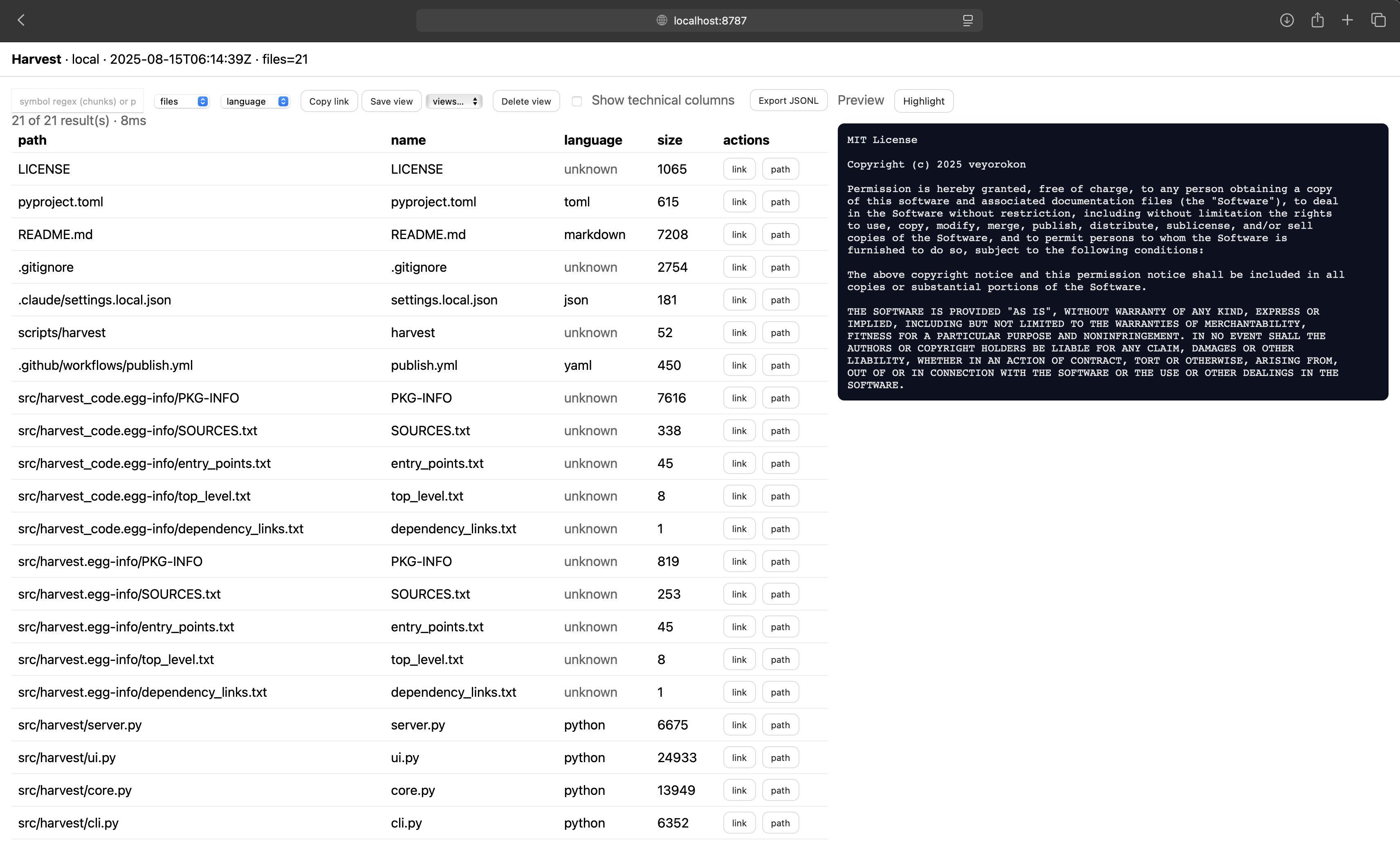
- 🔍 Zero dependencies - Pure Python, no external packages required
- 📊 Smart chunking - Extracts functions, classes, exports with stable IDs
- 🌐 Interactive UI - Web interface with search, filtering, and syntax highlighting
- 🎯 Intelligent filtering - Automatically skips build artifacts, binaries, and test files
- ⚡ Live updates - Auto-refreshes when files change (watch mode)
- 🚀 Scales - Handles 50k+ files with progressive loading
# Basic usage - output named after directory
harvest reap .                    # → ./current-dir-name.harvest.json
harvest reap /path/to/project     # → ./project.harvest.json

# Custom output
harvest reap . -o analysis.json

# Control what's included
harvest reap . --include metadata       # File inventory only
harvest reap . --include data          # File contents only
harvest reap . --exclude chunks        # Skip code parsing
harvest reap . --format jsonl          # Line-delimited JSON

# File type filtering (NEW)
harvest reap . --only-ext .py          # Only Python files
harvest reap . --only-ext py,ts,js     # Multiple extensions (dot optional)
harvest reap . --skip-ext .log,.tmp    # Skip specific types

# Common combinations
harvest reap . --include data --only-ext .py    # Python source only (for LLMs)
harvest reap . --include chunks --only-ext .ts  # TypeScript symbols only

# Override default filters
harvest reap . --no-default-excludes # Include hidden files, tests, etc.# Watch + serve (default)
harvest serve # Current directory on port 8787
harvest serve /path/to/project # Specific directory
harvest serve --port 8080 # Custom port
# Control options
harvest serve --no-watch # Disable auto-refresh
harvest serve --only-ext py,ts # Watch specific file typesWeb UI Features:
- Real-time search and filtering
- Syntax highlighting with toggle
- Skeleton view - Show only function/class signatures
- Auto-refresh on file changes
- Infinite scroll for large codebases
- Deep linking to specific files/lines
# Find specific code elements
harvest query data.json --entity chunks --language python --public true
harvest query data.json --entity files --export-named "MyComponent"
harvest query data.json --path-glob "src/**" --fields path,symbol,kind# Continuous harvesting
harvest watch . # → ./<dirname>.harvest.json
harvest watch /path/to/src -o out.json # Custom output
harvest watch . --only-ext py,js,ts # Specific extensions# Create React barrel exports
harvest sow data.json --react src/index.ts# Extract function/class signatures without bodies
harvest winnow data.harvest.json --skeleton # → data.skeleton.harvest.jsonl
harvest winnow data.harvest.json --skeleton --language python # Python only
harvest winnow data.harvest.json --skeleton --out custom.jsonl # Custom output
# Output formats
harvest winnow data.harvest.json --skeleton --format jsonl # → data.skeleton.harvest.jsonl (default)
harvest winnow data.harvest.json --skeleton --format json # → data.skeleton.harvest.json
harvest winnow data.harvest.json --skeleton --format md # → data.skeleton.harvest.md
harvest winnow data.harvest.json --skeleton --out - # Output to stdoutharvest generates JSON with three sections:
{
  "metadata": {
    "schema": "harvest/v1.2",
    "source": {"type": "local", "root": "/path/to/code"},
    "counts": {"total_files": 150, "total_bytes": 524288}
  },
  "data": [
    {
      "path": "src/utils.py",
      "language": "python",
      "content": "def helper():\n    pass",
      "exports": null,
      "py_symbols": {"functions": ["helper"]}
    }
  ],
  "chunks": [
    {
      "id": "abc123...",
      "file_path": "src/utils.py",
      "kind": "function",
      "symbol": "helper",
      "start_line": 1,
      "end_line": 2,
      "public": true
    }
  ]
}- metadata - File inventory, counts, timestamps
- data - File contents and language metadata
- chunks - Parsed symbols (functions, classes, exports)
Control output with --include and --exclude:
harvest reap . --include metadata       # Inventory only (fast)
harvest reap . --exclude chunks         # Skip parsing (smaller)
harvest reap . --include chunks # Symbols only (for analysis)harvest uses a three-tier filtering system:
Completely Skipped:
- Hidden files and directories (
.git/,.env) - Test directories (
tests/,__tests__/) - Build artifacts (
dist/,build/,node_modules/) - Binaries and media (
.exe,.mp3,.db) - Logs and temp files (
.log,.tmp)
Path-Only (no content):
- Images (
.jpg,.png,.svg) - Fonts (
.ttf,.woff) - Documents (
.pdf,.doc)
Fully Processed:
- Source code (
.py,.js,.ts, etc.) - Config files (
.json,.yaml,.toml) - Documentation (
.md,.txt)
Override with --no-default-excludes to include everything.
Full parsing (chunks + symbols):
- Python - Functions, classes via AST
- JavaScript/TypeScript - Functions, classes, React components, ES6/CommonJS exports
- JSON/YAML/TOML - Single file chunks
Syntax highlighting in web UI: Python, JavaScript, TypeScript, JSON, YAML, TOML, Markdown, Shell, Go, Rust
The web server exposes REST APIs:
# Search chunks
curl http://localhost:8787/api/search?entity=chunks&language=python

# Get metadata
curl http://localhost:8787/api/meta

# Download full harvest
curl http://localhost:8787/api/harvest# Get clean Python source for LLM context
harvest reap . --include data --only-ext .py
# Extract API signatures only
harvest winnow project.harvest.json --skeleton --language pythonimport json
with open('project.harvest.json') as f:
harvest = json.load(f)
# Extract public functions for context
api_functions = [
chunk for chunk in harvest['chunks']
if chunk['public'] and chunk['kind'] == 'function'
]# Generate architectural overview in Markdown
harvest winnow app.harvest.json --skeleton --format md # → app.skeleton.harvest.md
# Extract all exports
harvest query app.json --entity files --has-default-export --fields path,exports# Find all React components
harvest query app.json --entity chunks --kind export_default --language typescript
# Find large classes
harvest query app.json --entity chunks --kind class --min-lines 100- Output files use pattern:
<directory-name>.harvest.json - Created in current working directory (where command is run)
- Use
-oflag for custom names/paths - All
*.harvest.jsonfiles are automatically ignored to prevent recursion
git clone https://github.com/veyorokon/code-harvest.git
cd code-harvest
pip install -e .
harvest reap . -o self.harvest.jsonMIT - see LICENSE file