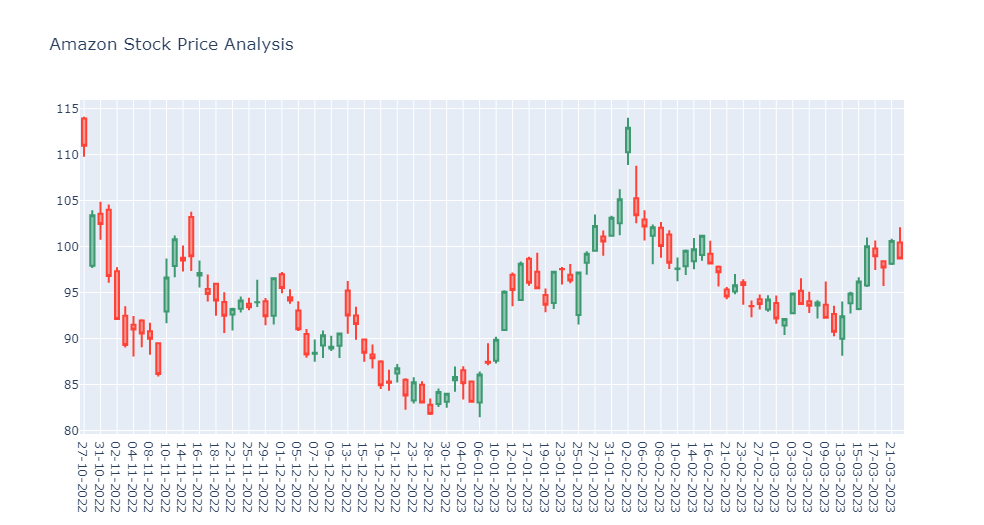
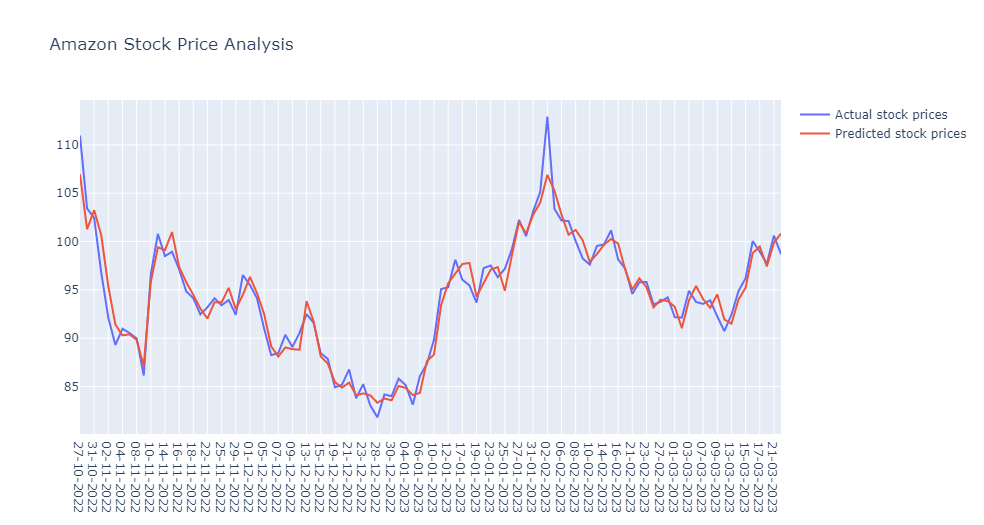
Creates a model to predict daily stock prices of Amazon.
Note: Project in early development stage.
- Amazon web service account: EC2 instance and S3 bucket
- Amazon IAM key: for .pem, access_key and secret_key
- Docker: pull tensorflow image from docker hub to run modelling in container
Clone or fork this repository.
- Run docker and pull tensorflow image (latest-jupyter gives tensorflow access to jupyter notebook).
docker pull tensorflow/tensorflow:latest-jupyter- (Open any terminal) Create container from tensorflow image.
docker run -it --name tf tensorflow/tensorflow:latest-jupyter bash- Clone or fork repository (leave directory open).
- Open jupyter notebook in browser (link to notebook provided by step no.2).
- Copy stock_prediction.ipynb from Data_project folder to notebook (leave browser open).
- Create Amazon web service EC2 instance and S3 bucket (open in new browser).
(skip to step no.6c if you have existing ec2 and s3) 6a. download .pem key when creating ec2 instance 6b. download csv file when creating s3 bucket 6c. select instance 6d. under connect tab select SSH and copy the code
example:
ssh -i "new_ssh.pem" ubuntu@ec2-3-135-190-123.us-east-2.compute.amazonaws.com- Open Windows PS and paste SSH code similar to example (ubuntu or ec2-user will appear as root when connected).
- Copy scraper.py to ec2 instance
example:
scp -i "new_ssh.pem" "scraper.py" ubuntu@ec2-3-135-190-123.us-east-2.compute.amazonaws.com:/home/ubuntu/- Create venv and install requirements as pip.
example:
create venv: python3 -m venv my_app/env
activate venv : source ~/my_app/env/bin/activate
(env) - pip3 install pandas
- pip3 install boto3
- pip3 install requests
- pip3 install beautifulsoup49a. (optional) Test scraper.py. Always check if connected to s3 bucket, otherwise data will not be stored.
python3 scraper.py - Create a cron task for scraping Amazon stock prices. (windows PS can be closed if this step is finished)
Open crontab
sudo crontab -eAdd a scheduler code to the last line of crontab
example:
0 9 * * * /home/ubuntu/my_app/env/bin/python /home/ubuntu/scraper.py 2>&1 | logger -t mycmdGreat! You created a scheduled Amazon stock price scraper!
-
(Return to jupyter notebook) Run all cells in stock_prediction.ipynb
-
If successful you will get images similar to this in your jupyter notebook: