


ECE 382,LAB 7
###Objective and Purpose:
The objective of this lab is to assist in learning the concepts associated with the analog-to-digital converter (ADC) for the MSP430. The robot consists of 3 IR emitter and sensor pairs that will obtain an analog value. The value must then be converted to digital values using the built in ADC of the MSP430.
Required Functionality [COMPLETED]
- Checked off by instructor
- "Use the ADC subsystem to light LEDs based on the presence of a wall. The presence of a wall next to the left sensor should light LED1 on your Launchpad board. The presence of a wall next to the right sensor should light LED2 on your Launchpad board. Demonstrate that the LEDs do not light until each of the three sensors comes into close proximity with a wall." [ECE382.com]
B - Functionality [COMPLETED]
- Used Interrupts to implement design
- "Create a standalone library for your ATD code and release it on Github. This should be separate from your lab code. It should have a thoughtful interface and README, capable of being reused in the robot maze laboratory." [ECE382.com]
A - Functionality [COMPLETED] -"Since each robot's sensors are a little bit different, you need to fully characterize the sensor for your robot. Create a table and graphical plot that shows the ATD values for a variety of distances from a maze wall. This table/graph must be generated for each IR sensor. Use these values to determine how the IR sensors work so you can properly use them to solve the maze." [ECE382.com]
###Implementation:
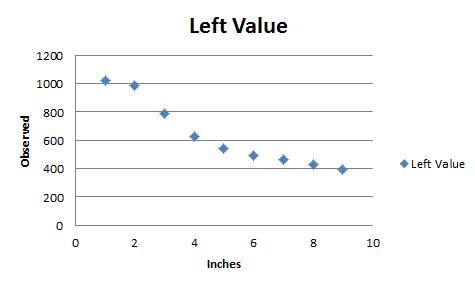
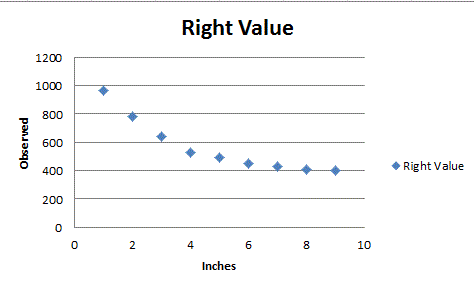
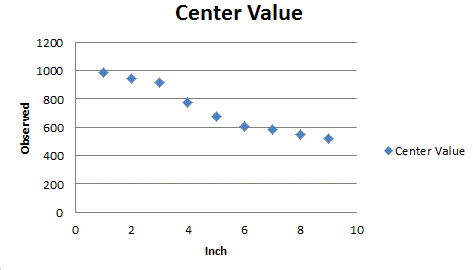
Implementation was first to correctly wire the robot to power the sensors. The sensors simply required 5V and GND and an output slot. Pins P1.3, P1.4, and P1.5 were used to obtained the analog value, and converted the analog value to a digital value to be analyzed. The sensors were than characterized as displayed below:
Left:
Right:
Center:
Data:
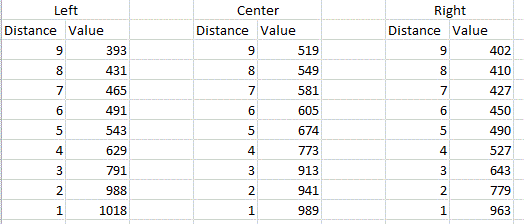
This allowed me to have a good idea of what the digital value means. Without the characterization, the digital number obtained would simply be numbers that are unit less. Now, the numbers correspond to a distance. The higher the number the closer the robot is to the wall.
Code: Lab7 primarily composed of figuring out the following code: ADC10CTL0 = 0; ADC10CTL1 = ADC10DIV_3; // Channel 4, ADC10CLK/4 ADC10AE0 = BIT3 | BIT4 | BIT5; // Make P1.3,P1.4, P1.5 analog input ADC10CTL0 = SREF_0 | ADC10SHT_3 | ADC10ON | ENC;// Vcc & Vss as reference
Once this code was defined, the ADC was configured. Since I used an interrupt implementation, I had to write an extra
method called selectInch(int8 num). This method just defined which pin I was obtaining data from:
ADC10CTL0 &= ~ENC; //turns off ADC
	ADC10CTL1 = INCH_3;  //Reads from P1.3
	ADC10CTL0 |= ENC; //turns ADC back on

I'm not sure why a method was required to change which pin to read from but for someone reason the change couldn't be
done within the timer.
##Debugging/Testing
Methodology: The methodology used was to simply get the sensors working. There wasn't much plan besides knowing that
I wanted to use interrupts to implement the sensing.  The preliminary design just understood how to set up the ADC on
the MSP430, and that composed primarily of understanding the code displayed above.

Testing: The test was conducted using lights. When an object was within a certain distance of the right sensor the
red light on the MSP430 would be illuminated. When an object was within a predefined range of the center sensor the
green light would turn on, when the object further the green light would turn off. When an object is within a
distance of the left sensor the red light would turn off.

Right Sensor: Turn on RED LIGHT
Center Sensor: Turn on GREEN LIGHT within distance, else turns off
Left Sensor: Turn off the RED LIGHT.
###Lessons Learned:
The biggest lesson learned is that the ADC of the MSP430 cannot be configured in the interrupt. The reason is
unknown, but this is also a root cause of the problem. Another lesson, that probably caused the most trouble is that
no P1.0, P1.1, and Pl.2 is used by the MSP430 is always transmitting. Thus using it as an ADC is not rational. The
pin could probably be configured to turn off the function it's performing, but to mitigate additional work and
problems, I simply just used P1.3, P1.4, and P1.5. Other than that the lab went smoothly, and working with interrupts
was a lot of fun.
#Conclusion
Conclusively, understanding of how to use the MSP430 as an ADC and characterizing the MSP430 was a success. I was
able to obtain a lot of knowledge on how to use the MSP430 and how to implement IR sensors with it. This also allowed
for a profound better understanding of interrupts which will definitely play a large role in future designs.
Everything worked as planned, with some difficulty at first but it all worked out in the end.
###Documentation:
Cadet Bodin figured out that the ADC must be configured outside of the interrupt. I used his idea of creating a
method that would be called by the interrupt that would configure the ADC. I alsu used the codes provided by
http://ecse.bd.psu.edu/cmpen352/