


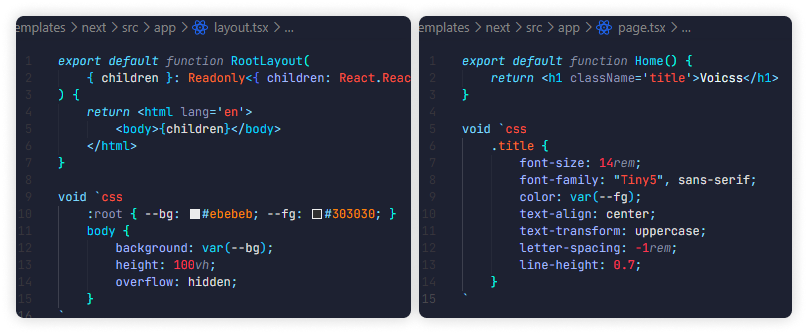
Voicss (/vɔɪs/) is a compile-time CSS-in-TS library that brings a fully native CSS experience directly into .ts(x) files.
Its core is just one line of code, and styling is done via the void `css ...` block syntax.
- ⚡ True Zero Runtime: styles are extracted at build time, no JS in production
- 💎 Native CSS: write standard CSS with all modern features
- 📦 Modern Bundlers: first-class support for Next.js and Vite
- 🔥 HMR: instant style updates during development
- 🧩 VS Code Extension: syntax highlighting, autocomplete, validation, and more
- 🧹 ESLint Plugin: CSS linting in template literals
Scaffold a demo project for your platform (Next.js/Vite/tsdown):
bun create voicssbun add -D voicss @voicss/next # for Next.js
bun add -D voicss @voicss/vite # for Vite// next.config.ts
import type { NextConfig } from 'next'
import { voicssTurboRule } from '@voicss/next'
export default {
turbopack: { rules: { ...voicssTurboRule } },
} satisfies NextConfig// vite.config.ts
import type { UserConfig } from 'vite'
import react from '@vitejs/plugin-react'
import voicss from '@voicss/vite'
export default {
plugins: [react(), voicss()],
} satisfies UserConfigWrite standard CSS inside your .ts(x) files using the void `css ...` syntax.
The bundler extracts these blocks into real CSS at build time — resulting in zero runtime overhead.