The actual use of the filterIcon of the Table component is inconsistent with the document description #4669

Description

- I have searched the issues of this repository and believe that this is not a duplicate.
Version
2.2.7
Environment
vue 3.2.11, chrome 91.0.4472.114
Reproduction link

Steps to reproduce
分别配置两个 Table-Column 属性
- 配置 filterIcon 为 VNode 函数,例如:
filterIcon: () => <SearchOutlined /> - 配置另一个为 slots,例如:
slots: {
    filterIcon: "filterIcon"
}
同时,配置插槽为
<template #filterIcon>
    <search-outlined />
</template>
What is expected?
二者最终展现形式应该保持一致
What is actually happening?
第一种配置方式,也就是使用 VNode 方式,图标没有居中
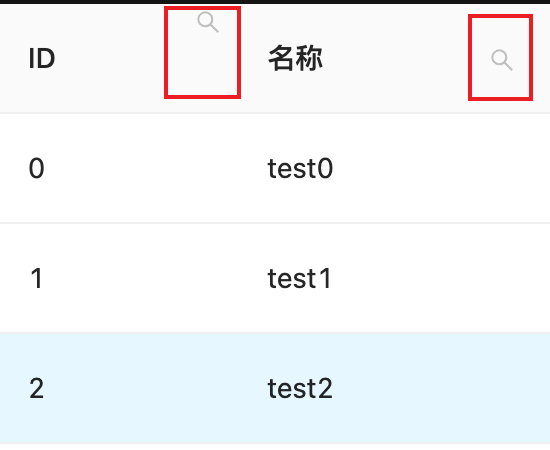
看了下代码,应该是某个地方判断与实际文档不一致
if (filterIcon.length === 1 && isValidElement(filterIcon[0])) {
    return cloneElement(filterIcon[0], {
        title: filterIcon.props?.title || locale.filterTitle,
        onClick: stopPropagation,
        class: classNames(`${prefixCls}-icon`, dropdownIconClass, filterIcon.props?.class),
    });
}
这里,判断自定义 filterIcon 的 length,也就是说,实际使用的时候需要返回一个数组(VNode[]),而文档里是 VNode ,导致这里判断为 false,进而进入到下一个代码块里
return (
    <span class={classNames(`${prefixCls}-icon`, dropdownIconClass)} onClick={stopPropagation}>
        {filterIcon}
    </span>
)
这里用 span 包了一层,导致最终默认 svg 样式不生效,建议修改一下文档