Turn any STEP/CAD file into an interactive 3D exploded-view on your website.


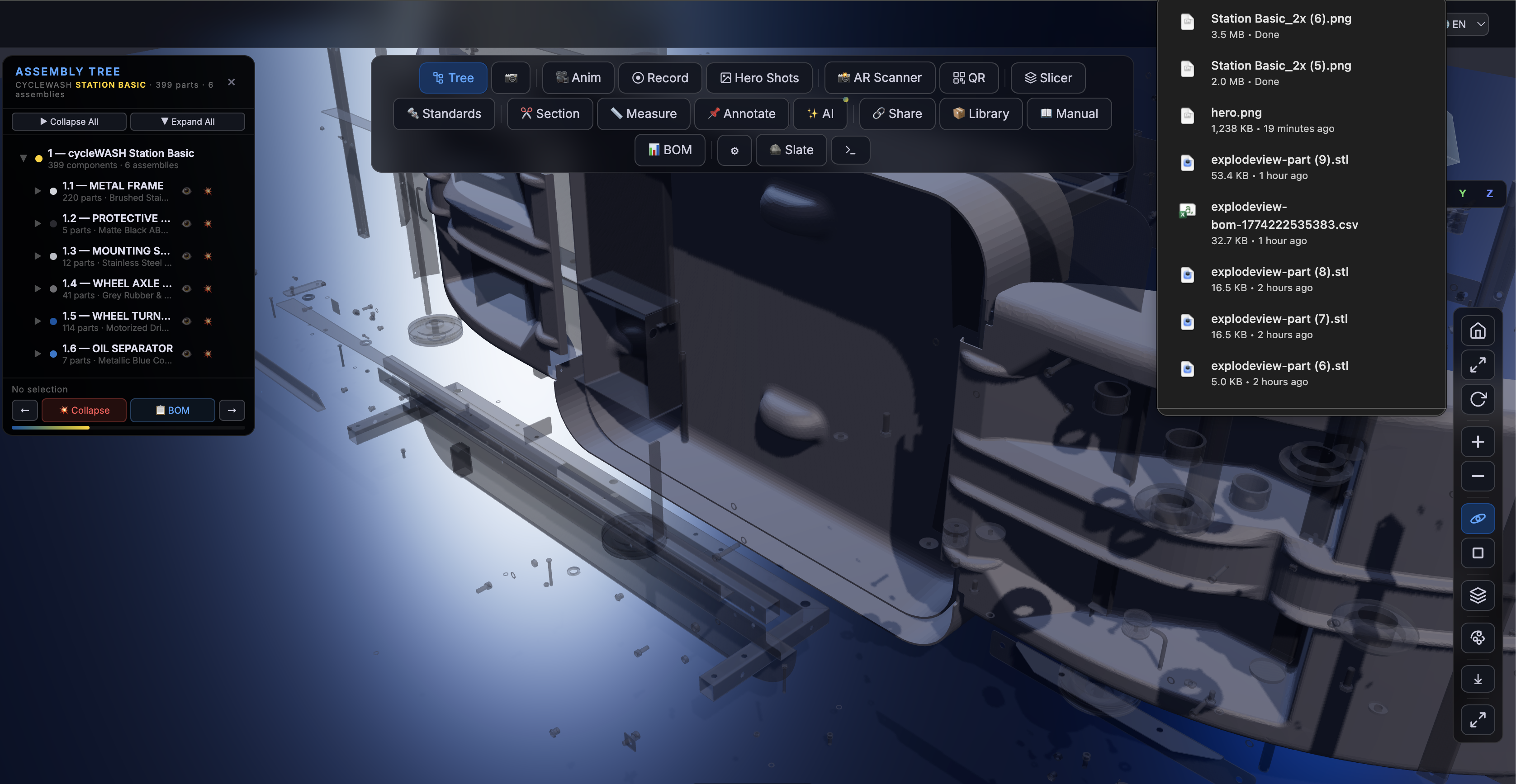
ExplodeView takes STEP/STP CAD assembly files and creates embeddable, interactive 3D viewers with:
- Exploded views — blow apart assemblies to show internal components
- Sub-assembly highlighting — click any assembly to isolate and inspect it
- Realistic materials — brushed steel, matte plastic, rubber, metallic finishes
- Full controls — zoom, rotate, pan, collapse/expand, auto-orbit
- Measurement tools — distance, angles, section cuts, annotations
- Manufacturing integration — Kiri:Moto (FDM/CNC/Laser/SLA), STL export, BOM export
- QR codes — scannable deep-links per part for AR and sharing
- Assembly animations — step-by-step disassembly/assembly sequences
- DIN/ISO identification — standard parts recognition + McMaster-Carr links
- Zero dependencies — single script, loads Three.js from CDN
- Responsive — works on desktop, tablet, mobile
pip install cadquery OCP
python3 bin/explodeview-process.py input.step output/ --name "My Product"<div data-stp-viewer="/output/"
data-brand="Your Brand"
data-product-name="Product Name"
style="width:100%; height:600px">
</div>
<script src="https://unpkg.com/explodeview"></script>That's it. Two lines.
npm install explodeview<script src="https://unpkg.com/explodeview"></script>Download dist/explodeview.js and serve it from your own server.
The CLI tool converts STEP/STP files into web-ready assets:
python3 bin/explodeview-process.py <input.step> <output_dir> [options]

Options:
  --name        Product display name
  --brand       Brand name
  --tolerance   Mesh quality (default: 0.5, lower = finer)
Requirements: Python 3.8+ with cadquery and OCP packages.
pip install cadquery OCPOutput structure:
output/
├── parts/           # Individual STL meshes per solid
├── manifest.json    # Part metadata (centers, bounding boxes)
├── assemblies.json  # Auto-detected assembly grouping
└── config.json      # Viewer configuration
// Programmatic initialization
const viewer = await STPViewer.init({
  container: '#my-viewer',
  src: '/path/to/processed/assets/',
  brand: 'Your Brand',
  productName: 'Product Name',
  assemblies: [],  // auto-loaded from assemblies.json
  captions: {
    brand: 'Your Brand',
    productName: 'Product Name',
    loaderTitle: 'Loading...',
    loaderText: 'Preparing 3D model...',
    btnOverview: 'Overview',
    btnCollapse: 'Collapse',
    btnExplode: 'Explode',
  }
});Override auto-detected assemblies with your own grouping:
STPViewer.init({
  container: '#viewer',
  src: '/assets/',
  assemblies: [
    {
      key: 'frame',
      name: 'MAIN FRAME',
      subtitle: 'Structural Steel',
      detail: 'Load-bearing frame assembly.',
      color: '#0055A4',
      indices: [0, 150],  // solid index range
    },
    {
      key: 'motor',
      name: 'DRIVE UNIT',
      subtitle: 'Electric Motor Assembly',
      color: '#FFD100',
      indices: [150, 200],
    }
  ]
});Each assembly can have custom material properties in the assemblies JSON:
{
  "key": "covers",
  "name": "PROTECTIVE COVERS",
  "color": "#2A2A30",
  "material": {
    "metalness": 0.0,
    "roughness": 0.85
  }
}| Feature | Free (MIT) | Pro |
|---|---|---|
| 3D exploded view | ✅ | ✅ |
| Assembly tree + highlighting | ✅ | ✅ |
| Collapse/expand controls | ✅ | ✅ |
| Auto-rotate, pan, zoom | ✅ | ✅ |
| Wireframe toggle | ✅ | ✅ |
| Custom branding | ✅ | ✅ |
| Embed on your site | ✅ | ✅ |
| STEP processing CLI | ✅ | ✅ |
| Multi-language (6 langs) | ✅ | ✅ |
| QR codes per part | — | ✅ |
| Part info cards | — | ✅ |
| BOM export (CSV) | — | ✅ |
| Measurement (distance + angles) | — | ✅ |
| Annotation pins | — | ✅ |
| Section cut / cross-section | — | ✅ |
| Assembly/disassembly animation | — | ✅ |
| DIN/ISO standard parts + McMaster | — | ✅ |
| STL export per part | — | ✅ |
| Kiri:Moto (FDM/CNC/Laser/SLA) | — | ✅ |
| Hero shots (marketing images) | — | ✅ |
| AR Scanner (WebXR) | — | ✅ |
| Interactive manual generator | — | ✅ |
| Cloud processing API | — | Enterprise |
| White-label (remove branding) | — | Enterprise |
| Priority support | — | Enterprise |
- Manufacturing companies — showcase products on your website
- E-commerce — interactive product pages that convert
- Engineering docs — maintenance and assembly manuals
- Sales teams — impressive presentations and proposals
- Education — teach mechanical engineering concepts
<div id="viewer"
     data-stp-viewer="/assets/"
     data-brand="cycleWASH"
     data-product-name="Station Basic"
     style="width:100vw; height:100vh">
</div>
<script src="https://unpkg.com/explodeview"></script><div class="product-3d"
data-stp-viewer="/assets/my-machine/"
data-brand="ACME Corp"
data-product-name="Widget Pro 3000"
style="width:100%; height:500px; border-radius:12px; overflow:hidden">
</div>
<script src="https://unpkg.com/explodeview"></script>Chrome 90+, Firefox 90+, Safari 15+, Edge 90+
PRs welcome! See CONTRIBUTING.md.
MIT — free for personal and commercial use.
Built by Sachin Kumar — creator of cycleWASH, the world's first automated bicycle washing station.