Documentation
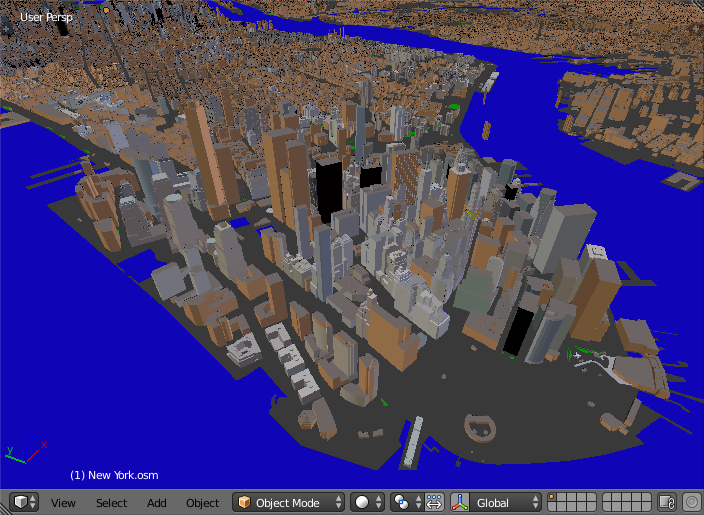
The addon imports a file in the OpenStreetMap format (.osm).
There are free and paid (2.85$) versions of the addon. The only difference between them is a popup window that shows up after the import finished. A mouse click closes the popup window and brings you to the webpage to buy the paid version for just 2.85$.
By buying the paid version you support the addon development.
The following items can be imported by the addon:
- Buildings. Building height, number of floors are used to create the final scene. Composition into 3D parts for a building with the complex structure is also processed.
- Water objects (rivers and lakes). Imported as polygons
- Highways, paths and railways. Imported as polygons.
- Vegetation (forests, grass, scrubs). Imported as polygons.
Polygons with holes are supported!
Buy the addon for just 2.85$ or download a free version from here. In either case you will get a zip archive. Install it via the usual Blender way:
- File → User Preferences... → Addons → Install from File...
- Find the zip archive in your file system and press Install from File... button
- Enable the addon by checking the Enable an addon
- Press Save User Settings in the Blender User Preferences window
- File → Import → OpenStreetMap (.osm)
- Find an OpenStreetMap file in your file system
- Press Import OpenStreetMap button
- If you have the free version, a popup window shows up after the import finished. A mouse click closes the popup window and brings you to the webpage to buy the paid version for just 2.85$.
- The paid version doesn't show you the popup and brings you directly to the imported scene.
Set far clipping distance of the 3D View and your render cameras at least to 10 thousands! The imported scene can be dozens of kilometers wide!
- The work is underway to support roof shapes!
- Only simple diffuse material are applied to the imported objects at the moment.
- Paid version
- twitter: @prokitektura
- blenderartists.org: thread