Documentation
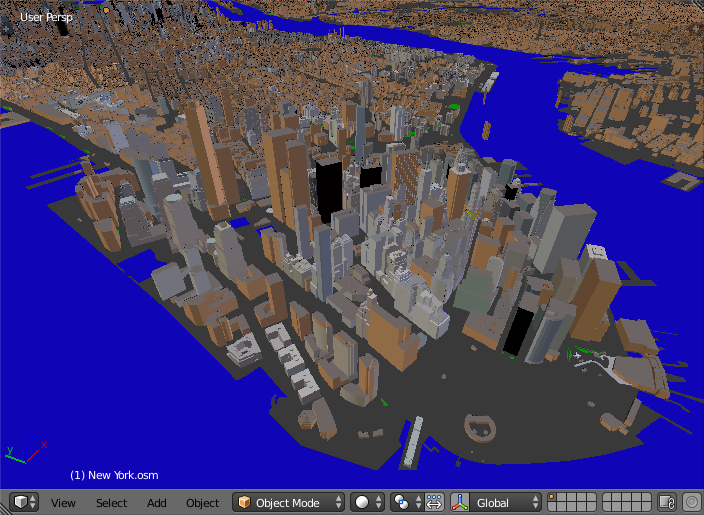
The addon imports a file in the OpenStreetMap format (.osm).
There are free and paid (2.85$) versions of the addon. The only difference between them is a popup window that shows up after the import finished. A mouse click closes the popup window and brings you to the webpage to buy the paid version for just 2.85$.
By buying the paid version you support the addon development.
The following items can be imported by the addon:
- Buildings. Building height, number of floors are used to create the final scene. Composition into 3D parts for a building with the complex structure is also processed.
- Water objects (rivers and lakes). Imported as polygons. Coastlines for seas and oceans are importes as edges.
- Highways, paths and railways. Imported as edges.
- Vegetation (forests, grass, scrubs). Imported as polygons.
Polygons with holes are supported!
Small OSM files (several megabytes) for an area of interest can be downloaded from the main OpenStreetMap website. Press Manually select a different area to select the area of interest interactively or enter coordinates of the area in the input fields. The same page lists additional services to download larger extracts from the OSM database.
Buy the addon for just 2.85$ or download a free version from here. In either case you will get a zip archive. Do not unpack it! Install it via the usual Blender way: Buy the addon for just 2.85$ or download a free version from here. In either case you will get a zip archive. Do not unpack it! Install it via the usual Blender way:
- Delete the previous version of the addon if you have one:
- File → User Preferences... → Addons
- Type osm in the search box in the top left corner of the Addons tab to find the addon
- Press Remove button in the GUI box with the header Import-Export: Import OpenStreetMap (.osm)
- File → User Preferences... → Addons → Install from File...
- Find the zip archive in your file system and press Install from File... button
- Enable the addon by checking the Enable an addon
- Press Save User Settings in the Blender User Preferences window
Small OSM files (several megabytes) for an area of interest can be downloaded from the main OSM website. Press Manually select a different area to select the area of interest interactively or enter its coordinates in the input fields. The same webpage lists additional services to download larger extracts from the OSM database.
- File → Import → OpenStreetMap (.osm)
- Find an OpenStreetMap file in your file system
- Press Import OpenStreetMap button
- If you have the free version, a popup window shows up after the import finished. A mouse click closes the popup window and brings you to the webpage to buy the paid version for just 2.85$.
- The paid version doesn't show you the popup and brings you directly to the imported scene.
Since coastlines for seas and oceans are imported as edges, create one or more faces manually for the seas and oceans limited by the edges representing those coastlines. Obviously you can skip this step, if your OSM file doesn't contain any coastline. Besides coastlines the other water objects (rivers and lakes) are also imported as edges, if they were mapped as OpenStreetMap multipolygon relations and have a part outside the bounds of your OSM file. In the latter case also create faces manually for the related water objects.
Watch this video by CG Geek to learn how to use the addon in a creative way.
Set far clipping distance of the 3D View and your render cameras at least to 10 thousand! The imported scene can be dozens of kilometers wide!
Take care with large .osm files (hundreds of megabytes and more)! For example, an OSM file used to create the scene of New York center shown on the very top image had the size of 350 Mb. It contained more than 100.000 buildings. It took around 1 hour to import the file. Even larger .osm files may hang up your computer completely.
- The work is underway to support roof shapes!
- Only simple diffuse materials are applied to the imported objects at the moment.
- Paid version
- Documentation
- twitter: @prokitektura
- blenderartists.org: thread
post there questions, nice renderings created with the addon and your experience with the addon - bugs and feature requests: issues