
This control creates a simple color gradient configurator. It is designed purely in CSS/SVG/Dart; there is no Canvas rendering occurring. This control works in conjunction with the Color Slider Control.
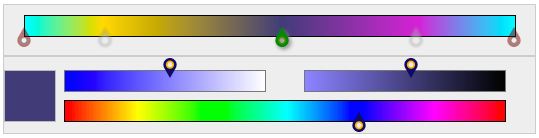
The control is appears as the Top portion of the compounded control as shown below. The Bottom section is the Color slider control.
##pubspec Start by adding a dependency for both the Gradient Color Configurator configurator and the Color Slider Selector selector in pubspec.yaml
    dependencies:
      color_slider_control:
        git: git://github.com/wdevore/color_slider_control.git
      gradient_colorstops_control:
        git: git://github.com/wdevore/gradient_colorstops_control.git
Import the libraries into your project
    import 'package:color_slider_control/color_slider_control.dart';
    import 'package:gradient_colorstops_control/gradient_colorstops_control.dart';
The two controls need to created and joined together. This is done by:
    void main() {
      ...
      gradientWidget.colorWidget = colorWidget;
    }
Below is an example. The example is present in the Web directory.
    void main() {
      ColorSliderWidget colorWidget = new ColorSliderWidget();
      _targetColorContainer = querySelector("#color_pickerId");
      _targetColorContainer.nodes.add(colorWidget.container);

      // We want the gradient widget to only send the colorstop of the marker
      // not the marker's color stop on the bar.
      GradientColorStopWidget gradientWidget = new GradientColorStopWidget(colorWidget.externalColorChange);
      gradientWidget.colorWidget = colorWidget;

      _targetGradientContainer = querySelector("#gradient_pickerId");
      _targetGradientContainer.nodes.add(gradientWidget.container);

      colorWidget.colorChangeCallback = gradientWidget.externalColorChange;

      colorWidget.bind();
      gradientWidget.bind();

    }
The selector defaults to a light teal color.
##Usage
The active marker is highlighted as darkgreen. Unselected markers are blurred, grayscaled and translucent. The end markers are highlighted in darkred and not movable.
##Example
A complete example on how to use the control can be found in the Web directory accompany the pub package.