This project was originally created for my final assignment for Tealeaf Academy's Third course: Build Robust and Production Quality Applications. The company has since changed its name to LaunchSchool.
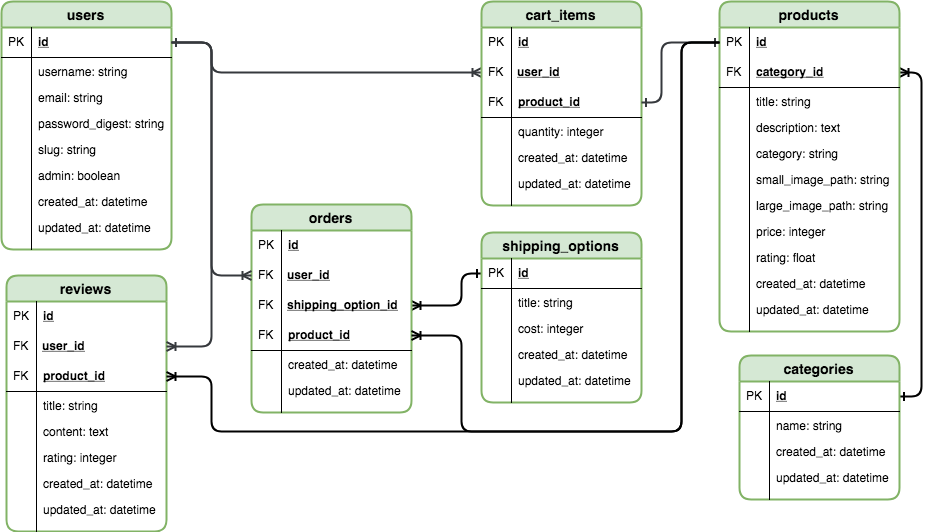
This is a demo online store. It allows a user to create an account, login and simulate purchasing items. Additionally, users can leave product reviews. Emails are sent to users when they register and make purchases. The structure of this project is based on what I learned in the Tealeaf courses.
The basic technology stack is:
- Ruby on Rails (web-application framework)
- RSpec (testing framework)
- Puma (web server)
- PostgreSQL(production database)
- SQLite (development/test database)
- Bootstrap (front-end component library)
- Stripe (payment processing)
- Letter-Opener gem (to simulate sending emails)
- Install Ruby on Rails: https://rubyonrails.org/
- Download project files
$ cd twill-store# navigate to project's root directory$ bundle install --without production# install the non-production gems listed in the Gemfile.$ rails db:migrate# setup database$ rails spec# run tests (they all should pass)$ rails server# start development server- Done. You can now navigate to localhost:3000 to open the app.
$ bundle update [name]# Update gems
In addition to what I learned while working through the Tealeaf curriculum, the following resources helped me complete this project
- Theme:
- Ryan Fait's sticky footer
- Omniauth setup:
- http://railscasts.com/episodes/241-simple-omniauth
- http://www.sitepoint.com/rails-authentication-oauth-2-0-omniauth/
- http://railscasts.com/episodes/360-facebook-authentication?autoplay=true
- http://stackoverflow.com/questions/11461084/handle-omniautherror-invali
- http://stackoverflow.com/questions/10737200/how-to-rescue-omniauthstrategiesoauth2callbackerror
- http://stackoverflow.com/questions/31337829/omniauth-facebook-cannnot-get-email-address
- simi/omniauth-facebook#209
- http://www.skorks.com/2009/09/ruby-exceptions-and-exception-handling/
- Omniauth testing:
- Misc:
- https://dollarbeardclub.com
- http://stackoverflow.com/questions/16268146/shoulda-matchers-should-validate-uniqueness-of-failing-with-scope
- http://stackoverflow.com/questions/22815009/add-a-reference-column-migration-in-rails-4
- http://stackoverflow.com/questions/14415857/rails-update-column-works-but-not-update-attributes
- http://guides.rubyonrails.org/active_record_querying.html