浏览器单线程机制 #5

Description

browser single thread
The browser UI thread is responsible for both UI updates and JavaScript execution, Only one can happen at a time.
everything in the UI of your browser, including the page layout and style engine, the JS engine, the garbage collector, etc — all of that is on a single-thread, which means at any given moment, only one of the tasks can be processing
from javascript-and-the-browser-ui. high-performance-javascript-capitoljs-2011)
浏览器的UI更新和js的执行共用同一个线程UI Thread,同一时间要么进行UI更新,要么执行js代码。他们通过共享同一个任务队列UI Queue来实现这一机制。
例子1.
<div id="foo">
aaaaaaaaaaaaaaaaaaaaaaaaaaaaaaaaaaaaaaaaaaaaaa
</div>
<button onclick="test();">test</button>
<button onclick="alert(2);">test2</button>
<script type="text/javascript">
function long_run(sep) {
    console.log('start');
    var s = +new Date();
    while (+new Date() - s < sep) {
      //
    }
    console.log('end');
}

function test() {
    var el = document.getElementById("foo");
    el.style.backgroundColor = "blue";
    // do some "long running" task, like sorting data
    long_run(3000);
    el.style.backgroundColor = "red";
}
在js代码执行的时候,UI更新被冻结:
- 表现为UI失去响应,例如点击没反应;
- handleClick函数里对dom的修改不会立即更新;
- 点击等其他事件触发的handle不会立即执行,被放入队列中依次执行,但是事件对应的UI update 被抛弃。
例子2.
<div id="foo">
aaaaaaaaaaaaaaaaaaaaaaaaaaaaaaaaaaaaaaaaaaaaaa
</div>
<button onclick="test();">test</button>
<button onclick="alert(2);">test2</button>
<script type="text/javascript">

function long_run(sep) {
    console.log('start');
    var s = +new Date();
    while (+new Date() - s < sep) {}
    console.log('end');
}

function test() {
    console.log('setTimeout');
    var el = document.getElementById("foo");
    el.style.backgroundColor = "blue";

    setTimeout(function() {
        el.style.backgroundColor = "red";
    }, 50);

    long_run(3000);
}

 </script>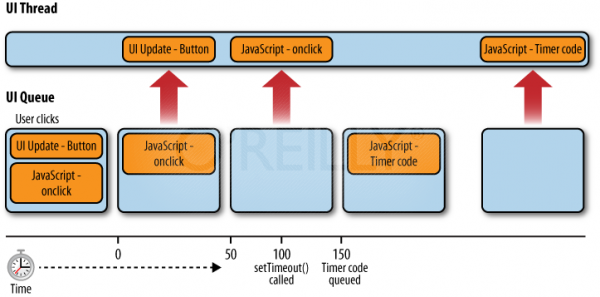
Figure 1 - JavaScript UI Queue and UI Thread
Script run time Limits of every browser
- Internet Explorer: 5 million statements
- Firefox: 10 seconds
- Safari: 5 seconds
- Chrome: Unknown, hooks into normal crash control mechanism
- Opera: none
“0.1 second [100ms] is about the limit for having the user feel that the system is reacting instantaneously, meaning that no special feedback is necessary except to display the result.”
- Jakob Nielsen
推荐每个js片段执行最长时间限制为50ms。
定时器
因为浏览器的单线程机制,所以定时器真正执行的时间是不能保证的。
即setTimeout(fn, 100) 或 setInterval(fn, 100),是不能确保在调用完之后100ms就会执行fn,具体的执行时间取决于于当前任务队列中的任务和等待把fn放入任务队列期间是否有其他立即执行的事件加入到队列中。
例子3.

<div id="foo">
aaaaaaaaaaaaaaaaaaaaaaaaaaaaaaaaaaaaaaaaaaaaaa
</div>
<button onclick="handleClick();">test</button>
<button onclick="alert(2);">test2</button>
<script type="text/javascript">
function long_run(sep) {
    console.log('start');
    var s = +new Date();
    while (+new Date() - s < sep) {
      //
    }
    console.log('end');
}
function handleClick() {
    console.log('handle click');
    long_run(11);
    //执行了11ms,从18ms到29ms结束
}
function handleTimeout(){
    console.log('setTimeout called');
    long_run(7);//执行了7ms,从29ms到36ms结束
}
function handleInterval(){
    console.log('setInterval call');
    long_run(5);//执行了5ms
}

function exec18ms(){
    long_run(2); // 先执行2ms
    // 2ms后执行一个10ms的定时器
    setTimeout(handleTimeout, 10);

    long_run(8); //执行8ms

   //t=10ms,启动一个10ms setInterval定时器,
   setInterval(handleInterval ,10);

   long_run(8); // 执行8ms
}

//t = 0ms,启动一个脚本,执行18ms,此时队列为空
    exec18ms();//执行18ms+

//t=2ms,启动一个setTimeout定时器,,此时队列为空
//t=8ms,发生了鼠标点击事件,此时队列为空,handleClick立即加入队列
//t=10ms,启动一个10ms setInterval定时器,此时队列有handleClick待执行
//t=12ms,Timer fires,Timer加入队列,此时队列有handleClick和Timer待执行
//t=18ms,之前的exec18ms执行完成,此时队列中有handleClick和Timer, 从队列中拿出handleClick进行执行,执行时间为11s,18-29ms,此时队列中有Timer
//t=20ms,10ms interval fires,10ms interval 加入队列,此时队列中有Timer和10ms interval
//t=29ms, handleClick 执行完成,队列中有Timer和10ms interval,拿出Timer进行执行,队列中有10ms interval。 //此时距启动Timer已经过去了27ms(29-2),延时了17ms(27-10)才执行了一个timeout为10ms的程序
//t=30ms,10ms interval fires again,但是此时队列已经存在同一个interval还没执行,所以本次interval 被dropped,队列仍旧中只有10ms interval
// t=36ms,Timer执行完成,从队列中拿出10ms inerval 执行,此时队列为空,此时距interval启动已经过去了26ms(36-10)延时了16ms(26-10)才执行了一个10ms的interval。
// t=40ms,10ms interval fires again,队列为空,立马把这个10ms interval放入队列
//t=41ms,10ms interval 执行完,队列中有一个10ms interval,从队列中拿出interval执行,此时距上一个interval执行完成间隔为0,此后队列为空
//t=46ms,10ms interval 执行完,队列为空,
//t=50ms,10ms interval fires,队列为空,马上加入队列,因为线程空闲,立即执行,距离上一个interval执行完成间隔4ms。

 </script>
Timer总结
- setTimeout(fn,delay) 和setInterval(fn2,delay) fn的执行时间间隔不一定是delay,可能比delay大;而setInterval的fn2执行的间隔则也不一定是delay,可能比delay大,可能比delay小,可能被drop掉。
- setInterval触发的时候,如果队列中有同一个interval触发的程序未执行会被drop掉,setTimeout不会有这个问题。
RAF(requestAnimationFrame)ie>=10,chrome>=27,ios7.1,Android4.4
function test() {
  	console.log('requestAnimationFrame');
    requestAnimationFrame(function() {
      var el = document.getElementById("foo");
      el.style.backgroundColor = "blue";

      requestAnimationFrame(function() {
        long_run(3000);
        el.style.backgroundColor = "red";
      });
    });

  }
//兼容性处理requestAnimationFrame,对不支持的浏览器用setTimeout来替换,时间间隔为一帧的时间
window.requestAnimFrame = (function() {
return window.requestAnimationFrame || window.webkitRequestAnimationFrame || window.mozRequestAnimationFrame || window.oRequestAnimationFrame || window.msRequestAnimationFrame || function(callback) {
window.setTimeout(callback, 1000 / 60);
};
})();
利用 定时器/RAF 分片执行来解决需要长时间执行的js的代码
timed-array-processing-in-javascript
Worker
高级浏览器支持web worker,每一个web worker新起一个线程,通过加载的一个js文件来初始化,不受单线程执行的限制,但是,有很多限制:
- 不能访问DOM,自然不能修改dom,
- 不能访问 any global variables or JavaScript functions within the main page
- access to some objects, including the window, document, and parent, is restricted.

他们通过postMessage/onmessage 来进行发送和接收消息进行交互。
example
CSS3 animations use transform
对于动画效果我们推荐是css3,对于不支持的浏览器才降级使用js来实现。
虽然用css3来实现动画,但是对于浏览器的单线程机制,当js执行的时候,浏览器的UI被冻结,不能update,自然css的动画也被冻结了。好消息是有的浏览器moves the CSS animations off of the UI thread,这样js执行的时候,不会影响css动画的执行。 from
但是有一点这个动画必须animations use transform
支持的浏览器
All Safaris and Andriod Chrome
IE10,Chrome
<head>
<style>
/*旋转的动画*/
.spin {
  -webkit-animation: 3s rotate linear infinite;
  animation: 3s rotate linear infinite;
  background: red;
}
@keyframes rotate {
  from {transform: rotate(0deg);}
  to {transform: rotate(360deg);}
}
@-webkit-keyframes rotate {
  from {-webkit-transform: rotate(0deg);}
  to {-webkit-transform: rotate(360deg);}
}


.walkabout-old-school {
  -webkit-animation: 3s slide-margin linear infinite;
  animation: 3s slide-margin linear infinite;
  background: blue;
}
/*位置移动的动画,注意这里是通过transform修改位置*/
@keyframes slide-transform {
  from {transform: translatex(0);}
  50% {transform: translatex(300px);}
  to {transform: translatex(0);}
}
@-webkit-keyframes slide-transform {
  from {-webkit-transform: translatex(0);}
  50% {-webkit-transform: translatex(300px);}
  to {-webkit-transform: translatex(0);}
}


.walkabout-new-school {
  -webkit-animation: 3s slide-transform linear infinite;
  animation: 3s slide-transform linear infinite;
  background: green;
}
/*位置移动的动画,通过margin-left来修改位置,这种方法仍然受单线程的影响*/
@keyframes slide-margin {
  from {margin-left: 0;}
  50% {margin-left: 100%;}
  to {margin-left: 0;}
}

@-webkit-keyframes slide-margin {
  from {margin-left: 0;}
  50% {margin-left: 100%;}
  to {margin-left: 0;}
}

div {
  width: 30px;
  height: 30px;
}
</style>
<script>
function kill() {
  var start = +new Date;
  console.log("" + new Date());
  while (+new Date - start < 2000){}
  console.log("" + new Date());
}
</script>
</head>
<body>
  <p><button onclick="kill()">kill 'em all for 2 sec</button></p>
  <p><div class="spin"></div>
  <p><div class="walkabout-old-school"></div>
  <p><div class="walkabout-new-school"></div>
</body>
how to solve browser thread limit
- setTimeout/setInterval
- RAF
- web worker
- css3 animations use transform