Typed pages for Roam Research. Add a Type:: attribute to a page and a chip appears next to the title; click it to open a sidebar panel with the fields you care about for that type.
Roam's freedom as an outline is the whole point. But the people, projects, books, and articles I keep coming back to all have some structure: an email, a status, a due date, an author. Today that structure is invisible — you have to read the page to learn what kind of thing it is, and scan the outline to find the fields that matter.
roam-meta-type keeps the outline. It just makes the structure visible.
- Unobtrusive pill-shaped chip page identification based on supported
Type::attribute. Multi-typed pages (Type:: #Project #Blog) get one chip per type. - Click a chip → a panel mounts at the top of Roam's right sidebar with that type's pinned fields, rendered as label/value rows.
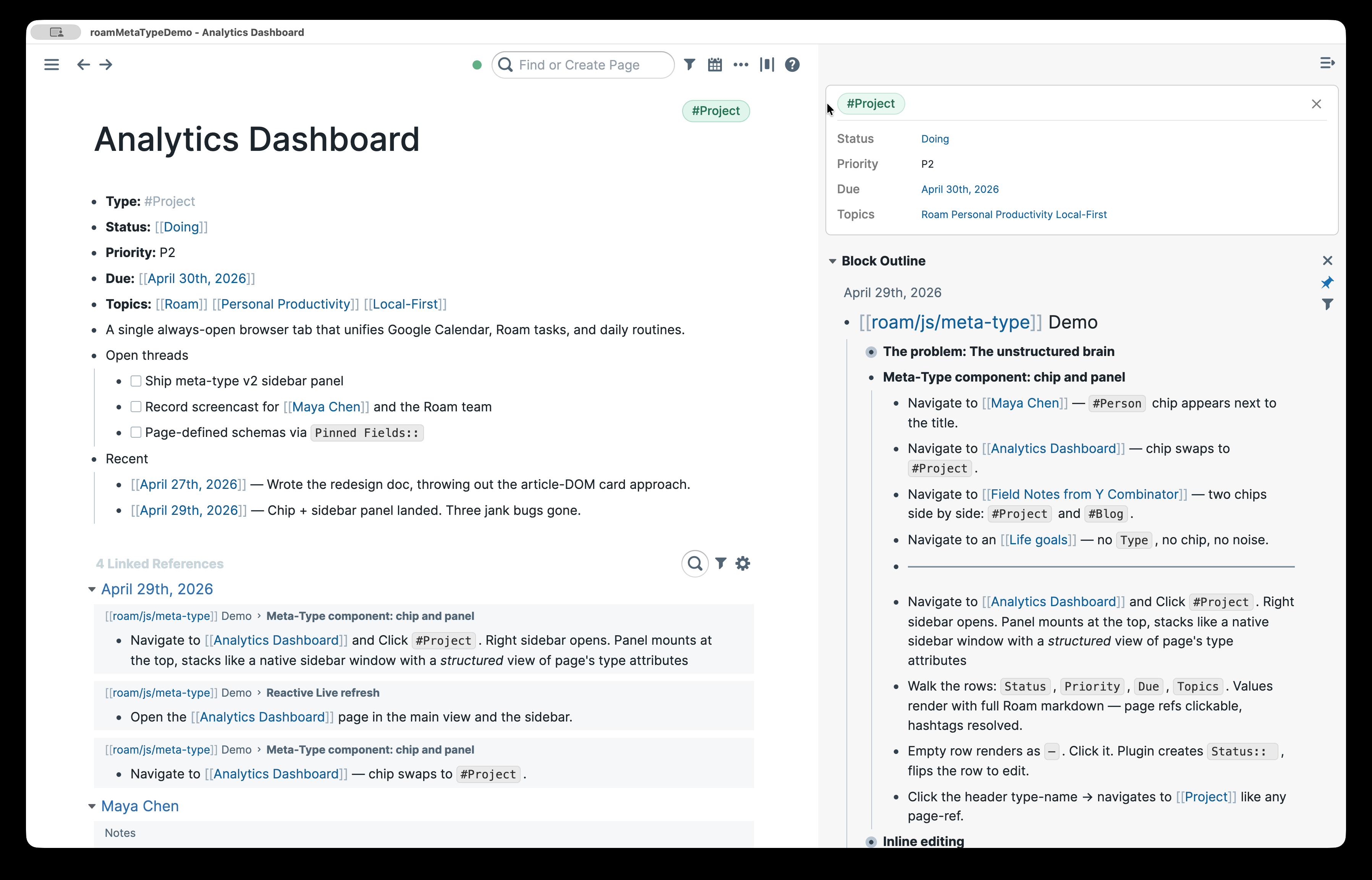
- Sidepanel is an integrated inline-editor. Click any row → it flips to inline edit mode using Roam's own block editor (autocomplete, page-refs, formatting — all of it). Click any value to flip the row into Roam's block editor. Empty rows render as
—. Click and the plugin creates the missing block (e.g.Status::) before flipping into edit mode.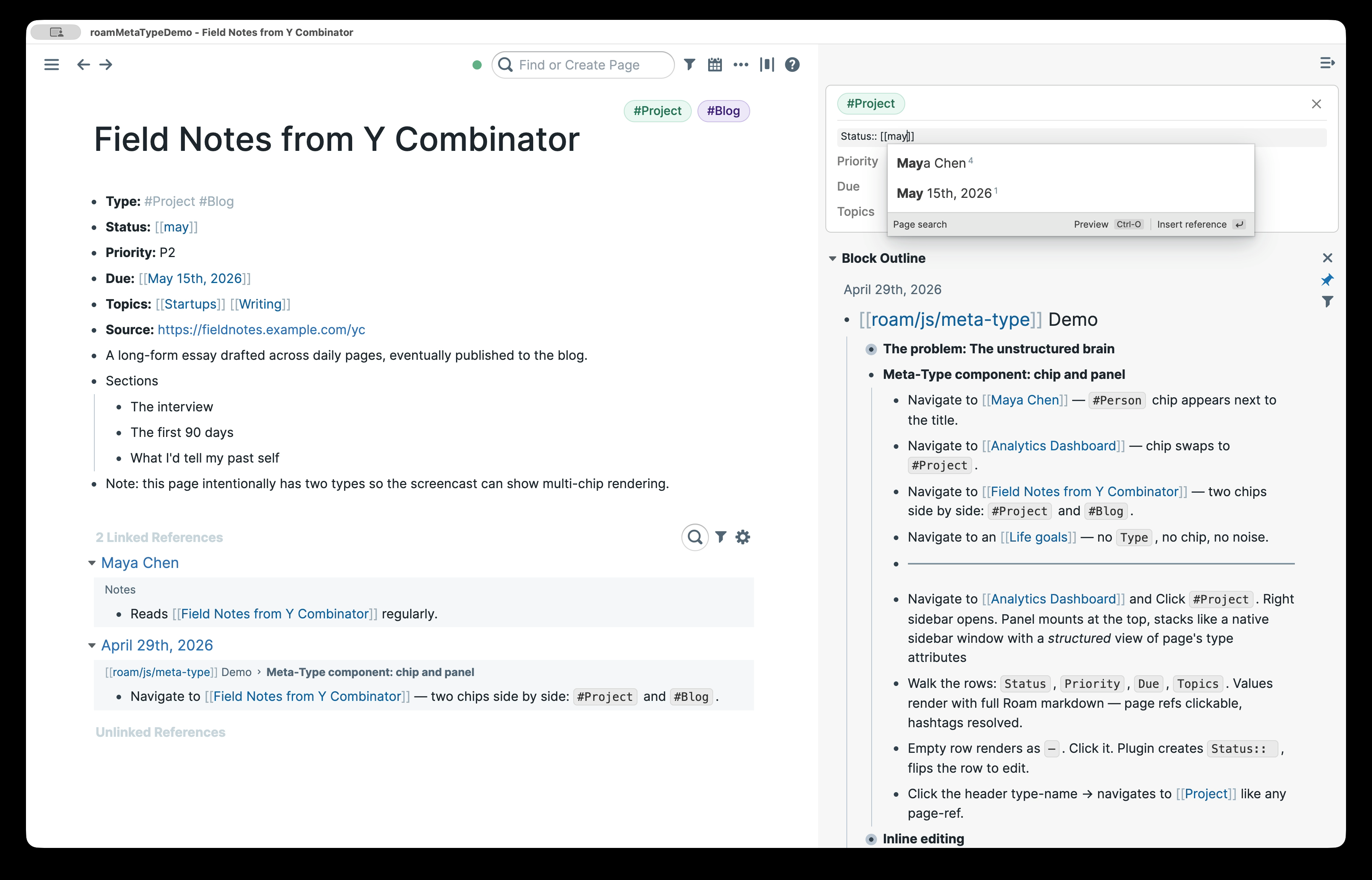
- Sidepanel reactively refreshes to updates live: edit
Priority::directly in the page body, the panel updates without a re-render. - Configurable types, fields, and accent colors via the Roam settings panel (no source edits required).
In Roam: Settings → Roam Depot → Browse → Meta Type → Install. (Available once the Depot PR is merged.)
For early testing or development:
- Clone and build:
git clone https://github.com/wireframe/roam-meta-type.git cd roam-meta-type npm install npm run build - In Roam: Settings → Roam Depot → Installed Extensions → gear icon → enable Developer mode.
- A Developer Extensions section appears. Click the folder-plus icon and choose this repo's folder. Roam loads
extension.jsand the siblingextension.cssautomatically from that folder. - The extension loads. Open any page with a
Type::attribute and a chip appears.
Reload after editing source: rebuild (npm run build), then press control-d control-r in Roam.
The extension ships with no default types. Open Settings → Meta Type to add your first one.
The settings tab shows a vertical stack of cards, one per configured type. Each card has:
- Name — the type name. Must match the page-ref in
Type::blocks (e.g.,Project). - Hue and Saturation — HSL components for the chip's accent color (hue 0–360, saturation 0–100; lightness is computed). A small swatch preview updates as you type.
- Fields — comma-separated list of field names (e.g.,
Status, Priority, Due, Topics). Each becomes a row in the sidebar panel. - A trash button on the right to remove the card.
Below the cards are Add type (appends a blank card) and Save. Click Save to persist; the extension closes any open panels and re-renders chips with the new config.
Two settings are not exposed in the UI and remain at their defaults:
typePrefix— the block prefix used to detect typed pages (defaultType::).flashColor— the RGB highlight color for the click-flash animation (default{ r: 16, g: 107, b: 163 }).
These are stored in the same JSON value as the types and preserved on every save. Power users who need to change them can edit the underlying setting key directly via Roam's developer tools (key: types-config under this extension's settings).
If the stored JSON is missing or malformed (e.g., from a manual edit gone wrong), the extension falls back to the empty defaults and logs a warning to the browser console.
Add a Type:: attribute as a top-level block on the page, with one or more #TypeName references:
- Type:: #Project
- Status:: Doing
- Priority:: P1
- Due:: [[April 30th, 2026]]
- Topics:: [[Roam]] [[Productivity]]
The plugin reads Type::, looks each reference up in the configured types, and renders one chip per known type. Unknown types are silently skipped — no chip, no error.
npm install         # vitest, esbuild, dev deps
npm test            # run unit tests (vitest)
npm run build       # rebuild extension.js with esbuild
The build uses esbuild with a small custom plugin (bin/build.mjs) that externalizes React, ReactDOM, and BlueprintJS to Roam's window.* globals — Roam Depot mandates that extensions consume these from there rather than re-bundling them. Source code uses standard ESM imports (import { Button } from "@blueprintjs/core"); the plugin remaps them at bundle time.
When adding a new named import from React or BlueprintJS, update the knownExports table in bin/build.mjs — esbuild fails the build with "no matching export" if a named symbol is missing.
The output extension.js is a single ESM file with export default { onload, onunload } — the Roam Depot plugin contract.
The extension exports { onload({ extensionAPI }), onunload() }. It also ships an extension.css that Roam loads alongside extension.js from the extension folder. On load it reads the config from extensionAPI.settings (key: types-config, JSON-encoded with fallback to baked-in defaults), registers a Blueprint-based settings panel under "Meta Type" using extensionAPI.settings.panel.create({ action: { type: "reactComponent", ... } }), installs document-level listeners for click-outside-to-exit-edit and Escape-to-exit-edit, registers a chip-click delegation listener on document.body, and starts a MutationObserver on .rm-title-display for page navigation. Every setup operation registers a corresponding cleanup with a small LIFO teardown registry; on unload everything is reversed in reverse-registration order so the observer is silenced before the DOM is torn down. On navigation, the plugin queries the page's Type:: attribute, removes any old chips, and renders new ones as siblings of the title element. Clicking a chip opens Roam's right sidebar via roamAlphaAPI.ui.rightSidebar.open() and prepends a custom panel <div> to #roam-right-sidebar-content. Each open panel registers a roamAlphaAPI.data.addPullWatch rooted at the page UID; the callback diffs new field values and re-renders affected rows without disturbing rows in edit mode (Roam's block editor, mounted via roamAlphaAPI.ui.components.renderBlock, owns that DOM until the user blurs). When the user saves a config change in the settings panel, all open panels close, chips re-mount with the new types/colors, and the flash-color CSS custom properties (--meta-type-flash-{r,g,b}) update on :root so the keyframes in extension.css pick up the new RGB.
See docs/backlog.md for planned improvements and future ideas.
MIT.