Automated Hyperparameter Model Tuning FrameWork.

Purpose. To develop a framework for fast tracking model development with hyper-parameter automated tuning. The code base presented will be constantly evolving and enhancements added based on need. With that stated, the current version allows the user to effectively train up to three [3] supervised models at once and auto-tune hyper-parameters for each of the models selected. Although this ability can be easily expanded to support more, it is not recommended if using on a CPU only system, due to resource constraints. Planned future enhancements include un-supervised and transfer learning along with the ability to add one’s own model architecture.
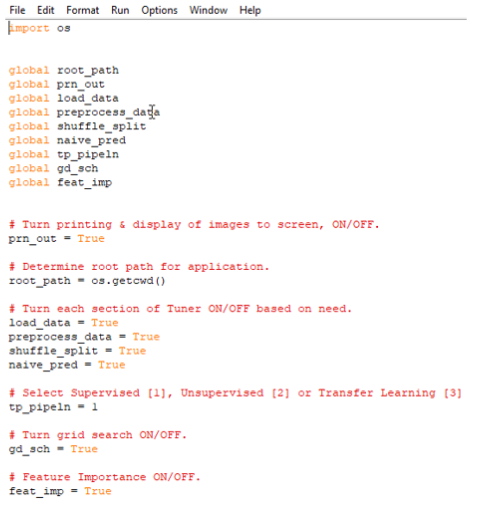
Configuration file. At root, one will find the Tuner configuration file. This is where one should start prior to anything else because this is where you will be configuring your entire training/model evaluation process. Within this file one can control the following attributes of how the framework will operate:
- Turn On/Off printing & display of images/graphs to screen
- Turn each section of the Tuner On/Off based on configuration need: a. Data Load b. Preprocessing Data c. Training, Validation, Testing datasets d. Naïve Predictor e. Grid Search f. Feature Importance
Data Preprocessing. In this module we load our data into a pandas data frame. The source data can come from a CSV file, remote URL, SQL Query from any RDBMS. A template of code bits is provided in order to point the user in the right direction for data sourcing.
For binary data [images], there is a separate example file ‘image_data.py’ that can be modified to import images for binary classification. The file ‘preprocessing.py’, is used to perform data discovery, defining a scaler, feature engineering, one-hot encoding and for performing any other ancillary metrics not best performed in the process data module. The file ‘process_data.py’, is where the magic happens, at least for loading of data. Here there are a few based needed metrics that must be provided such as:
- Number of records
- Defining of load data event
Any other metric that is best suited to be performed at time of ingestion should be considered in this module. If not, then it can be performed in the preprocessing module as an added attribute. The file ‘shuffle_split.py’, allows the user to define how the Training, Validation and Testing data will be split. For image data, this will need to be adjusted based on need.
Includes. The framework takes advantage of not only displaying textural output but also where appropriate, in graphical form. The file ‘graphics/visuals.py’, allows the user to make small modifications to the titles, subtitles of graphics for visual display. The plan is to enable the titles and subtitles to change in auto fashion in later versions. Also, this module in future versions will include scatter plots for cluster analysis. The file ‘naïve_predictor.py’, this is a basic naïve predictor for the selected case being evaluated. This file may need to be slightly modified for each use case. The file ‘grid_search.py’, will need to be modified based on the models hyper-parameters that you are interested in using for tuning. Within this directory, there is a file for suggested default hyper-parameters for different types of supervised learning. Each new version of the framework, this file will be updated to support additional architectures. The file ‘feature_importance.py’, supports those models with these attributes and coefficients for others. Modify this file as needed.
Model Selection. The file ‘predict_pl.py’, is where our training/predictions take place. Here you will find the learner [the learning algorithm to be trained and predicted on], the sample size [user defined size of the samples to be drawn from training set] and your features and other training/testing sets.