[1단계 - 행운의 로또 미션] 체프(심문성) 미션 제출합니다#17
Conversation


- 사용자가 로또 구입 금액을 입력하고 확인 버튼을 누르면 금액에 맞는 로또가 화면에 보여진다.
- index.html 에 class name, id 추가
- 사용자가 토글 버튼을 누르면 로또의 번호를 볼 수 있다.
- 각 로또 안의 번호가 중복되지 않았는지 확인한다.
- step1 테스트 항목 추가 및 누락된 체크 수정
- utils 함수에서 `$all`의 리턴값을 배열로 변경
- DOM 요소를 생성하는 utils 함수 추가
- `getRandomNumber`에서 최댓값이 제대로 생성되지 않는 문제 수정
- alert 메시지 문구를 상수로 분리
- 출력 관련 메소드는 `LottoView`로 분리
- 이벤트 핸들러 관련 메소드 분리
- 불필요한 Controller 및 store 제거
- `lottoNumbersToggleHandler`에서 `classList.toggle`로 수정
- 불필요한 항목 삭제


 jbee37142
left a comment
jbee37142
left a comment
jbee37142
left a comment
There was a problem hiding this comment.
1차 리뷰입니다 🙇
UX에 대한 고민을 해주신 부분 👏 * 100 입니다 👍
PR body에 올려주신 질문에 답변도 첨부해드려요~
-
데이터가 단방향이 아니라 양방향이라 생기는 고민인 것 같아요 ㅎㅎ View에서 값을 받아온다는 것 자체가 View에서 데이터를 그리는 것 뿐만 아니라 일종의 Model 역할도 하고 있음을 이미합니다. 이미 View가 View가 아닌 셈이고 ViewModel 이라고 하는데, 요런 느낌인 것이죵. 이 부분에서 좀 더 고민해보면 무엇이 좋을지 결론이 쉽게 도출될 것 같습니다.
-
object는 type같고 조금 아쉬운 면이 있는데, 저는 보통
models또는domains라고 합니다. (전자 선호) -
Lotto의 역할이 아닐까 생각되는데요??? 어떤 지점에서 고민이 되었는지 궁금하네요~
-
예측이 가능한 것을 테스트하는데 random은 예측가능하면 random이 아니라고 생각됩니다 ㅎㅎ random 함수를 사용하는 함수를 테스트할 때는 내부에서 사용하는 random 함수를 mocking해두고 진행하면 좋을 것 같아요~
| <label class="mb-2 d-inline-block">구입할 금액을 입력해주세요.</label> | ||
| <div class="d-flex"> | ||
| <input id="money-input" type="number" min="0" class="w-100 mr-2 pl-2" placeholder="구입 금액" /> | ||
| <button id="money-submit-button" type="submit" class="btn btn-cyan">확인</button> |
index.html
Outdated
| type="number" | ||
| class="winning-number mx-1 text-center" | ||
| /> | ||
| <input type="number" class="winning-number mx-1 text-center" /> |
There was a problem hiding this comment.
당첨 번호가 두자리수가 최대라면 validate를 해둬도 UX에 좋을 것 같아요~
There was a problem hiding this comment.
짚어주셔서 감사합니다! min, max도 함께 추가해두겠습니다!
src/css/index.css
Outdated
| } | ||
|
|
||
| .hidden { | ||
| visibility: hidden; |
There was a problem hiding this comment.
display: none을 하거나 visibillity: hidden을 해도 지금의 앱에서는 큰 차이가 없다는 생각이 들었고,
클래스 이름이 hidden인 것과 visibillity: hidden의 네이밍이 통한다는 생각에 무심코 visibillity: hidden로 작성했습니다.
나중을 생각해보면 다음 Step에 modal을 띄우는 부분이 있기 때문에 미리 display: none으로 통일하는 것이 더 좋아보이네요!
src/css/index.css
Outdated
|
|
||
| .lotto-list .lotto { | ||
| display: flex; | ||
| flex-direction: row; |
There was a problem hiding this comment.
flex-direction의 default value는 무엇인가요?
src/js/index.js
Outdated
| moneySubmitHandler(event) { | ||
| event.preventDefault(); | ||
|
|
||
| const money = Number($('#money-input').value); |
There was a problem hiding this comment.
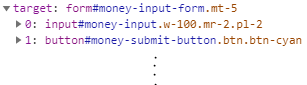
처음에는 event.target.value로 가져올 수 있을거라 기대했는데 제대로 작동하지 않아서 확인해보니
target에 value property는 아예 포함되어 있지 않았습니다.
그래서 이벤트 객체를 콘솔에 출력시켜 봤더니 target에 form의 하위 요소들이 포함되어 있었습니다.
이벤트 객체를 통해서 값을 가져오려면 event.target[0].value가 되어야 했고, 오히려 가독성을 해치는 코드가 된다고 생각해서 $('#money-input').value 와 같이 DOM에 접근한 후 value를 가져오는 코드로 작성하게 되었습니다.
지금 이벤트 객체를 좀 더 뜯어보니 event.target.elements['money-input'].value라는 이름으로 접근하는 방법이 있었네요. (money-input은 input 요소의 id 이름입니다.)
성능적으로 본다면 DOM에 한 번 더 접근하는 것보다 이벤트 객체에서 참조되는 DOM을 통해 가져오는 것이 더 좋아보이므로 event.target.elements['money-input'].value와 같이 수정하겠습니다!
아, 그리고 이벤트 객체를 뜯다가 valueAsNumber 라고 하는 속성을 발견했습니다. Number()로 바꾸는 것보다 valueAsNumber로 Number 값을 가져오는 것이 더 좋을 것 같아서 같이 수정해두겠습니다 :)
| const lottoCount = Math.floor(money / LOTTO.PRICE); | ||
| this.data.lottos = this.generateLottos(lottoCount); |
There was a problem hiding this comment.
model이 있었다면 price를 전달받는 buy라는 메서드를 만들었을 것 같은데, 요런 디자인을 하게 된 과정이 궁금해지네요 ㅎㅎ
There was a problem hiding this comment.
로또 번호 6개를 자동으로 생성해주는 메소드인 generateLottoNumbers를 Lotto model에 두어야 할지, LottoApp에 포함해야할 지 고민하는 과정에서, Lotto model을 로또 용지라고 했을 때, LottoApp은 로또 용지에 번호를 적어주는 기계라고 생각하고 작성했습니다.
그래서 generateLottos도 로또 기계가 돈을 입력받고, 기계가 로또를 생성하는 것이니 LottoApp에 포함시키게 되었습니다.
이 미션을 수행할 때는 처음부터 MVC와 같은 구조나 디자인 패턴을 염두에 두고 작성하지 않으려고 했습니다.
필요에 따라서 적절하게 구조를 변경해보고 싶었고, 여기서는 Lotto에 큰 의미를 부여하지 않고 로또 번호인 numbers라는 값만 가지고 있는 로또 용지처럼 생각하게 되었습니다.
src/js/index.js
Outdated
| return Array.from({ length: lottoCount }, () => new Lotto(this.generateLottoNumbers())); | ||
| } | ||
|
|
||
| moneySubmitHandler(event) { |
There was a problem hiding this comment.
함수 네이밍 상 동사가 앞에 위치하기 때문애 event handler의 경우 on-* 또는 handle-* prefix가 더 어울릴 것 같은데, 어떤가요?
There was a problem hiding this comment.
저도 handle이나 on과 같은 동사를 prefix로 붙이는 게 함수명으로 더 좋아보인다고 생각합니다!
컨벤션을 지키면서 함수명을 짓는 습관을 더 들여야겠습니다 ㅠㅠ
src/js/views/LottoView.js
Outdated
| show($element) { | ||
| $element.classList.remove('hidden'); | ||
| } | ||
|
|
||
| hide($element) { | ||
| $element.classList.add('hidden'); | ||
| } |
There was a problem hiding this comment.
이건 LottoView보다 일반 util에 가까워 보여요. Lotto와 상관없을 수도 있는 Modal을 보이고 말고 할 때도 사용하기 위해선 Lotto와 의존성을 제거해두는 것이 좋지 않을까요?
There was a problem hiding this comment.
Modal에 사용하기 위해서라면 저도 util 함수로 빼는 것이 더 좋다고 생각합니다!
'의존성 제거'라는 단어가 마음에 쏙 들어오네요 😄
src/js/views/LottoView.js
Outdated
| renderLottoList(lottos) { | ||
| const $lottoListChildren = lottos.map((lotto) => { | ||
| const $lottoSpan = createElement('span', 'lotto mx-1 text-4xl', '🎟️ '); | ||
| $lottoSpan.appendChild(createElement('span', 'lotto-numbers', lotto.numbers.join(', '))); |
There was a problem hiding this comment.
appendChild를 할 때마다 DOM에 변경이 가해집니다. DOM을 변경하는 작업은 비용이 큰 작업인데요, map을 돌면서 callback이 실행될 때마다 DOM 조작이 되는 것을 줄일 수 없을까요?
고민 포인트
- DOM을 조작하는 비용은 왜 클까?
- element를 임시로 생성해두는 방법은 없을까?
- 임시로 생성해둔다면 어디에 저장해둘 수 있을까?
There was a problem hiding this comment.
- DOM을 조작하는 비용이 큰 이유는 DOM 요소를 생성하고, DOM Tree에 추가하고 제거하는 등의 작업이 발생하며, DOM에 변경이 생길 경우 브라우저에서 화면을 다시 그려주는 등의 작업으로 인해 큰 비용이 발생한다고 생각합니다.
- element를 임시로 생성해두기 위한 방법으로
DocumentFragment를 찾을 수 있었습니다. 일반 element(DOM Node)와 달리DocumentFragment는 변경되어도 document에 영향을 주지 않으며,DocumentFragment객체에 많은 element를 appendChild하는 편이 더 좋은 성능을 보여줍니다. DocumentFragment를 임시로 생성해둔 뒤, 여러 하위 요소들을 이곳에 append한 뒤, 마지막에 이DocumentFragment를 DOM에 append하는 것으로 리팩토링을 진행했습니다.
- 당첨 번호를 입력하는 form에 `min`, `max` 속성을 통한 validation 추가
- `hidden` 클래스의 동작을 `display: none`으로 변경
- 이미 기본값으로 적용되는 CSS 구문 삭제
- 이벤트 핸들러 함수들의 이름 변경
- `handleSubmitMoney`에서 돈의 입력값을 이벤트 객체를 통해 받아오도록 수정
- `LottoView`에서 요소를 보여주거나 비활성화 하는 메소드들을 `utils` 함수로 이동
- `show`, `hide` 메소드 이름 변경

3 participants


🚀 데모 페이지
안녕하세요! 이번에 서니와 함께 페어를 진행한 체프입니다!
이번에 페어와 함께 정하고 고민했던 부분을 공유하면서 리뷰를 부탁드리려 합니다.
잘 부탁드립니다!
☝️ 미션 수행할 때 우리가 정한 목표
동작하는 쓰레기 코드부터 작성해보자
innerHTML과innerText사용하지 않기!createElement에서 시작하기UX를 조금 더 생각해보기
테스트 코드를 먼저 작성하고 기능 구현하기
이외에 별도로 커밋 메시지 컨벤션을 정하고 작성하였습니다.
🤔 의견 차이 & 고민이 있었던 부분
1.
View에는 DOM에 출력하는 기능 뿐만 아니라 값을 받아오는 역할도 해야 한다! 따라서 입력값을 받는 메소드를View에 포함시켜서 가져와야 한다! (e.g.this.view.getMoneyInputValue())Number($('#money-input').value)) (현재 적용된 형태)2.
Lotto라는 객체를 담는 폴더의 이름은objects로 적당한가?3.
generateLottoNumbers는Lotto객체를 정의하는 class 안에 들어있어야 하는가?LottoApp에 있어야 하는가? (현재는LottoApp안에 있음)4.
Math.random을 통해 생성한 랜덤값이 의도한 대로 잘 생성되고 있는지에 대한 테스트 코드는 필요한가?