[2단계 - 웹 기반 로또 게임] 부엉이(이승환) 미션 제출합니다.#234
Conversation


 jho2301
left a comment
jho2301
left a comment
jho2301
left a comment
There was a problem hiding this comment.
안녕하세요 부엉이
기존에 View라는 클래스를 통해 구조가 있었기때문에 클래스를 제거하기보단 클래스의 역할이 어떻게 변경되고, 외부에 사용할 수 있는 api를 어떻게 드러내야할지 고민이 되는 방식으로 진행됐다면 더욱 좋지 않을까 생각해봤어요. View를 따로 구현하진 않으셨다지만 사실상 ui 렌더링 을 따로 관리하는 파일 이 모듈형태로 분리된것이기 때문이에요. 어떻게보면 dom api 자체가 브라우저를 핸들링하는 방식이기 때문에 controller가 직접 사용할 수도 있지만, dom은 브라우저에서만 활용할 수 있는 api이기때문에, 좀 더 추상화해서 dom을 컨트롤러가 알지 않고도 사용할 수 있는 인터페이스가 제공된다면 더욱 알찬 과제가 될 수 있었을 것 같다고 생각합니다.
코멘트로 의견 남겨보았으니 자유롭게 의견 부탁드려요 감사합니다!
src/css/styles.css
Outdated
| @@ -0,0 +1,238 @@ | |||
| html { | |||
| font-size: 14px !important; | |||
There was a problem hiding this comment.
!important 는 css 속성 적용 우선순위 흐름이 깨지게 되어서 최대한 지양해봐도 좋을 것 같아요
There was a problem hiding this comment.
자세히 찾아봤는데 그런 이슈가 있었군요..!
해당 코드 수정했습니다
src/css/styles.css
Outdated
| @@ -0,0 +1,238 @@ | |||
| html { | |||
| font-size: 14px !important; | |||
| overflow: hidden; | |||
There was a problem hiding this comment.
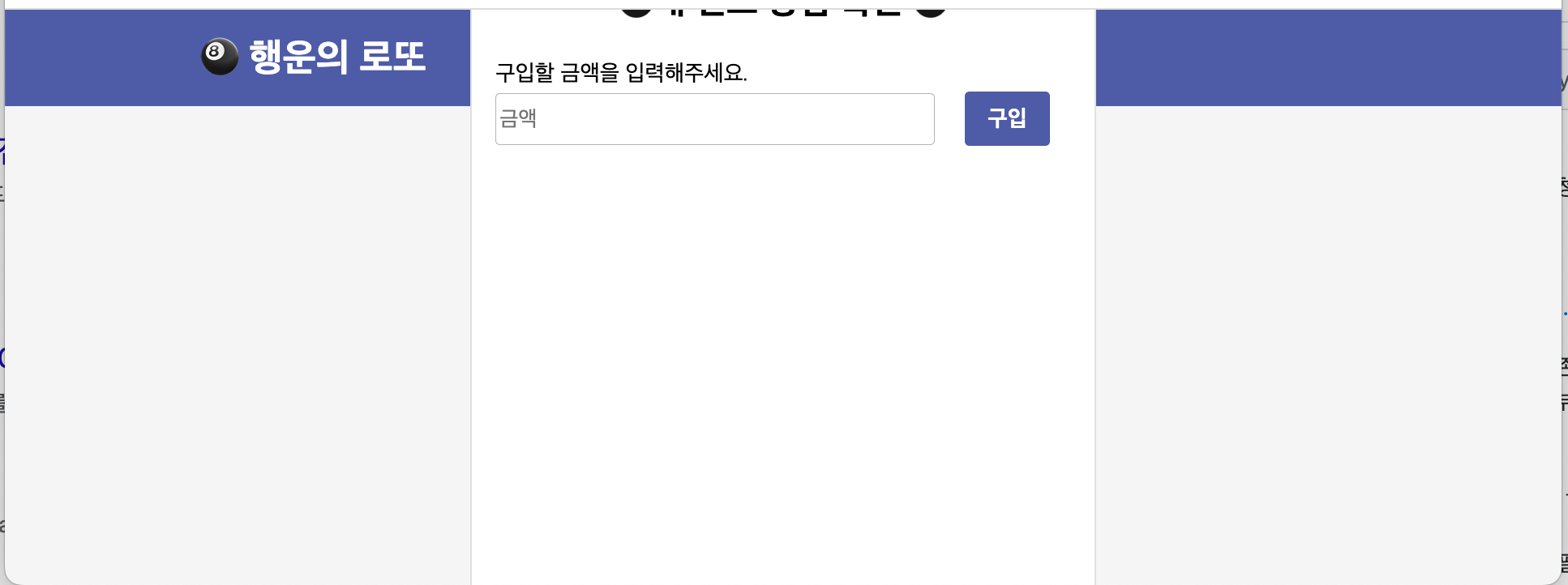
overflow가 hidden이라 창이 줄어들면 스크롤을 할 수가 없네요. ux적으로 불편한 것 같아요.
+@ 네비바가 최상단에 있어야할 것 같습니다
There was a problem hiding this comment.
짚어주셔서 감사합니다! 해당부분 인지하고 html 영역에 overflow-hidden 제거 후
네브바가 모바일 환경에서도 항상 보이도록 .main 스타일 수정했습니다!
main {
    display: flex;
    justify-content: center;
    align-items: center;
    width: 100%;
    min-height: 84vh;  /*수정 내역*/
    padding: 2rem 0; /*수정 내역*/
    background: #F5F5F5;
}| .top-nav { | ||
| width: 100%; | ||
| min-height: 4.26rem; | ||
| background: var(--lotto-primary); |
src/css/styles.css
Outdated
| font-weight: 700; | ||
| font-size: 1.7rem; | ||
| line-height: 2.4rem; | ||
| color: var(--lotto-greyScale-1); |
There was a problem hiding this comment.
이름컨벤션 역시 일관성이 있다면 좋을 것 같아요.
kebab or camel
There was a problem hiding this comment.
제가 해당 부분을 인지하지 못했네요 🥲
아래 코드와 같이 kebab case 로 통일했습니다!
:root {
    /*color*/
    --lotto-primary: #4E5BA6;
    --lotto-grey-scale-1: #FFFFFF;
    --lotto-grey-scale-2: #FCFCFD;
    --lotto-grey-scale-3: #B4B4B4;
    --lotto-grey-scale-4: #8B8B8B;
    --lotto-grey-scale-5: #000000;
}| padding-top: 1rem; | ||
| padding-left: 8.6rem; | ||
| font-weight: 700; | ||
| font-size: 1.7rem; | ||
| line-height: 2.4rem; |
There was a problem hiding this comment.
padding과 line-height 중앙정렬을 위해 사용해주신게 맞을까요? flex를 활용해보셔도 좋겠어요
There was a problem hiding this comment.
디자인 시안에 존재하는 네브바의 행운의 로또 베너가 중앙보다는 좌측에서 살짝 띄워져 있었기에 flex 를 통한 중앙정렬 보다는 미세조정 하는 방식이 어떨까? 라고 생각했었습니다!
flex 를 통해 중앙정렬을 먼저 하고 그 후 margin 이나 padding 을 통해 미세조정 하는 방식이 더 좋을까요?
There was a problem hiding this comment.
방법은 여러가지곘지만 수직중앙정렬만 하고 나머지는 패딩등 속성을 이용해볼 수 있을 것 같아요
| const generalStyleValues = { | ||
| colors: { | ||
| lottoPrimary: '#4E5BA6', | ||
| lottoGreyScaleOne: '#FFFFFF', | ||
| lottoGreyScaleTwo: '#FCFCFD', | ||
| lottoGreyScaleThree: '#B4B4B4', | ||
| lottoGreyScaleFour: '#8B8B8B', | ||
| lottoGreyScaleFive: '#000000', | ||
| }, |
There was a problem hiding this comment.
element.style.backgroundColor = 'var(--lotto-greyScale-1)'
요런 방식을 사용해보면 어떨까요? 색이 변경되면 두 군데를 고쳐야할 것 같아요
There was a problem hiding this comment.
아니면 lottoPrimary: 'var(~~~)' 이렇게 변경되어도 좋겠네요!
There was a problem hiding this comment.
lottoPrimary: 'var(~~~)'
이런 방식으로도 사용할 수 있군요! 감사합니다.
허나 해당 파일은 사용하지 않았지만 지우지 않았기에 지웠습니다!
src/js/view/stepTwo/domList.js
Outdated
| const domList = { | ||
| buyBtn: $('.buy-btn'), | ||
| moneyInput: $('.money-input'), | ||
| moneyInputErrorText: $('.money-input-error-text'), | ||
| mainContainer: $('.main-container'), | ||
| lottoBox: $('.lotto-box'), | ||
| lottoLengthText: $('.lotto-length-text'), | ||
| targetNumberInputs: $$('.square-input'), | ||
| resultBtn: $('.result-btn'), | ||
| targetNumberInputErrorText: $('.target-number-input-error-text'), | ||
| resultModal: $('#myModal'), | ||
| resultTable: $('table'), | ||
| resultTableBody: $('#myTableBody'), | ||
| ropText: $('.rop-text'), | ||
| retryBtn: $('.retry-btn'), | ||
| closeModalBtn: $('.close'), | ||
| allInputs: $$('input'), | ||
| }; |
There was a problem hiding this comment.
요소들이 동적으로 추가되고 제거되면 이 객체가 크게 유의미할지는 모르겠어요. + view객체를 통해 요소에 접근할 수 있도록 변경해보면 어떨까요?
There was a problem hiding this comment.
document.querySelelctor() 로 가져온 element 를 여러번 호출하는 경우가 많다고 생각해 상수화를 하려 해봤습니다.
view 객체를 통해 접근할 수 있도록 변경한다는 뜻이 view 레이어에 해당 객체를 그대로 이식하여 사용한다는 뜻일까요? 아니면 각각을 사용할 때 불러온다는 뜻인지 알 수 있을까요? 우선 전자의 방식으로 view 에 해당 객체를 넣었습니다!
There was a problem hiding this comment.
- controller에서 위 객체에 직접 접근하지 않기
- view에서 dom query를 진행해서 제공해주기
요정도로 정리해볼 수 있을 것 같아요. 캐싱이 필요하다면 view단에서 자체적으로 진행하는게 적합해보여요
src/js/utils/resetAllInputValues.js
Outdated
| import domList from '@lotto/view/stepTwo/domList'; | ||
|
|
||
| const resetAllInputValues = () => { | ||
| [...domList.allInputs].forEach(input => { |
There was a problem hiding this comment.
이함수는 view를 조작하기때문에 view의 api로 분류되는게 적합해보여요
There was a problem hiding this comment.
해당 로직은 view 의 api 로 분류하는게 맞네요..! 리팩토링 진행했습니다!
| addEvents() { | ||
| domList.buyBtn.addEventListener('click', this.buyLotto.bind(this)); | ||
| domList.resultBtn.addEventListener('click', this.calculateStatistics.bind(this)); | ||
| domList.retryBtn.addEventListener('click', this.restartGame.bind(this)); | ||
| domList.closeModalBtn.addEventListener('click', this.closeModal.bind(this)); | ||
| } |
There was a problem hiding this comment.
controller에서 dom이라는 세부사항을 알지못하게 변경해보면 어떨까요? 이벤트핸들링은 컨트롤러에서 해야하는 건 맞기때문에 view에서 이벤트등록하는 api를 controller에게 드러내주면 좋을 것 같아요
There was a problem hiding this comment.
확실히 controller 가 dom 의 세부사항을 알지 못하는게 맞겠네요!
허나 어떻게 간접적으로 알릴 수 있을까 하다 아래와 같이 이벤트 바인딩을 하는 메서드를 구현 후 view 의 get 메서드를 통해 element를 파라미터로 건넬 수 있게 구현해 보았습니다!
view
  domList: {
    buyBtn: $('.buy-btn'),
    moneyInput: $('.money-input'),
    moneyInputErrorText: $('.money-input-error-text'),
    mainContainer: $('.main-container'),
    lottoBox: $('.lotto-box'),
    lottoLengthText: $('.lotto-length-text'),
    targetNumberInputs: $$('.square-input'),
    resultBtn: $('.result-btn'),
    targetNumberInputErrorText: $('.target-number-input-error-text'),
    resultModal: $('#myModal'),
    resultTable: $('table'),
    resultTableBody: $('#myTableBody'),
    ropText: $('.rop-text'),
    retryBtn: $('.retry-btn'),
    closeModalBtn: $('.close'),
    allInputs: $$('input'),
  },

  getDomWithName(name) {
    return this.domList[name];
  }
controller
  addEvent({ element, event, type }) {
    element.addEventListener(type, event);
  }

  bindAllEvents() {
    this.addEvent({ element: ui.getDomWithName('buyBtn'), event: () => this.buyLotto(), type: 'click' });
    this.addEvent({
      element: ui.getDomWithName('resultBtn'),
      event: () => this.calculateStatistics(),
      type: 'click',
    });
    this.addEvent({ element: ui.getDomWithName('retryBtn'), event: () => this.restartGame(), type: 'click' });
    this.addEvent({
      element: ui.getDomWithName('closeModalBtn'),
      event: () => this.closeModal(),
      type: 'click',
    });
}There was a problem hiding this comment.
그냥 객체 프로퍼티에 직접 접근하면 안될까요..? 메서드를 통해 한 단계 에둘러서 dom요소를 가져오는게 어색해보여요. 특정요소를 가져오는 메서드가 각각있다면 그나마 나았을지도모르겠네요
src/js/utils/createElem.js
Outdated
| const createElem = (tagName, type, name) => { | ||
| const elem = document.createElement(tagName); | ||
| if (type === 'class') elem.className = name; | ||
| if (type === 'id') elem.id = name; | ||
|
|
||
| return elem; | ||
| }; |
There was a problem hiding this comment.
축약어는 지양해봐도 좋을 것 같아요 + 인자가 세 개가 넘어가고 , 순서로 인자에 대해 추론을 할 수 없으니 객체인자등을 통해 전달해야하는 인자에 네이밍을 해주면 좋을 것 같습니다.
There was a problem hiding this comment.
확실히 인자가 세 개가 넘어가니 순서도가 영향을 많이 끼치겠네요 🥲
해당 부분 인지하고 객체인자를 사용하도록 리팩토링 진행하였습니다!
const createElement = ({ tagName, type, name }) => {
  const element = document.createElement(tagName);
  if (type === 'class') element.className = name;
  if (type === 'id') element.id = name;

  return element;
};

const lottoElement = createElement({ tagName: 'li', type: 'class', name: 'lotto-container' });
jho2301
left a comment
jho2301
left a comment
There was a problem hiding this comment.
안녕하세요 부엉이
꼼꼼하게 반영해줘서 고맙습니다 ✋ ✋
다음 미션은 타입스크립트하고 컴포넌트 방식이라고 들었는데 잘 적응하실 거라 생각해요!
화이팅입니다~!
2 participants


안녕하세요 파노!
2단계 미션 구현 완료하여 리뷰 요청 드립니다 🙇♂️
배포주소는⤵️ 입니다!
이번 미션에서 어려웠던 부분은 기존
Console기반으로 구현한비즈니스 로직을 최대한 수정하지 않고web기반으로 구현하는 부분이었어요.질문 사항이 있습니다!
이번 미션을 사용하며 저는
View를 따로 구현하지 않고ui 렌더링을 따로 관리하는 파일을 구현했어요!그렇다보니 특정
input의 값이 필요할 때, 컨트롤러에서 직접적으로 값을 추출을 했어요.하지만 코드를 짜면서도 컨트롤러가 직접 DOM 에 접근을 해 값을 추출하는 역활을 가지는게 맞을까? 라는 생각을 했었어요.
이런 방식으로 해도 괜찮은지, 아니면 따로 ui 로직에 값을 추출하는
메서드를 두어 컨트롤러는 해당 메서드를 호출만 할지, 아니면 다른 방식이 있을지 궁금합니다!이번 리뷰도 잘 부탁드립니다! 🙇♂️