Move publish to new screen#10183
Conversation


Generated by 🚫 dangerJS |

 khaykov
left a comment
khaykov
left a comment
khaykov
left a comment
There was a problem hiding this comment.
Good job with new scheduling! Post status thing looks pretty complicated 😅 I have a couple of comments:
- Post time is updated without pressing the update button. It's pretty easy to mess up stuff without even noticing.
- What is the difference between Publish label and Scheduled? Also, what is the difference between IMMEDIATELY and NOW in date picker? Button said NOW, but I messed with time somehow and it says IMMEDIATELY.
- Selecting future date, opening dialog again and selecting NOW/IMMEDIATELY sometimes results in Publish label and sometimes in Published. Doing it a couple of time cycles between those.
WordPress/src/main/java/org/wordpress/android/ui/posts/EditPostPublishedSettingsFragment.kt
Outdated
Show resolved
Hide resolved
| // having the app be smart about it - we don't want to accidentally publish a post. | ||
| finalPostStatus = DRAFT | ||
| // show toast only once, when time is shown | ||
| ToastUtils.showToast( |
There was a problem hiding this comment.
Should we move the Toast away from VM, into fragment?
There was a problem hiding this comment.
totally, I actually did that in the following PR but I'll move the change here 👍
WordPress/src/main/java/org/wordpress/android/ui/posts/EditPostPublishedSettingsFragment.kt
Outdated
Show resolved
Hide resolved

|
Also, I found a crash, that I think might have been introduced in this branch (maybe something to do with ViewPager?), since I can't reproduce it in
|

|
hey @khaykov, thanks for the review!
I've checked the previous implementation and this behaves the same way. It's a pretty bad experience but I'd rather not change it now 😞
If I understand it correctly,
Good question, I have no idea why it was introduced but we show the
edit: I've found the issue and man, what a hack it was. Previously we were relying on updating the status twice after both date and time were set. The first set changed the status from Draft to Published and the second one from Published to Scheduled. Since I've removed the first update, the first iteration set the status from Draft to Published (and showed the "Published" label) and the second iteration from Published to Scheduled (and showed the "Publish" label)!!! It took me 3 hours to find this but it should be fixed now.
I'm pretty sure this happens in the post History which was implemented recently and has nothing to do with my PR. It's strange it's not happening in develop. I've fixed it by initializing the view model in |
khaykov
left a comment
khaykov
left a comment
There was a problem hiding this comment.
Thanks for the changes! I haven't used post settings that munch and didn't realize the logic comes from there :)
I have one comment in code, and one here:
.
..what is the difference between IMMEDIATELY and NOW in date picker? Button said NOW, but I >messed with time somehow and it says IMMEDIATELY.
Good question, I have no idea why it was introduced but we show the IMMEDIATELY status only when the post is a draft. However, when you select a date, the status changes to SCHEDULED and it's not draft any more so we show NOW. I don't think this is a great experience either.
I compared the effect of changing the published post status (not the post date) to the button label with develop and there is one difference:
When you manually change post status from Publish to Draft, button in date picker reflects this change (switches from now to immediate and back). In this branch does not happen. Maybe changes to the post model not correctly picked up by Publish settings VM/Fragment?
WordPress/src/main/java/org/wordpress/android/ui/posts/EditPostPublishSettingsFragment.kt
Show resolved
Hide resolved
|
@khaykov thanks for the check! I was not indeed reacting to the post status change in the post settings. This should now be fixed. I think there should be a singleton class like |

khaykov
left a comment
khaykov
left a comment
There was a problem hiding this comment.
Thanks for the fixes! Works well now :)


2 participants


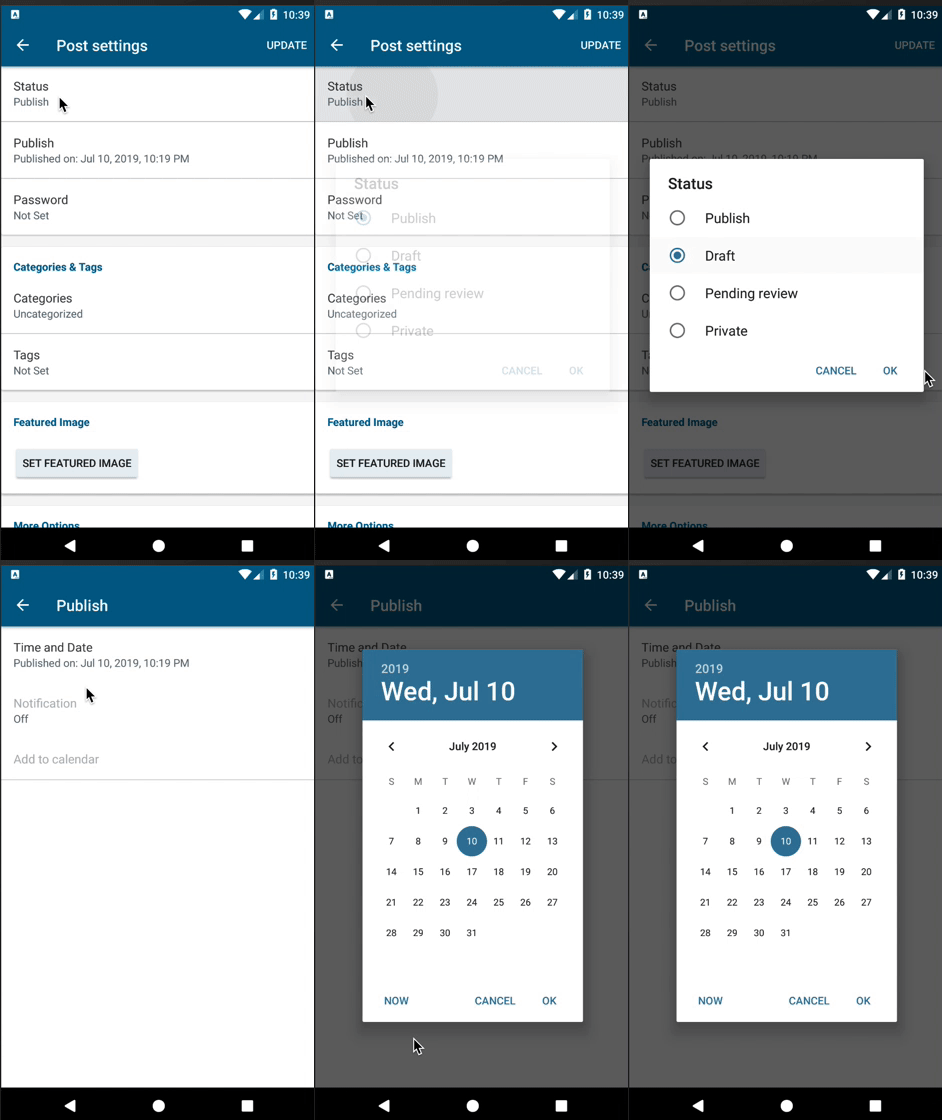
This PR is the first step of the improved post scheduling. It introduces a new screen that appears when the user clicks on the "Publish" button in post settings.
In this PR you can click on the "Time and Date" to select a date from Date/Time picker and the label gets filled correctly. Going back to the Post settings sets the scheduled date.
I'll add tests in another PR.
To test:
Overall notice that the date selection behaviour should be the same as before.
Update release notes:
RELEASE-NOTES.txt.