This repository was archived by the owner on Feb 5, 2025. It is now read-only.
Jetpack Signup Flow pushes 3 buttons instead of present #234
Conversation
This file contains hidden or bidirectional Unicode text that may be interpreted or compiled differently than what appears below. To review, open the file in an editor that reveals hidden Unicode characters.
Learn more about bidirectional Unicode characters


Merged
3 tasks

mindgraffiti
commented
Apr 6, 2020
Comment on lines
+566
to
+569
| func showWPComLogin(loginFields: LoginFields) { | ||
| self.loginFields = loginFields | ||
| performSegue(withIdentifier: .showWPComLogin, sender: self) | ||
| } |
Contributor
Author
There was a problem hiding this comment.
I think this should say // no-op? Because in this context: coming from Jetpack Remote Install > Sign up > Continue with Apple, it would never call the showWPComLogin() method...right?
Contributor
There was a problem hiding this comment.
I do believe showWPComLogin is needed. It's nothing to do with Jetpack at this point, it's all about the SIWA flow.
It pertains to this logic in AppleAuthenticator:
guard !existingNonSocialAccount else {

    if existing2faAccount {
        self?.show2FA()
        return
    }

    self?.updateLoginEmail(wpcomUsername)
    self?.logInInstead()
    return
}
Basically, what happens here is if an Apple ID is used where the email has already been used on a WP account, the flow will re-direct to WP login.

ScoutHarris
approved these changes
Apr 6, 2020
Contributor
 ScoutHarris
left a comment
ScoutHarris
left a comment
ScoutHarris
left a comment
There was a problem hiding this comment.
Tested with wordpress-mobile/WordPress-iOS#13827.
Contributor
Author
|
Thanks @ScoutHarris ! |
Sign up for free
to subscribe to this conversation on GitHub.
Already have an account?
Sign in.


Add this suggestion to a batch that can be applied as a single commit.
This suggestion is invalid because no changes were made to the code.
Suggestions cannot be applied while the pull request is closed.
Suggestions cannot be applied while viewing a subset of changes.
Only one suggestion per line can be applied in a batch.
Add this suggestion to a batch that can be applied as a single commit.
Applying suggestions on deleted lines is not supported.
You must change the existing code in this line in order to create a valid suggestion.
Outdated suggestions cannot be applied.
This suggestion has been applied or marked resolved.
Suggestions cannot be applied from pending reviews.
Suggestions cannot be applied on multi-line comments.
Suggestions cannot be applied while the pull request is queued to merge.
Suggestion cannot be applied right now. Please check back later.
Fixes #233
This PR fixes the black screen bug.
PR to test on WPiOS: wordpress-mobile/WordPress-iOS#13827
Summary
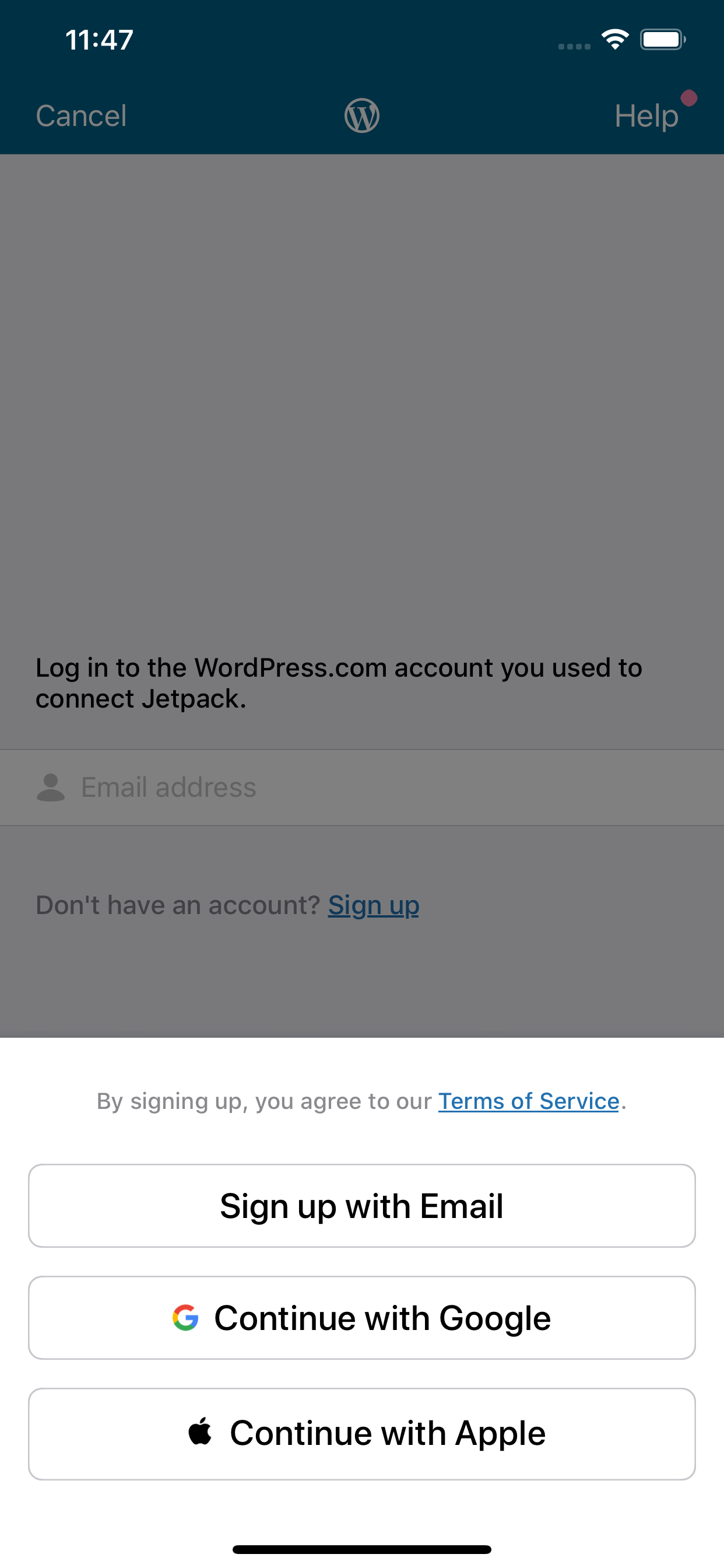
After the Jetpack install flow, the user is asked to sign in again. The LoginEmailViewController is presented, and there text and a link below the email field that says, "Don't have an account? Sign up"
Tapping the "Sign up" link pushes the 3 button view instead of presenting the 3 button view. Pushing the nav creates the black screen (seen in Figure 2 below).
Steps to Reproduce
Expected: the 3 button view appears as an overlay to the email login screen. (See Figure 3)
Actual: the 3 button view is pushed and the background is black.
Figure 1

Figure 2

Figure 3