


The modern BigDump alternative. Import large MySQL databases with a beautiful step-by-step wizard interface.
• Report Bug • Request Feature
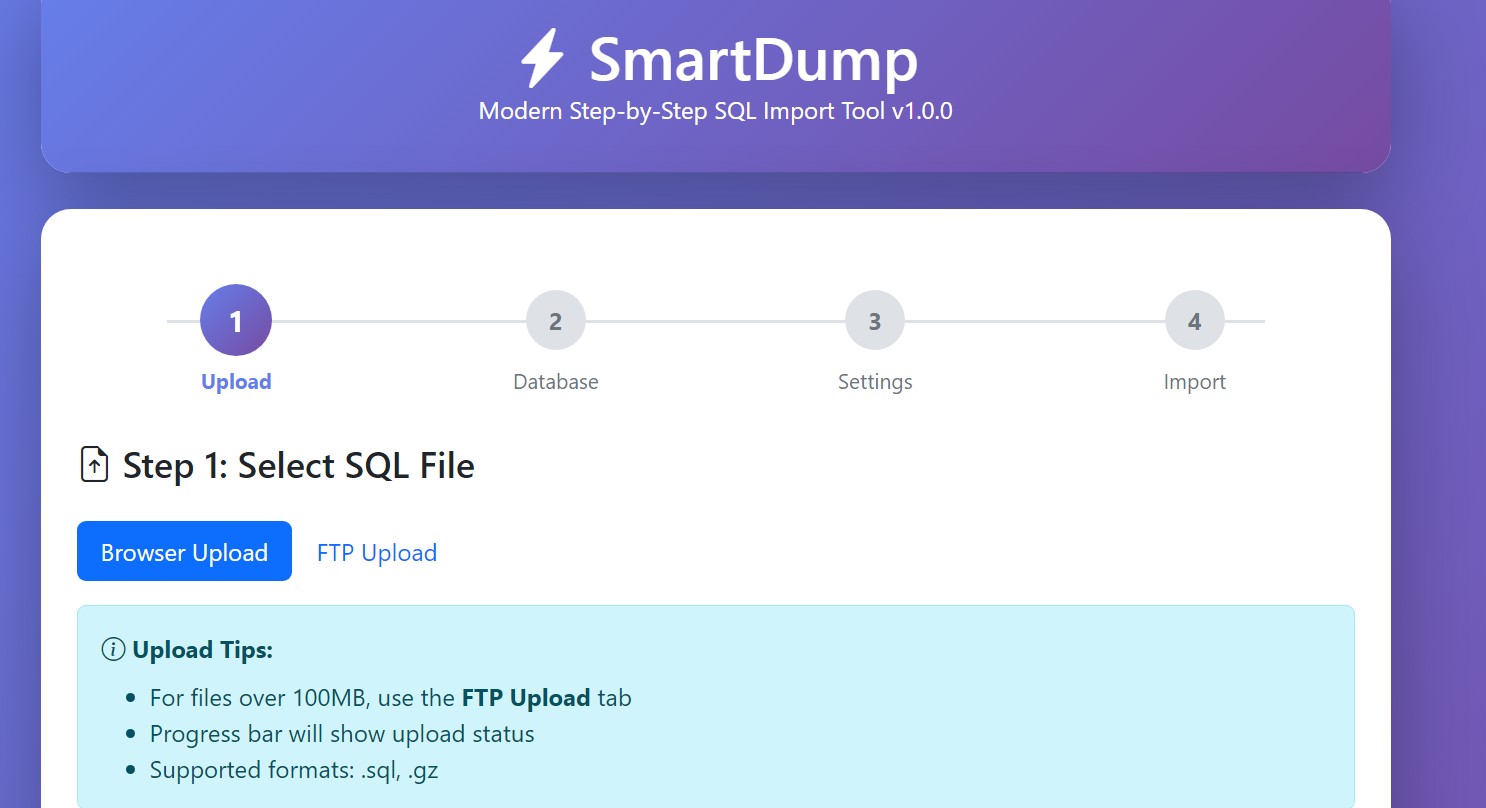
| Feature | BigDump | SmartDump |
|---|---|---|
| Modern UI | ❌ | ✅ Bootstrap 5 |
| Step-by-Step Wizard | ❌ | ✅ 4 simple steps |
| Upload Progress | ❌ | ✅ Real-time |
| Auto-Detection | ❌ | ✅ Charset & Prefix |
| Live Logs | ✅ Terminal-style | |
| Error Handling | ✅ 3 modes | |
| Email Notifications | ❌ | ✅ |
| Database Backup | ❌ | ✅ |
| WordPress Optimized | ✅ | |
| Mobile Responsive | ❌ | ✅ |
| Last Updated | 2023 | 2024 (Active) |
- Chunked Execution - Import databases up to 500MB+ without timeout errors
- Smart Auto-Detection - Automatically detects charset, collation, and table prefixes
- Real-Time Progress - Live progress bar, percentage, and terminal-style logs
- WordPress Ready - Handles WordPress & WooCommerce serialized data perfectly
- Table Prefix Replacement - Easily change table prefixes (e.g.,
wp_→newwp_) - Resume Support - Continue from where you left off if connection drops
- 3 Error Modes - Continue on errors, ignore duplicates only, or stop on first error
- FTP Upload Support - For files too large for browser upload
- Database Backup - Backup your database before importing
- Email Notifications - Get notified when import completes
- Enterprise Security - Input validation, SQL injection prevention, path traversal protection
- PHP 7.4 or higher
- MySQL 5.6+ or MariaDB 10.0+
- MySQLi extension enabled
- At least 128MB PHP memory limit
-
Download SmartDump
wget https://github.com/workflowdone/smartdump/releases/latest/download/smartdump.php
-
Upload to your server
- Via FTP/SFTP to your web directory
- Or copy directly if you have shell access
-
Access via browser
https://yourdomain.com/smartdump.php -
Follow the wizard (4 simple steps)
-
Delete the file when done
⚠️ IMPORTANT for security!
That's it! No configuration needed.
Option A: Browser Upload
- Drag & drop your
.sqlor.gzfile - Real-time upload progress bar
- Recommended for files under 100MB
Option B: FTP Upload
- Upload large files via FTP to
smartdump_uploads/folder - Click "Refresh Files" in the FTP tab
- Select your file
Enter your MySQL credentials:
- Host (usually
localhost) - Database name
- Username
- Password
Click "Test Connection" to verify before proceeding.
Auto-Detection (Recommended)
- Click magic wand 🪄 buttons to auto-detect:
- Charset from SQL file
- Table prefix from existing database
Manual Configuration
- Charset:
utf8mb4,utf8,latin1,cp1251 - Collation:
utf8mb4_unicode_ci, etc. - Max queries per step:
300(default) - Max time per step:
30seconds (default)
Optional Settings
- Old Prefix → New Prefix: Change table prefixes
- Email Notification: Get notified when done
- Error Handling:
- Continue on errors (recommended for WordPress)
- Ignore duplicates only
- Stop on first error (strict mode)
- DROP DATABASE:
⚠️ Delete all existing data
- Watch real-time progress
- Monitor live logs
- Get statistics (queries executed, failed, success rate)
- Optionally backup database when complete
Edit line 23 in smartdump.php:
define('ENABLE_IP_WHITELIST', true);
define('ALLOWED_IPS', ['123.45.67.89', '98.76.54.32']);Create/edit php.ini or .htaccess:
upload_max_filesize = 500M
post_max_size = 500M
max_execution_time = 300
memory_limit = 512M
For Nginx, edit your config:
client_max_body_size 500M;Perfect for moving WordPress sites between hosts:
- Export database from old host (via phpMyAdmin or plugin)
- Upload SQL file to SmartDump
- Auto-detect charset and prefix
- Import with "Continue on errors" mode
- Update
wp-config.phpwith new credentials
Handles large WooCommerce databases with ease:
- Automatically handles serialized product data
- Skips duplicate entry errors (common with WooCommerce)
- Live logs show exactly what's happening
- 99%+ success rate even with complex stores
- Use "Backup Database" feature before risky operations
- Download the backup SQL file
- If something goes wrong, restore using SmartDump
Import development databases to production:
- Change table prefix if needed (
local_→prod_) - Set error handling to "stop on first error" for strict imports
- Get email notification when complete
- ✅ Input validation on all user inputs
- ✅ SQL injection prevention (prepared statements)
- ✅ Path traversal protection (basename, realpath checks)
- ✅ XSS prevention (htmlspecialchars on output)
- ✅ File type validation (whitelist)
- ✅ CSRF protection via session validation
- ✅ Optional IP whitelist
- ✅
.htaccessprotection for upload directories
- Delete SmartDump after use - Most important!
- Use strong database passwords
- Enable IP whitelist in production
- Only use on trusted networks
- Review SQL files before importing
- Keep backups before importing
- Don't leave uploaded files on server
Problem: File too large for server
Solution:
- Use FTP Upload tab instead
- Or increase Nginx
client_max_body_size - Or increase PHP
upload_max_filesize
Problem: Cannot connect to database
Solutions:
- Verify credentials are correct
- Check database exists
- Ensure MySQL is running
- Check if host allows external connections
- Try
localhostinstead of127.0.0.1or vice versa
Problem: WordPress queries failing
Solution:
- Use "Continue on errors" mode (recommended)
- Or "Ignore duplicates only" mode
- This is normal for WordPress - failed queries are usually cache/transients
Problem: Script times out
Solutions:
- Reduce "Max queries per step" (try 200 or 100)
- Reduce "Max time per step" (try 20 seconds)
- Check server timeout limits
- For very large files, consider using command line import
Problem: Uploaded files don't appear
Solutions:
- Check
smartdump_uploads/directory exists - Verify directory permissions (755 or 777)
- Check PHP
upload_tmp_diris writable - Look at browser console (F12) for errors
Contributions are welcome! Here's how:
- Fork the repository
- Create your feature branch (
git checkout -b feature/AmazingFeature) - Commit your changes (
git commit -m 'Add some AmazingFeature') - Push to the branch (
git push origin feature/AmazingFeature) - Open a Pull Request
# Clone the repo
git clone https://github.com/workflowdone/smartdump.git

# No dependencies to install!
# Just edit smartdump.php and testInitial Release
- Step-by-step wizard interface
- Auto-detection for charset and table prefixes
- Real-time upload progress
- Live import logs
- 3 error handling modes
- WordPress/WooCommerce optimization
- Database backup feature
- Email notifications
- FTP upload support
- Mobile responsive design
This project is licensed under the MIT License - see the LICENSE file for details.
If SmartDump saved you time and money, consider supporting development:
Your support helps keep SmartDump free and actively maintained!
Created with ❤️ by WorkflowDone.com
Inspired by BigDump (2003-2023) - Thanks for years of service!
Built with:
- Bootstrap 5
- Bootstrap Icons
- Modern PHP & vanilla JavaScript
-
Website: WorkflowDone.com
-
Issues: Report a bug
-
Email: temo@workflowdone.com
-
Donate: PayPal.me/workflowdone
-
Support & Knowledge Base: workflowdone.com/support
Made with ❤️ by WorkflowDone.com
⭐ Star us on GitHub — it helps!