This repository was archived by the owner on May 1, 2024. It is now read-only.
This repository was archived by the owner on May 1, 2024. It is now read-only.
ImageCell line Separator not Rendering properly on iOS ListView #4711

Description

Description
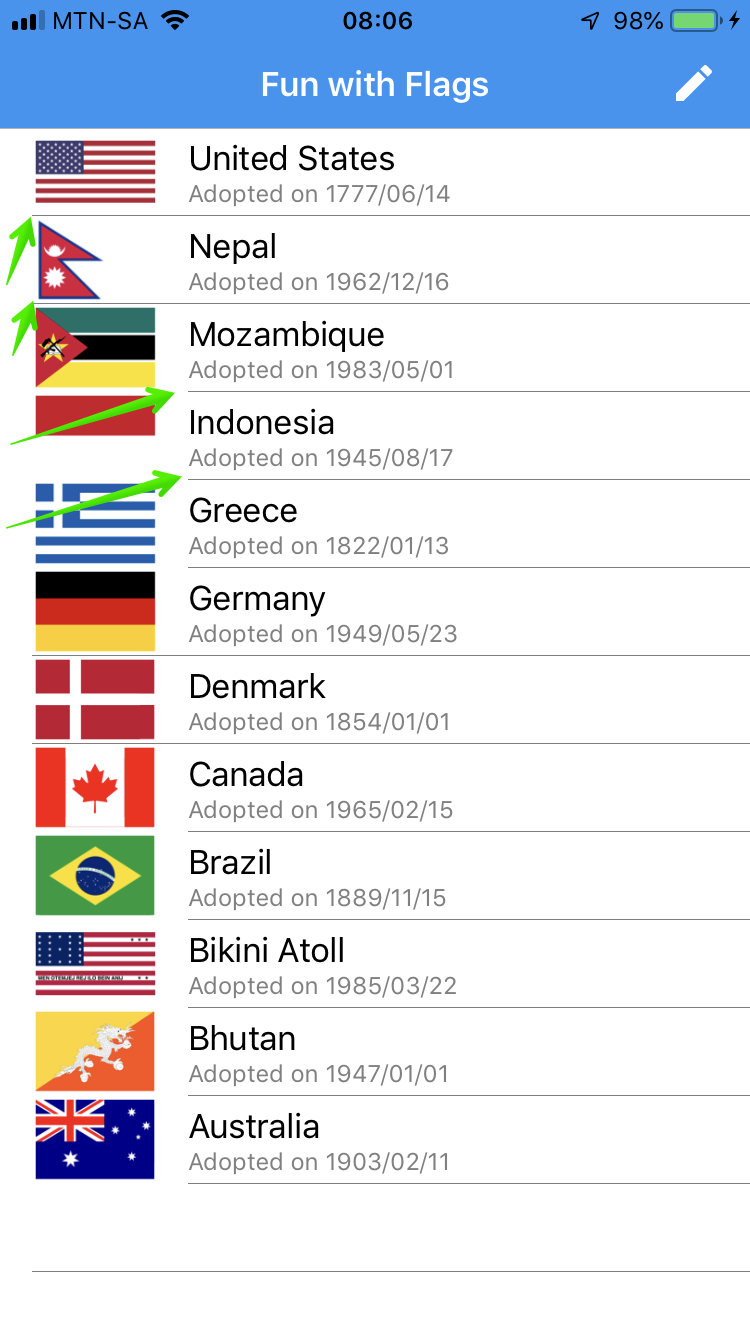
When using an ImageCell in a ListView, and all the properties of the ImageCell are set, specifically the ImageSource, the list item separator is not shown.
Creating a custom ViewCell with a a grid and an Image to emulate a similar layout doesn't have the same issue. The list item separator is rendered fine.
Steps to Reproduce
- Create ListViewXAML or Code)
- Create an ImageCell
- Set the Text, Detail and Image Source
Expected Behavior
All list items should be separated by a grey line separator
Actual Behavior
No list items are separated by a grey line separator. When pulling the listview down to force a repaint of the top list items, the line is drawn only for the first 2 items.
Basic Information
- Version with issue: 3.4.0.1008975
- Last known good version: /
- IDE: Visual Studo for Mac
- Platform Target Frameworks:
- iOS:
- Nuget Packages: Xamarin.Forms
- Affected Devices:
Screenshots

Reproduction Link
This can be reproduced using the Xamarin University Example XAM280 (Exercise 5 complete)
Or download my source code on github: https://github.com/rogerwcpt/xamarin-forms-list-app