Cant ignore some files #626

Description

PHP version: 7.2.24-0 ubuntu0.18.04.8
Xdebug version: v3.0.4
VS Code extension version: v1.17.0
Your launch.json:
 "version": "0.2.0",
 "configurations": [

     {
         "name": "Listen for Xdebug",
         "type": "php",
         "request": "launch",
         "port": 9003,
         "ignore": [
             "/wp-content/plugins/*.php",
             "/wp-content/themes/brooklyn/",
             "/wp-content/themes/brooklyn/**/*.php",
             "/wp-content/themes/brooklyn/inc/ut-custom-css.php"
         ]
     },
     {
         "name": "Launch currently open script",
         "type": "php",
         "request": "launch",
         "program": "${file}",
         "cwd": "${fileDirname}",
         "port": 0,
         "runtimeArgs": [
             "-dxdebug.start_with_request=yes"
         ],
         "env": {
             "XDEBUG_MODE": "debug,develop",
             "XDEBUG_CONFIG": "client_port=${port}"
         }
     },
     {
         "name": "Launch Built-in web server",
         "type": "php",
         "request": "launch",
         "runtimeArgs": [
             "-dxdebug.mode=debug",
             "-dxdebug.start_with_request=yes",
             "-S",
             "localhost:0"
         ],
         "program": "",
         "cwd": "${workspaceRoot}",
         "port": 9003,
         "serverReadyAction": {
             "pattern": "Development Server \\(http://localhost:([0-9]+)\\) started",
             "uriFormat": "http://localhost:%s",
             "action": "openExternally"
         }
     }
 ]
}
Xdebug php.ini config:
zend_extension = /usr/lib/php/20170718/xdebug.so
xdebug.mode = debug
xdebug.start_with_request = yes
Xdebug logfile (from setting xdebug.log in php.ini):
VS Code extension logfile (from setting "log": true in launch.json):
Hi there
I try to ignore some files in WordPress but still see errors in file ut-custom-css.php. Here is my ignore config:
       {
            "name": "Listen for Xdebug",
            "type": "php",
            "request": "launch",
            "port": 9003,
            "ignore": [
                "/wp-content/plugins/*.php",
                "/wp-content/themes/brooklyn/",
                "/wp-content/themes/brooklyn/**/*.php",
                "/wp-content/themes/brooklyn/inc/ut-custom-css.php"
            ]
        },
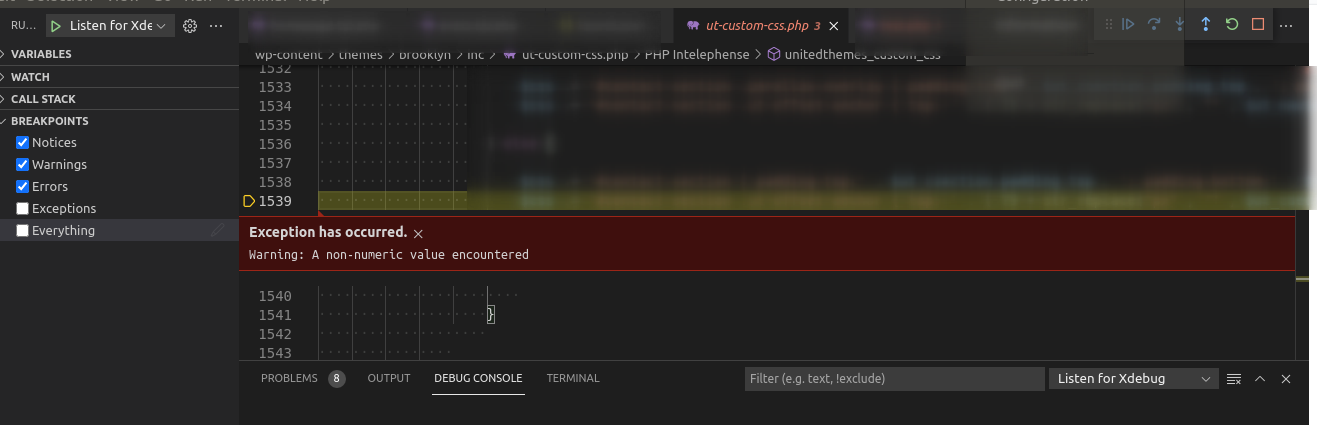
The question is: how can I ignore files and folders in a proper way?
Thanks