English | Chinese (Simplified)
The polished browser cockpit for the pi coding agent.






Stream conversations, inspect tool calls, manage files, and run your workspace — all from one place.
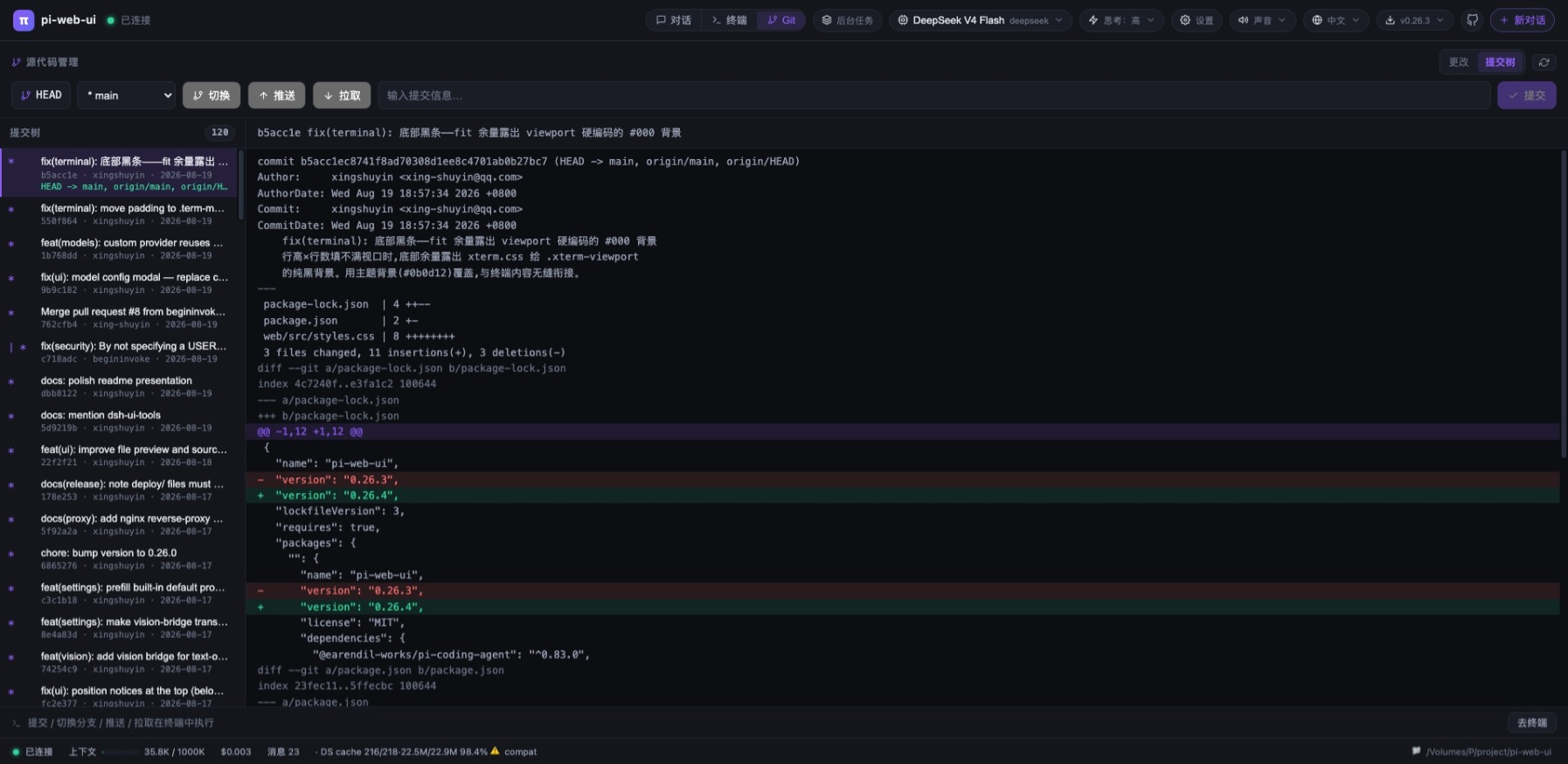
A web chat interface for the pi coding agent. The agent runs in-process via the pi SDK and streams events to the browser over WebSocket: thinking blocks, tool calls, file trees, a built-in terminal, model management, theme switching, and a full settings panel — tuned for daily development.
Requirements — Node.js ≥ 22.19 and a configured pi install.
Building with DSH?
dsh-ui-tools is the author's companion project for building and extending UI tools in the DSH ecosystem.
| 💬 Chat that works like you do | 🖼️ Files & images | 🧩 Extensible by design | 🔒 Private by default |
|---|---|---|---|
| Streaming replies, steer & follow-up queueing, slash commands, multiple conversations per project, edit-&-re-ask. | Attach files, paste images, ask about pictures (vision bridge), preview anything with GBK fallback. | Drop-in UI plugins (extra top-bar tabs + agent tools) and standalone themes — no rebuild, no restart. | Loopback-only, credential-safe: provider keys & headers never reach the browser. |
- 🚀 Features
- 🖼️ Screenshots
- 📦 Install
- ⚡ Quick start
- 🖥️ System service
- 🧩 Plugins
- 🎨 Themes
- 🔒 Security
- 🌐 Reverse proxy (nginx)
- 🤝 Contribute
- 📄 License
- Streaming agent chat over WebSocket — the pi SDK runs in-process; events are pushed as snapshots (60 ms throttled) and the browser renders them.
- Thinking blocks, tool-call cards and bash outputs with live status (running → finished · waiting for the model · duration).
- Steer (follow-up queueing) — send a follow-up while the agent is replying; it is queued and injected as soon as the current turn's tool calls settle (the "Interrupt" equivalent of the pi CLI).
- Slash commands —
/opens a command picker (built-in / extension / template / skill); built-ins include/new /model /compact /cwd /thinking /resume, plus/help(command list) and/copy(copy last reply). - Multiple conversations per project — each conversation gets its own agent runtime and keeps running in the background after you switch away; the "Running conversations" list shows stream progress and lets you switch back.
- Edit & re-ask — fork any past question into a new branch and re-prompt; the original conversation stays untouched.
- Long threads auto-collapse messages older than 30 into lazy summary rows (click to expand).
- Question navigation — a floating rail plus per-question tags to jump between questions.
- First-party subagents — spawn independent background conversations for parallel exploration / implementation / review (
subagent_spawn, with optionalmodeloverride or a template's model); collect results without polling viasubagent_wait_all(blocks until every subagent finishes, then summarizes results/errors). Manage them like a chat right in the left panel: view live output, inject follow-ups (steer), abort, dismiss — failed runs surface a red dot in the running list and an error notice in the main chat. In-memory sessions — they never touch the history / resume list, and can be nested. - Subagent templates — configure reusable presets in Settings → Subagent templates: a role system prompt (append or replace), skills & extensions whitelists, and an optional per-template model. The AI picks one via the
subagent_templatestool andsubagent_spawn(template="…"), or spawns without one (default = follow the main conversation's current model, or the global default subagent model set in the same panel). Disabled templates stay in the panel for re-enabling but become invisible to the AI tools (can't be listed or picked). Templates are shared globally across browser clients (<dataDir>/subagent-templates.json). Six built-in templates (review / implement / research / scout / audit / delegate, adapted from the pi-subagents community projects) seed the list on first run — marked 「Built-in」, editable and deletable like any other.
- Three attachment modes:
inline(≤12 KB),reference(path only),lines(selected ranges) — over-limit ones degrade automatically. - Paste / drag-drop / upload images — resized client-side and sent as image content when the model supports vision (warning otherwise).
- Vision bridge — when the current model is text-only, images are transcribed into text evidence by an auto-discovered vision model (cached per batch; model & on/off configurable in Settings).
- Attach arbitrary files without a workspace path — stored in a global uploads dir, inlined when small, referenced by absolute path otherwise.
- File preview — line numbers, click/drag/Shift selection (add to chat as
lines), GBK fallback decoding, binary hex view, media preview over HTTP with Range support, and a download button. - Live file tree — the server watches the listed directory (
fs.watch) and re-lists on change; oversized directories show a truncation warning.
- Built-in terminal (xterm.js + node-pty) with per-client PTY management; Windows auto-selects Git Bash (busybox fallback).
- Source control (Git) panel — status / branch / diff / untracked files via a hidden query terminal; commit, switch branch, push and pull run in the visible terminal and auto-switch to the terminal view.
- Theme switching — pick a theme in the top bar; themes are pure
:rootpalette overrides on top of the single layout stylesheet (default dark + bundled light/dark palettes). See Themes for how to add your own or contribute one. - Model management — edit
models.jsonin the UI and set per-provider API keys (keys/headers never leave the server). - Thinking level per model (only the levels the model actually supports are shown).
- First-run setup wizard.
- Settings panel — system prompt (append or replace), toggle skills/extensions on/off with immediate effect, save/apply/delete settings presets, and vision-bridge model & switch.
- Goal bar — set a target with a review model, max rounds and a lock switch.
- Goal wizard (AI Refine) — turns a raw request into a concrete goal through a guided questionnaire.
- Automatic review loop — after each turn an independent review session checks the goal against the final text and
git diff HEAD; on fail the feedback is injected as steer until it passes (or the round cap is hit).
- Switchable engine —
PI_WEB_ENGINE=pi|dsh(defaultpi). The pi engine runs the agent in-process via the pi SDK; the DSH engine runs the official@deepseek-ai/dsh(DeepSeek Harness) runtime as a subprocess./api/healthreportsengine; the footer shows a DSH badge. - Same wire protocol — the DSH engine implements the same WebSocket protocol, so goal mode, SCM, background tasks, settings, plugins, terminals, message-delta & snapshots all work identically.
- Native goal machinery — DSH's own goal state machine + round-driver auto-continues rounds; the model judges completion/blocked (no separate review session). The goal wizard drives it via the model's
ask_user_question. - Real image blocks — photos are sent as true image content to vision-capable DeepSeek models (e.g.
deepseek-v4-flash-vision-exp); text-only models get a text-transcription bridge instead. - Question dialog — the model's
ask_user_questionsurfaces as a browser dialog (single/multi-select + free text) with queueing and a countdown. - Tools & MCP bridge — plugin AI tools and external MCP servers (
mcp.json) are bridged into the DSH runtime, so the DSH model can call them (executed server-side). - Skill enable/disable — the DSH skill catalog is exposed in Settings; disabling a skill filters it out of the model's view at runtime.
- DSH user patches — drop
.ymlCordis patches into<dataDir>/dsh-patches/to extend the runtime and reload from Settings.
- Background-task panel — servers launched by the agent are detected via port snapshots and listed (port/pid/name); stop one or kill all.
- Tool watchdog — a tool call running over 20 minutes is aborted automatically.
- Stop bash command only — abort a running bash tool without killing the conversation.
- Loopback-only by default; set
PI_WEB_HOST=0.0.0.0for LAN / containers. - WebSocket Origin/Host same-authority check — cross-origin pages are rejected (403);
PI_WEB_ALLOW_ORIGINSwhitelist for reverse proxies. - Quiesce drain mode via a local control socket (
server status|quiesce|unquiesce). - Credentials stay server-side — provider headers are never sent to the browser.
- Sound alerts, Chinese/English UI, and a recent-projects list (click to switch workspace).
- Foreground, global npm install, Docker (docker-compose), macOS launchd, Linux systemd, Windows Task Scheduler, and a desktop shortcut (
server shortcut). - In-app self-update — checks the npm registry, installs and auto-restarts the service.
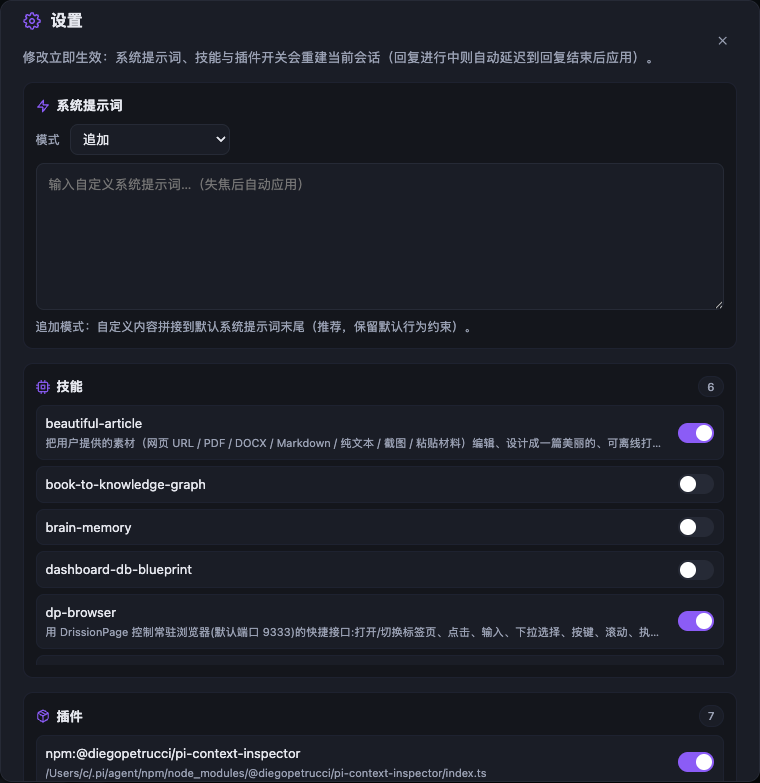 Settings panel |
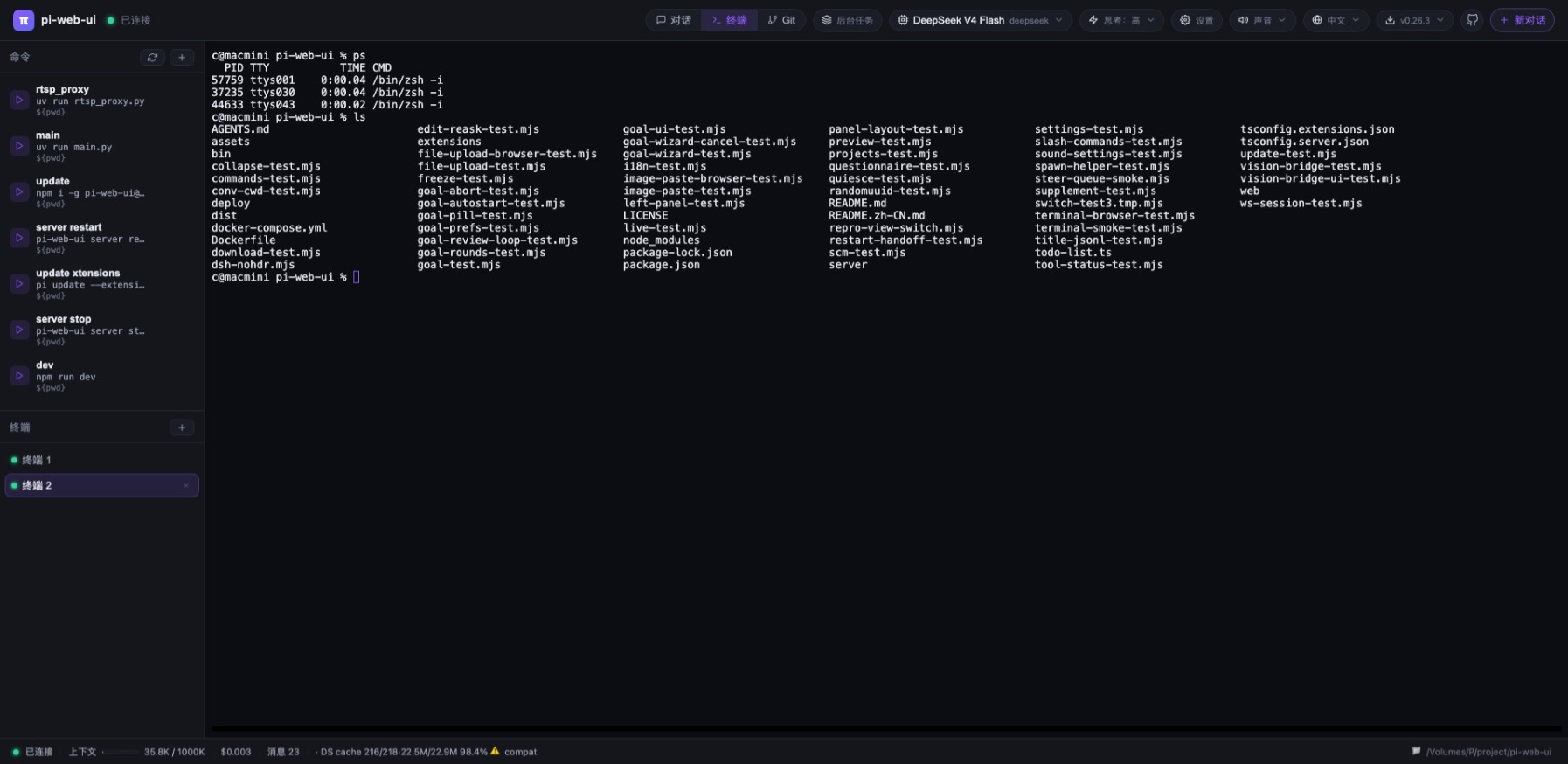 Built-in terminal |
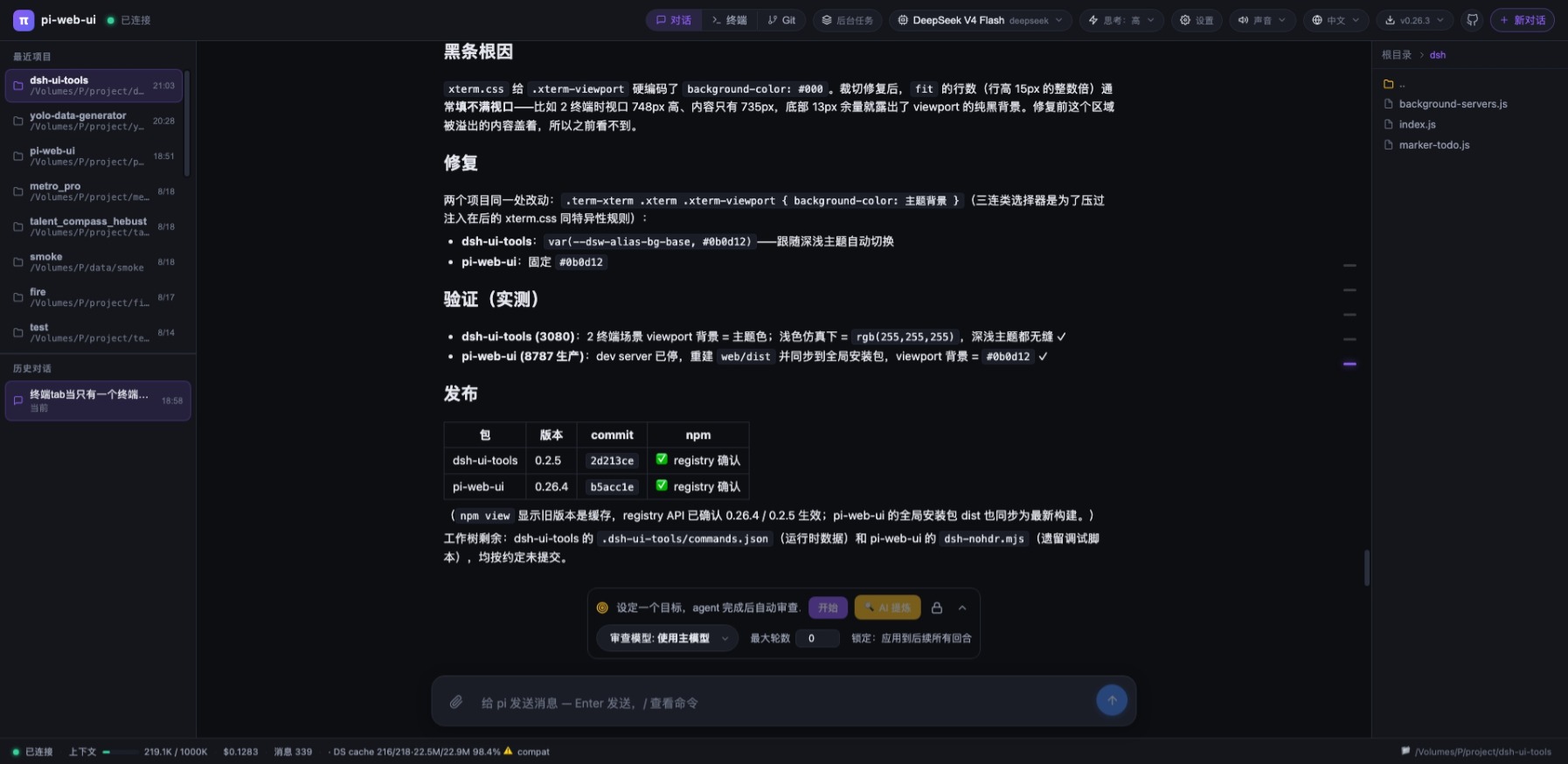 Chat interface |
Git source control panel |
npm i -g pi-web-ui            # global install (recommended)
npx pi-web-ui                 # or run without installing (latest, starts on :8787)
npm i -g .                    # or install the local checkout
npm ≥ 12? npm 12+ blocks dependency install scripts by default (you'll see
npm warn install-scripts … blocked). node-pty is a native module, so allow its
script (the other two packages it lists are harmless no-ops — allowing them just
silences the warning):
npm i -g --allow-scripts=node-pty,@google/genai,protobufjs pi-web-ui@latestpi-web-ui runs fine on Android via Termux, but node-pty
(the native dependency) needs a toolchain, and Android has a few quirks worth
knowing:
-
Install the build toolchain first —
node-ptyneeds Python and a C toolchain:pkg install python clang make binutils
-
Point the node-pty build at a dummy NDK path. On Android, gyp fails with
Undefined variable android_ndk_pathunless the variable is defined:GYP_DEFINES="android_ndk_path=' '" npm i -g --allow-scripts=node-pty,@google/genai,protobufjs pi-web-ui@latest -
If
pi-web-uiwon't execute after install (the exec bit and/or shebang can get mangled on Android): restore it:chmod +x "$(command -v pi-web-ui)" sed -i 's/\r$//' "$(command -v pi-web-ui)"
-
Run it in the background with
--no-browser(there is no desktop browser to auto-open):setsid nohup pi-web-ui --no-browser --cwd /path/to/workspace >~/pi-web.log 2>&1 &
setsiddetaches the server from the launching shell's process group, so closing the Termux session doesn't take the server down —nohupalone is not enough when the parent process group gets killed.
The [control] socket error: EACCES …/.pi-web/pi-web-ui.sock warning at startup
is harmless on Android: pi-web-ui server stop/restart won't work over the
control socket, but the web UI itself is unaffected.
Start (foreground)
pi-web-ui # foreground, http://localhost:8787Start flags & environment variables — every setting can be passed as a --flag on the command
line or set as an environment variable (flag wins). Pick whichever you prefer:
| Flag | Env var | Default | Purpose |
|---|---|---|---|
--port <n> |
PI_WEB_PORT |
8787 |
HTTP port |
--cwd <dir> |
PI_WEB_CWD |
current dir | workspace root (read/write/terminal) |
--data-dir <dir> |
PI_WEB_DATA_DIR |
~/.pi-web |
data dir (sessions, plugins, uploads) |
--engine <pi|dsh> |
PI_WEB_ENGINE |
pi |
agent engine; --engine dsh = DeepSeek Harness |
--host <addr> |
PI_WEB_HOST |
127.0.0.1 |
listen address (0.0.0.0 for LAN/Docker) |
--agent-dir <dir> |
PI_CODING_AGENT_DIR |
~/.pi/agent |
pi config dir (auth.json, models, skills) |
| env only | PI_WEB_TOKEN |
empty | optional shared auth token |
| env only | PI_WEB_DSH_* |
— | dsh runtime, patches & debug settings |
The two are equivalent — pick one:
pi-web-ui --engine dsh --port 9000 --cwd /path/to/project
PI_WEB_ENGINE=dsh PI_WEB_PORT=9000 PI_WEB_CWD=/path/to/project pi-web-ui
For the DSH engine also install the runtime (npm i -g @deepseek-ai/dsh@0.1.1-rc.2) and set a
DeepSeek API key (read from ~/.pi/agent/auth.json, set in the provider/API-key panel).
Stop
- Foreground: press
Ctrl+Cin the terminal running it. - As a service:
pi-web-ui server stop(stops the instance; auto-start stays untilserver uninstall).
Update
npm i -g pi-web-ui@latest     # upgrade to the latest published version
pi-web-ui server restart      # restart the service to apply it (foreground: restart manually)
Uninstall
npm uninstall -g pi-web-uiUninstalling does not delete your chats — session data lives in
<cwd>/.pi-web (or PI_WEB_DATA_DIR) and survives uninstall/upgrade.
pi-web-ui server install --port 9000 --cwd /path/to/project   # install + start
pi-web-ui server status                     # running? auto-start?
pi-web-ui server restart                    # restart (applies config/version changes)
pi-web-ui server stop                       # stop (auto-start stays)
pi-web-ui server start                      # start again
pi-web-ui server uninstall                  # remove the service entirely
pi-web-ui server shortcut                   # desktop one-click launch icon
pi-web-ui server quiesce                    # drain: refuse NEW chats/messages, let running ones finish
pi-web-ui server unquiesce                  # reopen admission
server status also shows live stats via a local control socket (version,
PID, quiesce state, connected browsers, running conversations) — the same
socket drives quiesce/unquiesce.
- macOS → launchd agent (no sudo), logs to
/tmp/pi-web-ui.log/.err - Linux → systemd unit (
systemctl enable --now), logs viajournalctl -u pi-web-ui -f - Windows → Task Scheduler logon task (hidden PowerShell window, no black console)
Options: --port (default 8787), --cwd (workspace), --data-dir (sessions),
--engine <pi|dsh>, --host, --agent-dir, --name (custom service name). Rerunning
server install with new options regenerates the config and restarts the service — that's how
you change its port/cwd/engine. --engine / --host / --agent-dir are baked into the service
automatically; env-only vars (PI_WEB_TOKEN, PI_WEB_DSH_*) must be added to the service config
by hand. See the start flags table above.
pi-web-ui server install --engine dsh --port 9000 --cwd /path/to/projectPlugins are optional UI components (extra top-bar tabs backed by their own
client view, optionally with a server-side entry and agent tools). They live in
your data-dir plugins folder (<dataDir>/plugins/<id>/, default
~/.pi-web/plugins/) — a plugin is simply a directory containing
manifest.json, an optional server entry (index.mjs) and an optional view
entry (client/entry.mjs). No plugin directories = no plugins, nothing shows
up in the UI.
These plugins ship in this repository (plugins/<id>/) and can be installed
straight from GitHub:
| Plugin | What it does |
|---|---|
| 📬 webmail | IMAP inbox browsing / search / read / mark / delete + SMTP sending, new-mail notifications, and an optional "allow AI to manage my mailbox" switch (six mail_* agent tools). Auto-installs its npm deps on first activation. |
| 🗄️ db-client | Database workbench: connection manager + schema tree for MySQL / PostgreSQL / SQLite / SQL Server / MongoDB / Redis — table structure, paginated data with sorting, SQL editor, and row editing. Drivers auto-install on first use. |
| 📝 vscode-editor | VS Code-like workbench: multi-root file tree (local + SSH hosts), CodeMirror multi-tab editor, Remote-SSH remote file browsing/editing, draggable multi-terminal panel (xterm.js), SFTP sync & upload/download to your computer. Auto-installs ssh2. |
| 📬 demo-mailbox | Minimal example plugin demonstrating the server entry + client view + two-way message protocol. Doubles as the plugin test fixture — start here if you want to write your own. |
Example — install the webmail plugin:
pi-web-ui install https://github.com/xing-shuyin/pi-web-ui/tree/main/plugins/webmailYou can also install from inside the UI: 设置 → 界面插件 → 插件市场 lists
maintainable plugins (the same set, shipped in plugins/catalog.json) with
full 安装 / 更新 / 卸载 controls (updates keep config.json), and lets you
drop any third-party plugin into the list via 添加插件 (paste owner/repo
or an owner/repo/subdir source) — your additions are stored in
<dataDir>/plugin-catalog.json. A plugin author can contribute to the built-in
list with a one-line PR to plugins/catalog.json.
Each plugin's directory in the repo has its own README.md with full feature
lists, configuration and per-plugin caveats.
From GitHub (any of these source forms):
pi-web-ui install owner/repo                                  # shorthand
pi-web-ui install https://github.com/owner/repo               # full URL (.git optional)
pi-web-ui install https://github.com/o/r/tree/dev/sub/dir     # branch + subdirectory inside the repo
pi-web-ui install owner/repo#v1.2                             # pin a branch/tag (#suffix works on any form above)
pi-web-ui install /path/to/plugin-dir                         # local directory (for development)
Useful options:
--name <id>— custom plugin id / directory name (defaults to the repo or subdirectory name; letters/digits/-/_only).--force— overwrite an existing installation. Your plugin's localconfig.json(credentials etc.) is preserved across upgrades.--data-dir <dir>— override the data dir (default~/.pi-web).
The CLI clones the repo (shallow; falls back to a tarball download without
git), locates the manifest.json (including inside subdirectories) and copies
the plugin into <dataDir>/plugins/<id>/.
No git? No network? You can also just copy a plugin directory into
~/.pi-web/plugins/ by hand — same result.
Re-run install against the same source with --force:
# example: update the webmail plugin to the latest version in the repo
pi-web-ui install https://github.com/xing-shuyin/pi-web-ui/tree/main/plugins/webmail --force- The upgrade preserves the plugin's local
config.jsonautomatically. - Plugins that store other local state inside their directory (e.g. db-client's
db-connections.json, vscode-editor'sssh-hosts.json) are not covered by that preservation — back those up before a forced reinstall. - Refresh the browser afterwards; no server restart needed.
If the server is running, just refresh the browser — new plugins are picked up on attach without a restart. If it isn't, they load on next start. Each plugin appears as a tab (🧩 or its own icon) in the top bar.
pi-web-ui plugins             # list installed plugins (id / name / version / description)
pi-web-ui uninstall <id> # remove a plugin- To temporarily hide a plugin without uninstalling, use the Settings panel (⚙) → UI plugins switches — stored per client, purely visual, no restart needed. Re-enable any time.
uninstalldeletes the plugin directory; refresh the browser and its tab disappears. Plugin configuration written inside the plugin dir is removed too — back up<dataDir>/plugins/<id>/config.jsonfirst if you need it.
Each theme is a pure :root palette override — a small CSS file that only sets CSS variables (see the :root block in web/src/styles.css for the full variable list: base colors --bg/--accent/--term-* plus derived colors like --tooltip-bg/--code-bg/--notice-*). The layout lives ONLY in the bundled web/src/styles.css; picking a theme overrides the variables, so every theme works with every build and layout changes never touch themes. Built-in themes are generated by node make-light-theme.mjs.
Built-in themes ship in the npm package (themes/, e.g. the bundled light theme). The theme picker lives in the top bar (🌞 icon); the current choice is stored per browser in localStorage.
Just pick it in the top bar — built-in and user themes are merged in the same menu. User themes win over built-ins on the same id.
Any CSS file dropped into your data-dir themes folder shows up in the theme menu automatically — no restart, no rebuild:
- Find your data dir (default
~/.pi-web, override withPI_WEB_DATA_DIR). - Create
<dataDir>/themes/and drop your stylesheet in: e.g.~/.pi-web/themes/my-theme.css. - Reload the page and pick it in the top bar. The file name (without
.css) is the theme id shown in the menu.
~/.pi-web/
└── themes/
    └── my-theme.css          # appears in the menu as "my-theme"
Easiest way to write one: copy a built-in palette (e.g. themes/white.css from the source repo) and change the :root colors — list every variable you want to override; unlisted ones fall back to the dark defaults in styles.css. Notes:
- The terminal follows the theme — set the
--term-*variables (terminal ANSI palette +--term-bg) in your:rootand both the xterm canvas and its padded container adapt automatically (see the defaults instyles.css). - Syntax-highlight colors (
highlight.js'sgithub-dark.cssis bundled) must be overridden in your theme file or code will be unreadable on light themes — see the.hljsoverrides at the bottom ofthemes/white.cssfor the pattern (dark themes can skip it). - Theme ids must match
^[A-Za-z0-9_-]+$(no dots/slashes — path-traversal guard on the server).
Want your theme shipped to everyone? Open a pull request at github.com/xing-shuyin/pi-web-ui:
- Fork the repo and clone it.
- Create your theme as
themes/<id>.css— a pure:rootpalette. Copythemes/white.css(orthemes/cyberpunk.cssfor a dark palette) as the starting template. - Verify locally: run
npm run dev, then use the top bar theme picker — your theme must be listed and render correctly (chat cards, code blocks, tool-call cards, git/terminal panels). - Regenerate all built-in themes with
node make-light-theme.mjswhen you changed the variable list instyles.css. - Commit (
git add themes/<id>.css) and open the PR. Thethemes/folder is already in the npm packagefileswhitelist, so once merged and released,npm i -g pi-web-uiwill ship your theme to everyone.
Rules for merged themes: the file must be a single CSS file, set the --term-* variables for a readable terminal, and override .hljs syntax colors for readable code on light themes.
- Loopback-only by default — the server binds
127.0.0.1and is not reachable from the network unless you explicitly setPI_WEB_HOST=0.0.0.0(e.g. LAN access, Docker port mapping — the compose file sets it for you). - WebSocket origin check — browser pages connecting to
/wsmust present anOriginwhose hostname and port match the requestHost; cross-origin pages are rejected with 403. Non-browser clients (noOrigin) are unaffected. AddPI_WEB_ALLOW_ORIGINS=http://your-host:portfor reverse-proxy setups. - Quiesce —
server quiescerefuses new prompts/forks/session resumes until youserver unquiesce; in-flight runs finish cleanly (useful before upgrades/backups). - Credentials stay server-side — provider
headers(which may carryAuthorization/ API keys) are never sent to the browser; the model management UI edits everything else and the server preserves the headers.
Serve pi-web-ui behind nginx on the same host (it binds loopback only, so a
same-machine reverse proxy is the supported remote-access path — no
PI_WEB_HOST=0.0.0.0 needed):
# pi-web-ui on 127.0.0.1:8787, exposed as https://your-host/pi/
server {
    listen 443 ssl;
    server_name your-host;
    # ssl_certificate ... / ssl_certificate_key ...

    # App entry at a sub-path (strips the /pi/ prefix)
    location /pi/ {
        proxy_pass http://127.0.0.1:8787/;
        proxy_http_version 1.1;
        # $http_host keeps the port — the server's origin check compares the
        # full authority (hostname AND port). $host would drop it and get 403.
        proxy_set_header Host $http_host;
        proxy_set_header X-Real-IP $remote_addr;
        proxy_set_header X-Forwarded-For $proxy_add_x_forwarded_for;
        proxy_set_header X-Forwarded-Proto $scheme;
    }

    # WebSocket — MUST forward Host identically or the upgrade is 403'd
    # (page loads, but chat/terminal keep reconnecting)
    location /ws {
        proxy_pass http://127.0.0.1:8787;
        proxy_http_version 1.1;
        proxy_set_header Host $http_host;
        proxy_set_header Upgrade $http_upgrade;
        proxy_set_header Connection "upgrade";
        proxy_read_timeout 3600s;
        proxy_send_timeout 3600s;
    }

    # Absolute-path assets/API the built frontend requests (root, not /pi/)
    location /assets/  { proxy_pass http://127.0.0.1:8787; }
    location = /favicon.svg           { proxy_pass http://127.0.0.1:8787; }
    location = /favicon-streaming.svg { proxy_pass http://127.0.0.1:8787; }
    location = /api/file   { proxy_pass http://127.0.0.1:8787; }
    location = /api/health { proxy_pass http://127.0.0.1:8787; }
}
Key points:
Hostmust be$http_host(keeps the port) on both/pi/and/ws— the origin check compares hostname and port.proxy_set_header Host $hostor leaving it unset (defaults to the upstream127.0.0.1:8787) both fail with 403.- Same-origin works automatically: as long as the browser's
Originequals the forwardedHost(it does through a plain proxy), noPI_WEB_ALLOW_ORIGINSis needed. Only set it when the browser origin differs from the Host the server sees (e.g. a TLS-terminating proxy that changes the port). - No
proxy_protocolunless you really need real client IPs: it makes nginx reject every connection that does not send a PROXY header, which breaks direct LAN access and any non-frp clients. With frp, droptransport.proxyProtocolVersionfrom the proxy config unless nginx listens withproxy_protocoltoo. - LAN access without a proxy: just set
PI_WEB_HOST=0.0.0.0(and a firewall rule) — or put the whole server block above on port 80/443.
Full working example (with an frp tunnel): deploy/nginx-subpath.conf.
pi-web-ui is a small open-source project — your contributions are what make it grow. Code, plugins, themes, docs, translations, ideas: everything is welcome, and every merged PR ships to all users with the next npm publish. ❤️
| Way to contribute | How to get started |
|---|---|
| 🧩 Write a plugin | Build your own UI tab + agent tools. Copy plugins/demo-mailbox as the minimal template (it doubles as the test fixture), develop locally, then either open a PR to ship it in the catalog or publish it standalone. |
| 🎨 Contribute a theme | Copy themes/white.css (light) or themes/cyberpunk.css (dark) as a pure-palette template, tweak the :root palette + --term-* + .hljs, verify with npm run dev, then open a PR — full walkthrough in Contributing a theme. |
| 💻 Fix a bug / add a feature | Look for open issues or propose something new. Fork → branch → PR. Keep the code conventions in AGENTS.md (tabs, i18n keys in both languages, protocol changes in server/protocol.ts). |
| 📖 Docs & translations | Improve the READMEs, write plugin docs, fix typos, or help translate the UI / docs into more languages. |
| 💡 Ideas & feedback | Open an issue or start a discussion — feature requests, bug reports, UI polish ideas, deployment experience reports. |
Before opening a PR, a quick sanity pass keeps reviewers happy:
npm run format— prettier formatting (tabs, width 120; CI checks it).npm run lint— oxlint (unused vars, risky patterns; CI runs it).npm run check:protocol+npm test— protocol sync and unit tests.npm run typecheck— no type errors.npm run build— both frontend and backend compile.- For protocol changes: add branches in both
server/index.tsandweb/src/use-chat.ts(see the "Protocol single source" note inAGENTS.md).
Enjoying pi-web-ui? Give the repo a ⭐ — it helps others find it. And if you built something cool on top (plugin, theme, deployment recipe), tell us — we love showcasing community work.