FluentValidation是一个非常流行的构建强类型验证规则的.NET库,支持在任何场景下的模型验证,且不侵入代码。 NETCore系统默认的模型验证功能仅支持在Controller的Action中使用,不支持非Controller中或者控制台程序的验证,且代码侵入性较强。
FluentValidation支持一下平台:
- .NET 4.6.1+
- .NET Core 2.0+
- .NET Standard 2.0+
文档地址:https://fluentvalidation.net/ 源码地址:https://github.com/FluentValidation/FluentValidation 实例地址:https://github.com/xteamwx/FluentValidationExample
使用Nuget下载最新的FluentValidation库
PM> Install-Package FluentValidation.AspNetCore在Startup.cs文件中添加FluentValidation服务
public void ConfigureServices(IServiceCollection services)
{
     services.AddControllers()
        //添加模型验证器
            .AddFluentValidation(conf =>
            {
                //注册验证类
                //RegisterValidatorsFromAssemblyContaining方法会遍历IValidation接口类所在项目下的所有验证类,并注册到服务中
                conf.RegisterValidatorsFromAssemblyContaining<IValidation>();
                //true表示使用系统默认的模型验证,false表示使用FluentValidation模型验证。
                conf.RunDefaultMvcValidationAfterFluentValidationExecutes = false;
            });

    // 覆盖ModelState管理的默认行为,以返回统一格式。
    services.Configure<ApiBehaviorOptions>(options =>
    {
       options.InvalidModelStateResponseFactory = (context) =>
       {
          var errors = context.ModelState
              .Values
              .SelectMany(x => x.Errors
                          .Select(p => p.ErrorMessage))
              .ToList();
          var result = new
          {
              isSuccess = false,
              code = "406",
              message = "验证错误",
              response = errors   //errors为模型中的错误输出
          };
          return new BadRequestObjectResult(result);
       };
    });
}添加一个UserEntity.类。
 public class UserEntity
    {
        public int UserID { get; set; }
        public string Account { get; set; }
        public string Password { get; set; }
        public string ConfirmPassword { get; set; }
        public string SIM { get; set; }
        public string Mail { get; set; }
}创建校验空接口类 IValidation
 public interface IValidation
    {
    }
创建校验器类,校验器类都需要继承自一个抽象类AbstractValidator和接口类 IValidation,可以把校验器类和模型类写在一个文件中,方便修改和查看。 更多校验规则可通过官方文档查询。
public class UserEntityValidator : AbstractValidator<UserEntity>,IValidation
{
   public UserEntityValidator()
   {
        RuleFor(x => x.Account)
            .NotEmpty().WithMessage("账号不能为空")
            .NotEqual("admin").WithMessage("账号不能使用admin")
            .MaximumLength(20).WithMessage("账号长度已经超出了限制!");
        RuleFor(x => x.Password)
            .Length(6, 16).WithMessage("密码长度最小{min}位,最大{max}位!")
            .Must(x => Helper.HasValidPassword(x));
        RuleFor(x => x.ConfirmPassword)
            .Equal(x => x.Password)
            .WithMessage("2次密码不一致!");
        RuleFor(x => x.Mail).EmailAddress().WithMessage("电邮地址错误");
        RuleFor(x => x.SIM).NotEmpty()
            .Must((o, list, context) =>
            {
                if (!string.IsNullOrEmpty(o.SIM))
                {
                    context.MessageFormatter.AppendArgument("SIN", o.SIM);
                    return Helper.IsValidSIN(int.Parse(o.SIM));//自定义验证器
                }
                return true;
            })
           .WithMessage("SIM不能为空");
   }
}创建一个action, 并将需要验证的数据模型放到action的参数中。
[Route("api/[controller]")]
[ApiController]
public class UserController : ControllerBase
    {
        [HttpPost]
        public IActionResult Post(UserEntity user)
        {
            return NoContent();
        }

        [HttpGet]
        public IActionResult Get()
        {
            return Ok("OK");
        }
}打开PostMain,访问https://localhost:5001/User ,提交响应如下所示
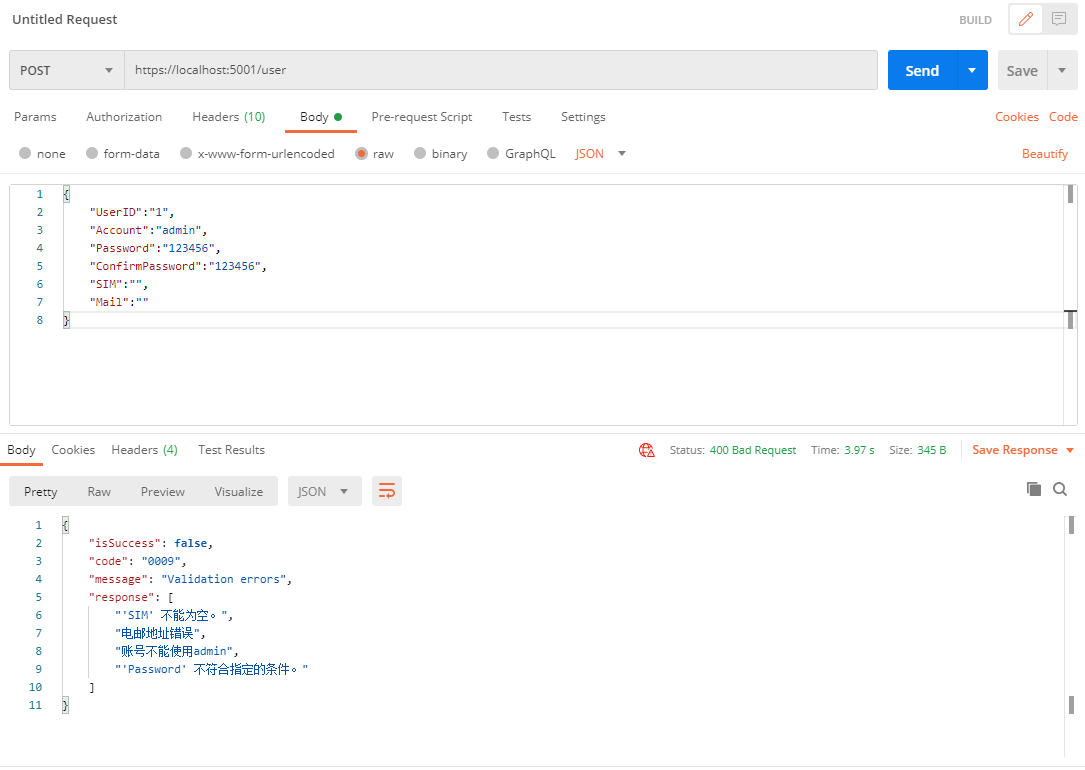
至此,在 ASP.NET Core中集成FluentValidation就完成了。
本篇讲解了如何在Web API项目中使用FluentValidation进行数据模型验证,更多验证方法请参考官方文档。
本篇源代码 https://github.com/xteamwx/FluentValidationExample
作者:SAMURAI 出处: 原创 版权:本作品采用「署名-非商业性使用-相同方式共享 4.0 国际」许可协议进行许可。