A lightweight, self-hosted operational control plane for Capsule Services.
xtrape-capsule CE 是一个轻量、可私有化部署的 Capsule Service 运行态治理平台。



Opstage CE is the Community Edition of Xtrape Capsule. It gives you one place to see, govern, and operate the small services that power AI products — integration adapters, automation workers, background jobs, private tools, and AI Agent runtimes — through an embedded Agent SDK.
Status: Public Review · pre-v0.1 Public Preview. Xtrape Capsule is currently in Public Review before the
v0.1.0 Public Previewrelease. APIs, contracts, deployment instructions, and SDK interfaces may still change. Recommended for local evaluation, small private deployments, and demos. Not recommended for business-critical HA production yet.
Public Review readiness is tracked in
docs/public-review-readiness.md.
During Public Review, the source-build Docker Compose path remains the canonical quick-start path. GHCR images may be produced from main for validation, but the stable ghcr.io/xtrape-com/xtrape-capsule-ce:0.1.0 image becomes the primary documented path only after the v0.1.0 Public Preview cut.
Note: Before exposing Opstage beyond
localhost, copy.env.exampleto.envand change the default passwordChangeMeBeforeRunning123!and session secret.
git clone https://github.com/xtrape-com/xtrape-capsule-ce.git
cd xtrape-capsule-ce
cp .env.example .env
docker compose -f deploy/compose/docker-compose.yml up --build -dAfter the v0.1.0 Public Preview cut, use the pinned official Docker image:
# Create environment file
cat > .env << EOF
OPSTAGE_HOST=0.0.0.0
OPSTAGE_PORT=8080
OPSTAGE_DATA_DIR=/app/data
DATABASE_URL=file:/app/data/opstage.db
OPSTAGE_ADMIN_USERNAME=admin@example.local
OPSTAGE_ADMIN_PASSWORD=ChangeMeBeforeRunning123!
OPSTAGE_SESSION_SECRET=your-very-long-random-secret-here
OPSTAGE_PUBLIC_BASE_URL=http://localhost:8080
EOF

# Run with Docker
docker run -d \
  --name opstage-ce \
  --env-file .env \
  -p 8080:8080 \
  -v $(pwd)/opstage-data:/app/data \
  ghcr.io/xtrape-com/xtrape-capsule-ce:0.1.0
Open http://localhost:8080. Default bootstrap credentials are in .env.example.
Change the password and OPSTAGE_SESSION_SECRET before exposing Opstage beyond localhost.
AI products quietly accumulate dozens of small services. They are too small for a service mesh, too important to leave unmanaged, and they don't deserve a custom admin panel each. Opstage gives them a single, opinionated control plane:
- Inventory — every Agent and every Capsule Service in one list, with
effectiveStatus. - Health — protocol-level health reported by Agents and Capsule Services.
- Effective status — operator-facing service status derived by Opstage.
- Configs — observed from each service; never pushed.
- Actions — operator-callable, schema-driven, audited.
- Commands — the dispatch lifecycle
(
PENDING → RUNNING → SUCCEEDED / FAILED / CANCELLED / EXPIRED). - Audit — every meaningful event, exportable as CSV / JSON.
- Single-container deployment (Fastify + SQLite + React console)
- Hash-only token storage (registration tokens + agent tokens)
- RBAC:
owner/operator/viewer - Agent disable / revoke; registration-token revoke
- Maintenance scheduler (offline detection, expiry, audit pruning)
- Metrics, diagnostics, audit export, owner-only SQLite backup
- Schema-driven action panels with
ACTION_PREPARE→ACTION_EXECUTE - Structured action results for table-style lists, row actions, and detail views
- UI in English and 中文 (selected language stored in
localStorage)
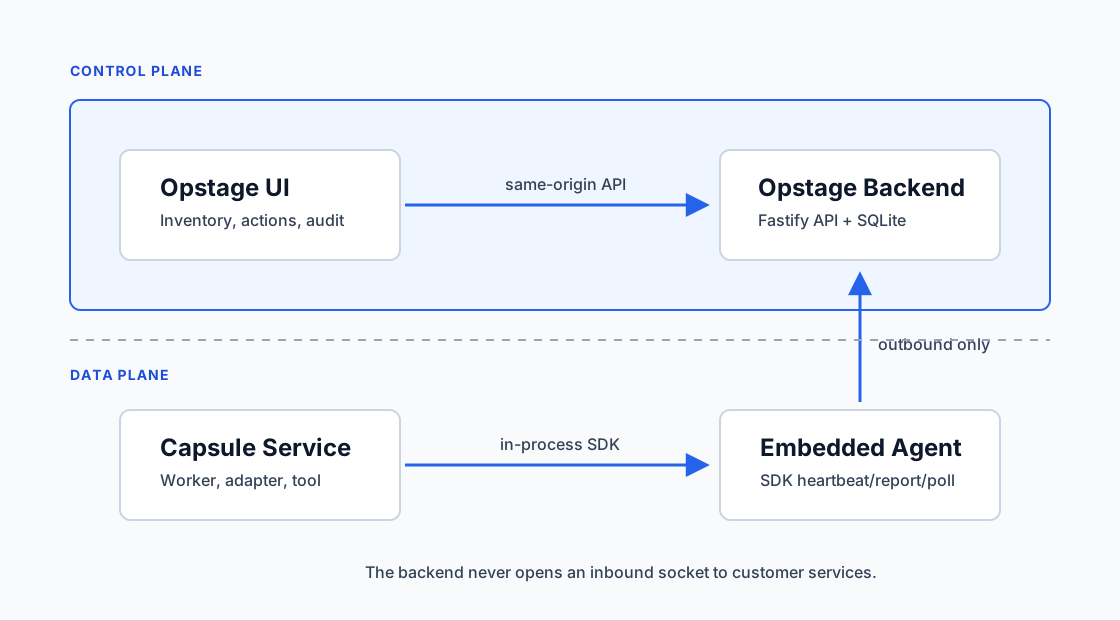
Real product screenshots are scheduled for the v0.1.0 Public Preview release. Until then, use the public architecture diagram below and spin up the console locally with the Quick Start.
When the screenshots land, they will live under
xtrape-capsule-site/docs/public/screenshots/
and will cover: Dashboard, Agents, Capsule Services, Service detail, Action
execution, and Audit Events.
TODO before v0.1.0 Public Preview:
- Dashboard screenshot
- Agents screenshot
- Capsule Services screenshot
- Service detail screenshot
- Action execution screenshot
- Audit events screenshot
+---------------------+
|     Opstage UI      |   ← human operator
+----------+----------+
           |
           v
+---------------------+
|  Opstage Backend    |   ← control plane (Fastify + SQLite + Prisma)
+----------+----------+
           ^
           |  outbound only
           |
+----------+----------+
|  Embedded Agent     |   ← @xtrape/capsule-agent-node
+----------+----------+
           |
           v
+---------------------+
|  Capsule Service    |   ← your service
+---------------------+
The Backend never opens a socket to your services. All connections are initiated outbound by the Agent — this is what makes Opstage runnable behind NAT, on a laptop, or inside customer environments.
Capsule Services and Agents report protocol-level HealthStatus values: UP,
DEGRADED, DOWN, UNKNOWN.
Opstage derives operator-facing effectiveStatus values: HEALTHY,
UNHEALTHY, STALE, OFFLINE.
To see a complete runnable Capsule Service, use:
https://github.com/xtrape-com/xtrape-capsule-demo
The demo shows Agent registration, service manifest reporting, health/config reporting, action prepare/execute, command result reporting, and audit visibility.
This is a pnpm workspace.
During Public Review, CE consumes @xtrape/capsule-contracts-node and
@xtrape/capsule-agent-node as npm packages under the public-review dist-tag.
apps/opstage-backend       # Fastify + Prisma backend
apps/opstage-ui            # React 18 + Ant Design admin console
packages/db                # Prisma schema and migrations
packages/shared            # cross-cutting helpers
packages/test-utils        # in-process backend bootstrapping for tests
pnpm install
pnpm contracts:check
pnpm db:validate
pnpm typecheck
pnpm build
For local development with hot reload:
pnpm dev:backend          # http://localhost:8080
pnpm dev:ui               # http://localhost:5173 (Vite proxies /api to :8080)
See CONTRIBUTING.md for the full developer flow, and SECURITY.md for how to report vulnerabilities responsibly.
| Repo | Purpose |
|---|---|
| xtrape-capsule-site | Public website + documentation |
| xtrape-capsule-agent-node | Node embedded Agent SDK |
| xtrape-capsule-contracts-node | Shared contracts and Zod schemas |
Apache-2.0. "Xtrape", "Xtrape Capsule", and "Opstage" are trademarks of their respective owners; the open-source license does not grant trademark rights.