A high-performance, server-authoritative 2D rendering and interactive user interface system for open.mp servers and SA-MP clients. The system consists of a server-side component (omp-dx.dll) and a client-side ASI plugin (omp-dx.asi) that communicate via custom RPCs to render dynamic, responsive, and hardware-accelerated user interfaces directly within the Direct3D9 loop.
omp-dx/
├── client/                      # Client-side (ASI Plugin - C++)
│   ├── source/                  # D3D9 Hooking, WndProc handler, and widget rendering engine
│   │   ├── Plugin.cpp           # D3D9 Present Hook, WndProc input routing, and widget drawing
│   │   ├── Plugin.h             # Element definitions, font handlers, and state schemas
│   │   └── dllmain.cpp          # DLL entry point
│   ├── libs/                    # Third-party dependencies (RakHook, samp-api)
│   └── CMakeLists.txt           # CMake configuration for building the ASI plugin
│
├── server/                      # Server-side (open.mp Component & Pawn API)
│   ├── main.cpp                 # Server component entry point
│   ├── dx-component.cpp         # RPC handling and Pawn event dispatcher
│   ├── dx-renderer.cpp          # RPC serialization functions
│   ├── natives.cpp              # Native definitions for the Pawn scripting interface
│   ├── omp-dx.inc               # Pawn include file containing natives and callback forwards
│   └── CMakeLists.txt           # CMake configuration for building the open.mp component
│
└── test/                        # Pawn Test Suite (Modular Scripting API Validation)
    ├── test_dx.pwn              # Main entry script routing hooks to modules
    └── modules/                 # Modular subsystems
        ├── test_defs.inc        # State declarations and configurations
        ├── test_speedo.inc      # Speedometer HUD logic
        ├── test_dash.inc        # Diagnostic and GPS panel logic
        ├── test_widgets.inc     # Standard form widget logic
        ├── test_features.inc    # Premium visual effect widgets logic
        └── test_misc.inc        # Shape and image drawing helpers
To install pre-built release versions of omp-dx without compiling from source:
- Download
omp-dx.asifrom the repository releases section. - Place
omp-dx.asiinto your Grand Theft Auto: San Andreas game root directory. - Ensure you have an ASI Loader (such as
vorbisFile.dll) in your game directory to automatically load the plugin.
- Download
omp-dx.dllfrom the repository releases section. - Place
omp-dx.dllinto your open.mp server'scomponents/folder. - Copy
omp-dx.incfrom theserver/directory of the source repository to your Pawn include path (e.g.qawno/include/). - Include
omp-dxin your server scripts:#include <omp-dx>
The client component hooks the Direct3D9 device context and intercepts input window messages to render widgets and process cursor events locally.
- Requirements: Visual Studio 2022 (with Desktop Development with C++ workload).
- Compilation Steps:
- Open a command prompt or terminal in the
client/directory. - Generate the build files using CMake:
cmake -B build -A Win32
- Compile the release binary:
cmake --build build --config Release
- The compiled plugin will be located at
client/bin/Release/omp-dx.asi.
- Open a command prompt or terminal in the
- Deployment:
- Copy
omp-dx.asiinto the Grand Theft Auto: San Andreas root directory. - Ensure a working ASI Loader (e.g.,
vorbisFile.dll) is installed in the game client directory.
- Copy
The server component integrates into the open.mp modular host, providing the Pawn API and managing network communications with clients.
- Requirements: CMake 3.19+, Conan 1.53+, Visual Studio 2022.
- Compilation Steps:
- Open a command prompt or terminal in the
server/directory. - Generate the build files (Win32 architecture is required as open.mp operates on a 32-bit server architecture):
cmake -G "Visual Studio 17 2022" -A Win32 -B build - Compile the component:
cmake --build build --config Release
- The compiled DLL will be located at
server/build/Release/omp-dx.dll.
- Open a command prompt or terminal in the
- Deployment:
- Copy
omp-dx.dllto your open.mp server'scomponents/directory. - Update the server
config.jsonfile to loadomp-dxunder the components/plugins list.
- Copy
- Copy
server/omp-dx.incinto your Pawn compiler's include directory (e.g.,pawno/include/orqawno/include/). - Copy the
test/directory to your development environment. - Open
test/test_dx.pwnin your Pawn compiler, make sure the include files intest/modules/are accessible, and compile it. Load the resultingtest_dx.amxas a filterscript in your open.mp server.
The repository contains a highly structured, modular test suite inside the test/ directory. This test suite validates all available visual primitives, complex widgets, dynamic assets, sound overlapping, and local drag-and-drop mechanics.
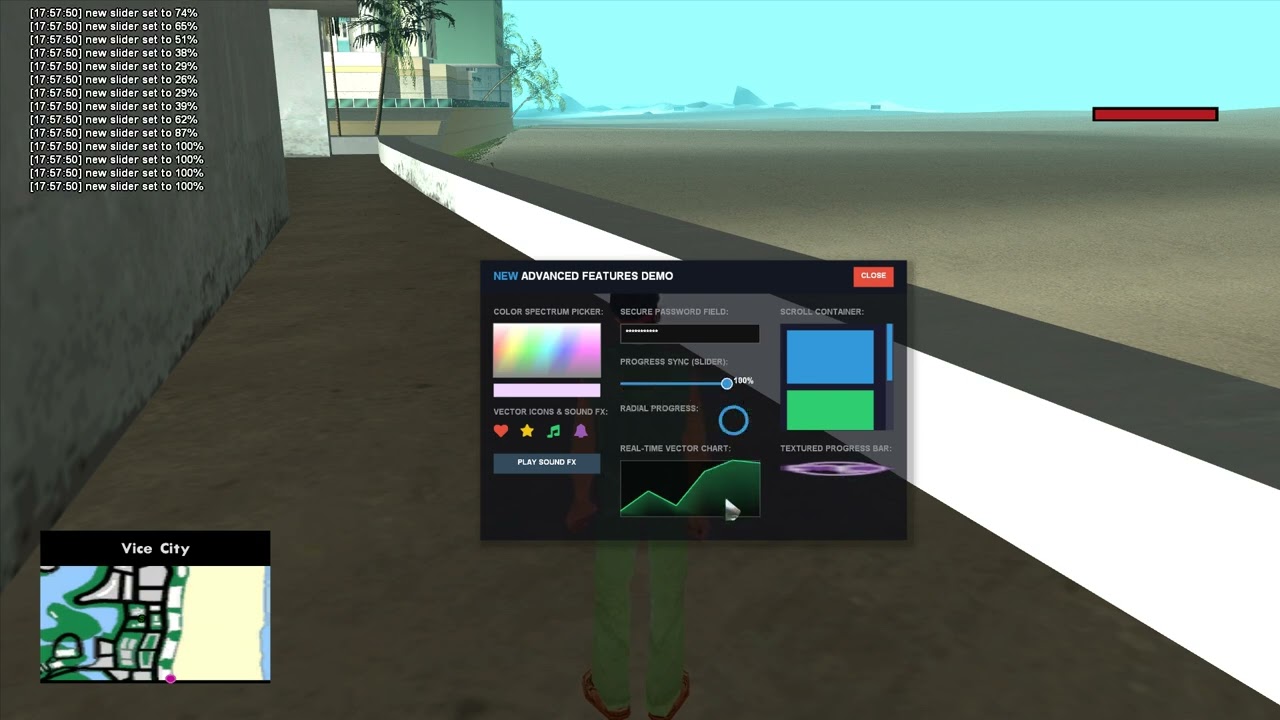
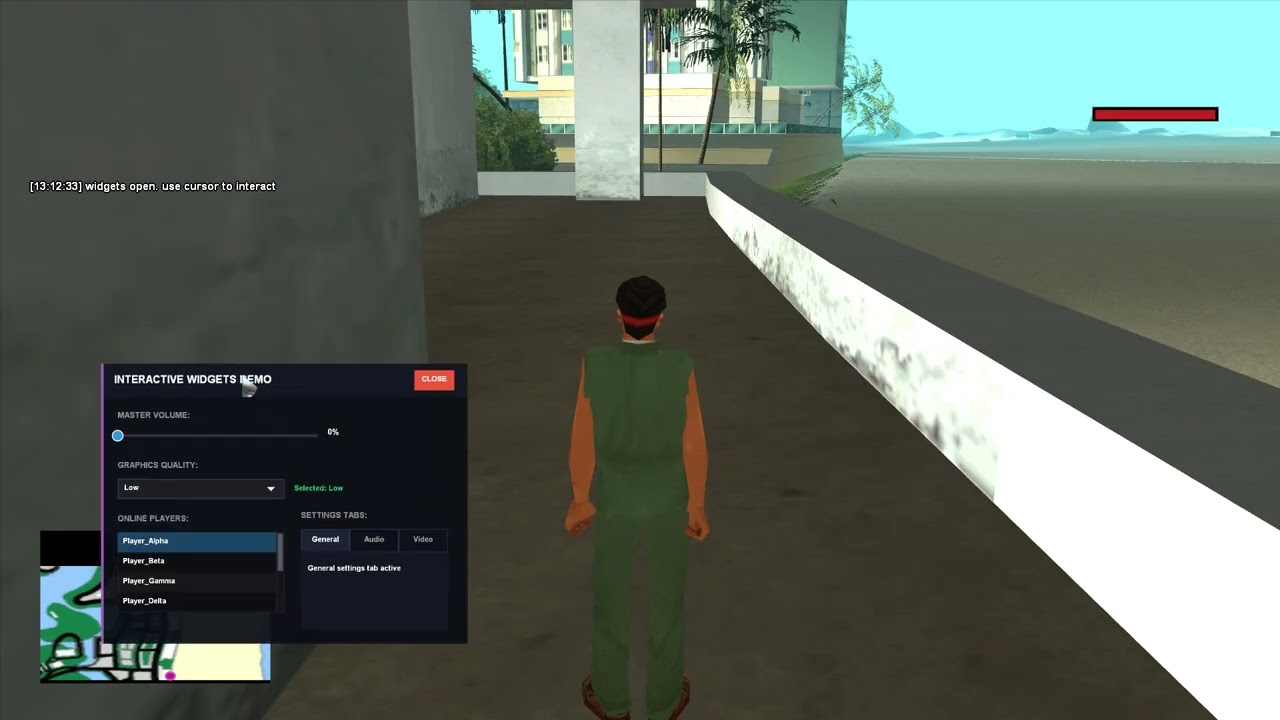
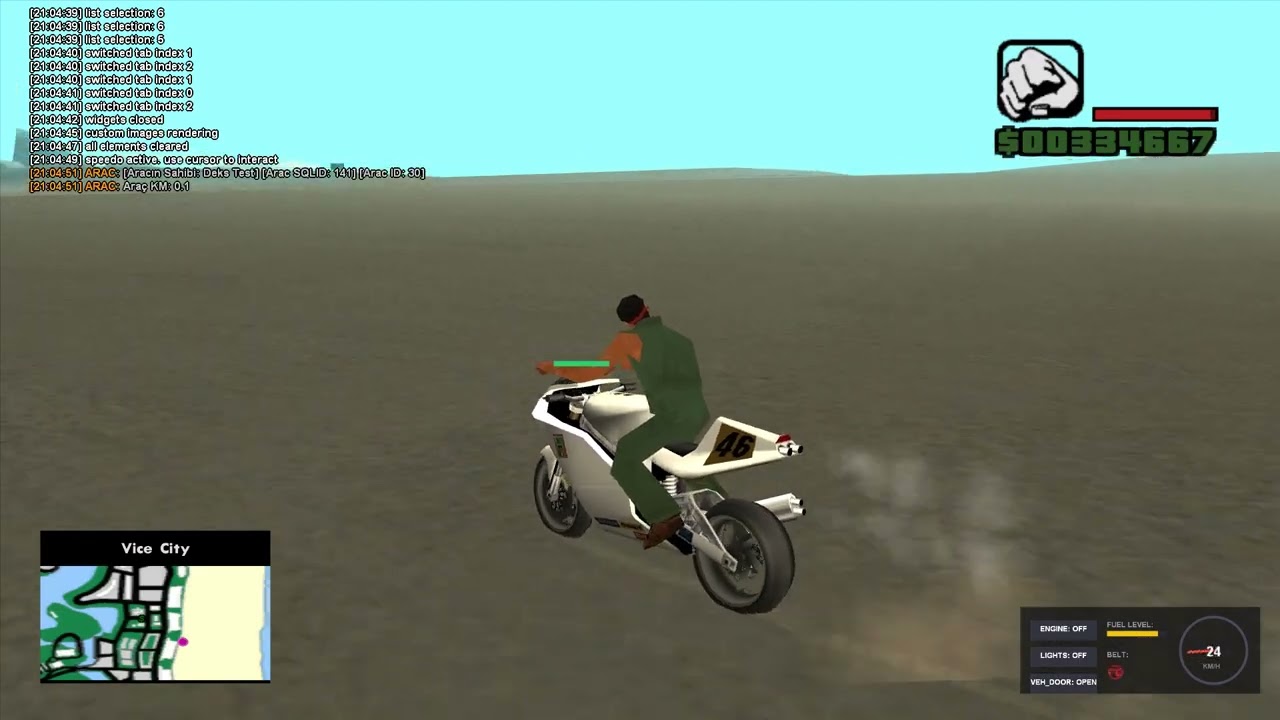
test_dx.pwn: The main entry point script routing standard Pawn player callbacks (such asOnPlayerClickDX,OnPlayerChangeDXSlider, andOnPlayerDragDX) directly to module-specific event handlers.modules/test_defs.inc: Unified header declaring macros for element coordinates, ID allocations, and player state variables (e.g., fuel level, speed limiter values, engine states).modules/test_speedo.inc: Implements a real-time dial needle speedometer, fuel gauge level, seatbelt status flashing animation, and interactive control buttons (Engine, Lights, and Lock) rendering in the bottom-right corner.modules/test_dash.inc: Implements an interactive GPS Map ring dashboard with compass vectors, engine temp metrics, custom input limiters, and hardware-clipping live alert feeds.modules/test_widgets.inc: Implements a multi-tab settings panel demonstrating sliders, comboboxes, listviews, password fields, and radial progress synchronization.modules/test_features.inc: Validates dynamic color picker spectrum arrays, scrollable containers with mousewheel clipping layers, vector line graphs, dynamic audio playbacks, and vector icons.modules/test_misc.inc: Handles basic primitive render checks including geometric outlines, color gradient panels, rounded corners, custom textures, and hardware scissor-clipping validation.
Once the test_dx filterscript is loaded on your open.mp server, the following commands are available to test the features:
/dxspeed: Toggles the real-time Speedometer HUD in the bottom-right corner. Use the cursor to interact with Engine, Lights, and Lock buttons./dxshow//dxhide: Opens/closes the Vehicle Diagnostics Dashboard in the center of the screen, allowing speed limiter values to be updated via text inputs./dxwidgets//dxhidewidgets: Opens/closes the Classic Interactive Widgets Panel for adjusting values, combobox dropdown selections, and tab transitions./dxnew//dxhidenew: Opens/closes the Advanced Features Panel to interact with color pickers, scrollable blocks, overlapping sound clips, and vector graphs./dximage: Downloads and renders dynamic texture assets./dxshapes//dxshapes2//dxhideall2: Visualizes line thicknesses, polygon triangles, custom circle parameters, gradient rectangles, and rounded cards./dxclip: Renders clipping boundaries demonstrating scissor mask alignments./dxhideall: Instantly destroys and clears all active UI elements on the screen.
- Network-Optimized Vector Rendering: Server-directed commands for basic primitives (rectangles, rounded rectangles, gradient rectangles, circles, triangles, lines, clips, icons, and textures) are serialized and transmitted through dedicated client-server RPCs (RPC 190 and 192), minimizing bandwidth usage while enabling custom UI components.
- Interactive UI Widgets: Built-in stateful widgets including buttons, checkboxes, input text fields, sliders, comboboxes, listviews, tab panels, radial menus, inventory slots, color pickers, and scrollable containers.
- Parent-Child Hierarchy: Supports logical grouping where child widgets inherit parent transforms. When a parent element is dragged or animated, all child elements are updated client-side instantly with zero network delay and zero CPU overhead.
- Direct3D9 Device Reset Resilience: Handles transitions such as Alt-Tab window toggling, resolution modifications, and graphic settings adjustments without visual degradation. Direct3D9 texture surfaces are safely cleared and re-created while font references remain persistently registered in memory, preventing the common "square box" font placeholder bug.
- Hardware-Accelerated Effects: Supports high-performance features including multi-layered dropshadows, single-pass circular progress indicators, and pixel-shader based background blur (glassmorphism) rendered directly within the D3D9 viewport.
- Dynamic Font and Vector Asset Loading: Supports dynamic runtime font registration over HTTP. The server can stream
.ttffont files to the client, which registers them process-wide. This enables crisp vector rendering of icons (e.g., FontAwesome) or custom typography without modifying client game archives. - Robust Input Handler: Windows message loop hook (WndProc) coordinates and scales mouse operations, accounting for OS DPI scaling offsets and windowed mode resolution adjustments to ensure pixel-perfect hover and click detections.
- Integrated Audio Manager: Asynchronously downloads, caches, and plays audio resources over HTTP using a multi-channel overlapping sound player, providing sub-second execution times and minimizing network re-downloads.
- Network RPC Throttling: Interactive UI transitions (such as sliders and drags) are computed locally at the client’s display rate (up to 1000Hz+), while state synchronization packets sent to the server are throttled to a maximum of 60Hz, preventing packet congestion and jitter.
native bool:DX_DrawRectangle(playerid, elementid, Float:x, Float:y, Float:w, Float:h, color);Renders a 2D flat rectangle on the screen.
playerid: The ID of the target player.elementid: A unique ID to identify the UI element.x,y: Screen coordinates (top-left corner).w,h: Width and height of the rectangle in pixels.color: Color value in ARGB format (e.g., 0xFFFFFFFF for solid white).- Returns
trueon success,falseotherwise.
native bool:DX_DrawGradientRectangle(playerid, elementid, Float:x, Float:y, Float:w, Float:h, colorTL, colorTR, colorBL, colorBR);Renders a rectangle with a multi-directional color gradient.
colorTL,colorTR,colorBL,colorBR: ARGB colors for the Top-Left, Top-Right, Bottom-Left, and Bottom-Right corners.
native bool:DX_DrawRoundedRectangle(playerid, elementid, Float:x, Float:y, Float:w, Float:h, Float:radius, color);Renders a rectangle with rounded corners.
radius: Radius of the corner rounding in pixels.
native bool:DX_DrawText(playerid, elementid, const text[], Float:x, Float:y, color, Float:scale, const font[] = "");Renders text at specified screen coordinates. Supports BBCode-style color formatting (e.g., "{FF0000}Red {00FF00}Green").
text: String to display.scale: Scaling factor for the text size.font: Optional registered font name (defaults to default UI font).
native bool:DX_DrawButton(playerid, elementid, Float:x, Float:y, Float:w, Float:h, color, Float:scale, const text[], const font[] = "");Creates an interactive button that triggers OnPlayerClickDX when clicked. Automatically manages hover color transition effects.
native bool:DX_DrawCheckbox(playerid, elementid, Float:x, Float:y, Float:w, Float:h, color, bool:checked, Float:scale, const label[], const font[] = "");Creates a stateful checkbox that triggers OnPlayerToggleDXCheckbox.
checked: Initial selection state.
native bool:DX_DrawInput(playerid, elementid, Float:x, Float:y, Float:w, Float:h, color, Float:scale, const defaultText[], const placeholder[], const font[] = "");Creates a text input field. Triggers OnPlayerDXInputSubmit when the player presses Enter.
defaultText: Initial text content.placeholder: Text displayed when the field is empty.
native bool:DX_DrawSlider(playerid, elementid, Float:x, Float:y, Float:w, Float:h, color, Float:value, const font[] = "");Renders an interactive horizontal slider. Triggers OnPlayerChangeDXSlider on modification.
value: Initial value ratio between0.0(0%) and1.0(100%).
native bool:DX_DrawComboBox(playerid, elementid, Float:x, Float:y, Float:w, Float:h, color, selectedIndex, const options[], const font[] = "");Creates a dropdown menu selection widget. Triggers OnPlayerSelectDXComboBox.
selectedIndex: Index of the option selected by default (0-indexed).options: Options separated by commas (e.g.,"Option 1,Option 2,Option 3").
native bool:DX_DrawListView(playerid, elementid, Float:x, Float:y, Float:w, Float:h, color, selectedIndex, const items[], const font[] = "");Renders a scrollable vertical selection list. Triggers OnPlayerSelectDXListView.
items: Item values separated by commas.
native bool:DX_DrawTabPanel(playerid, elementid, Float:x, Float:y, Float:w, Float:h, color, selectedIndex, const tabs[], const font[] = "");Renders an interactive horizontal tab selector. Triggers OnPlayerSelectDXTab.
tabs: Comma-separated tab labels.
native bool:DX_DrawImage(playerid, elementid, const url[], Float:x, Float:y, Float:w, Float:h, color = 0xFFFFFFFF);Downloads asynchronously over HTTP, caches, and renders a 2D image.
url: Direct path to the image asset (PNG/JPG).
native bool:DX_DrawIcon(playerid, elementid, Float:x, Float:y, Float:size, const iconName[], color, const font[] = "FontAwesome");Renders a crisp vector icon from a loaded font library.
iconName: The name of the icon code inside the specified font family (e.g.,"heart").font: The font family name. Must be preloaded viaDX_LoadFont. Defaults to"FontAwesome".
native bool:DX_DrawLine(playerid, elementid, Float:x1, Float:y1, Float:x2, Float:y2, Float:thickness, color);Draws a 2D line between two screen points.
native bool:DX_DrawCircle(playerid, elementid, Float:x, Float:y, Float:radius, color, Float:thickness = 0.0);Draws a circle. If thickness is greater than 0.0, an outlined circle is drawn instead of a filled one.
native bool:DX_DrawTriangle(playerid, elementid, Float:x1, Float:y1, Float:x2, Float:y2, Float:x3, Float:y3, color);Draws a filled polygon triangle using hardware vertices.
native bool:DX_DrawCircularProgress(playerid, elementid, Float:x, Float:y, Float:radius, Float:progress, color, Float:thickness);Renders a circular speedometer or ring indicator.
progress: Value ratio between0.0(0%) and1.0(100%).
native bool:DX_DrawShadow(playerid, elementid, Float:x, Float:y, Float:w, Float:h, color, Float:size = 8.0, Float:offset = 4.0);Applies a hardware-optimized gradient-layered box shadow around a rectangular area.
native bool:DX_DrawGraph(playerid, elementid, Float:x, Float:y, Float:w, Float:h, color, const Float:values[], numValues, Float:maxVal);Draws a real-time line graph plotting an array of floating-point values.
native bool:DX_DrawInventorySlot(playerid, elementid, Float:x, Float:y, Float:w, Float:h, color, const iconUrl[], const label[], amount);Creates an inventory slot containing an image icon, label, and numerical counter. Supports item dragging and swapping.
native bool:DX_DrawTexturedProgressBar(playerid, elementid, Float:x, Float:y, Float:w, Float:h, const bgTextureUrl[], const fillTextureUrl[], Float:progress, color = 0xFFFFFFFF);Renders a progress bar utilizing customized texture URLs for both its background and foreground layers.
native bool:DX_DrawRadialMenu(playerid, elementid, Float:x, Float:y, Float:radius, color, selectedIndex, const items[], const icons[]);Renders an interactive circular pie menu. Triggers OnPlayerSelectRadialItem.
items: Comma-separated labels.icons: Comma-separated asset URLs.
native bool:DX_DrawScrollContainer(playerid, elementid, Float:x, Float:y, Float:w, Float:h, Float:contentHeight, Float:scrollVal, color);Renders a container with an interactive vertical scroll bar. Triggers OnPlayerScrollDXContainer.
contentHeight: Real vertical height of the scroll content in pixels.scrollVal: Current vertical scroll position percentage from0.0to1.0.
native bool:DX_DrawColorPicker(playerid, elementid, Float:x, Float:y, Float:w, Float:h, selectedColor);Renders an interactive RGB gradient color picker spectrum. Triggers OnPlayerSelectDXColor.
native bool:DX_Destroy(playerid, elementid);Removes a specific UI element for a player.
native bool:DX_ClearAll(playerid);Removes all active UI elements for a player.
native bool:DX_LoadFont(playerid, const fontFamily[], const url[]);Downloads a TrueType Font (.ttf) from a URL and registers it process-wide in the client's OS for safe, high-fidelity rendering.
fontFamily: Unique family name identifier to bind the font to (e.g.,"Comfortaa").url: Direct HTTP web link hosting the.ttffile.
native bool:DX_PlaySound(playerid, const url[]);Downloads, locally caches, and plays a dynamic multichannel overlapping sound.
url: Direct HTTP link to the.mp3or.wavaudio track.
native bool:DX_SetDraggable(playerid, elementid, bool:draggable);Enables or disables local drag interaction. Triggers OnPlayerDragDX callback upon coordinate modifications.
native bool:DX_SetParent(playerid, elementid, parentid);Links an element as a child of another. Child elements move relative to their parents instantly on the client side.
native bool:DX_SetTooltip(playerid, elementid, const tooltipText[]);Binds an automated hover popup tooltip message to a specific UI widget.
native bool:DX_SetInputPassword(playerid, elementid, bool:enable);Toggles password mode on input boxes, masking letters locally as asterisks while maintaining text integrity in server sync calls.
native bool:DX_SetBlurBehind(playerid, elementid, bool:enable);Enables pixel-shader based glassmorphism background blurring inside the boundaries of a given element.
native bool:DX_SetClipArea(playerid, elementid, Float:x, Float:y, Float:w, Float:h);Defines a bounded rectangular clipping viewport limiting child render pipelines.
native bool:DX_Animate(playerid, elementid, Float:targetX, Float:targetY, Float:targetW, Float:targetH, Float:targetAlpha, durationMs, easingType);Triggers a hardware-interpolated transition for position, size, and transparency.
easingType: Interpolation curve calculation code (0 = Linear, 1 = EaseIn, 2 = EaseOut, 3 = EaseInOut).
native bool:DX_GetScreenSize(playerid, &Float:width, &Float:height);
native bool:DX_GetCheckboxState(playerid, elementid, &bool:checked);
native bool:DX_GetInputText(playerid, elementid, text[], len = sizeof(text));
native bool:DX_GetSliderValue(playerid, elementid, &Float:value);
native bool:DX_GetComboBoxIndex(playerid, elementid, &index);
native bool:DX_GetListViewIndex(playerid, elementid, &index);
native bool:DX_GetTabActive(playerid, elementid, &index);
native bool:DX_GetColorPickerColor(playerid, elementid, &color);
native bool:DX_GetScrollContainerVal(playerid, elementid, &Float:value);
native bool:DX_IsReady(playerid);
Various API routines to query current state metrics and player readiness securely on the server side.
forward OnPlayerClickDX(playerid, elementid);Triggered when a player clicks a clickable widget (e.g., button, image, rectangle).
forward OnPlayerToggleDXCheckbox(playerid, elementid, bool:checked);Triggered when a player toggles the state of a checkbox.
forward OnPlayerDXInputSubmit(playerid, elementid, const text[]);Triggered when a player submits text inside an input field by pressing Enter.
forward OnPlayerChangeDXSlider(playerid, elementid, Float:value);Triggered when a player changes the position of a slider.
forward OnPlayerSelectDXComboBox(playerid, elementid, index);Triggered when a player selects a dropdown option from a ComboBox.
forward OnPlayerSelectDXListView(playerid, elementid, index);Triggered when a player clicks a list item inside a ListView.
forward OnPlayerSelectDXTab(playerid, elementid, index);Triggered when a player selects a tab from a TabPanel.
forward OnPlayerDragDX(playerid, elementid, Float:x, Float:y);Triggered when a player drags an element designated as draggable.
forward OnPlayerSwapDXSlots(playerid, sourceElementid, targetElementid);Triggered when a player drags and drops one inventory slot element over another.
forward OnPlayerSelectRadialItem(playerid, elementid, index);Triggered when a player selects a segment in a Radial Menu.
forward OnPlayerSelectDXColor(playerid, elementid, color);Triggered when a player selects a color on a Color Picker spectrum.
forward OnPlayerScrollDXContainer(playerid, elementid, Float:scrollVal);Triggered when a player scrolls within a Scroll Container.
forward OnPlayerDXReady(playerid);Triggered when the player's client-side DirectX eklenti (ASI plugin) has successfully initialized, hooked the D3D9 renderer, and is ready to draw custom elements.