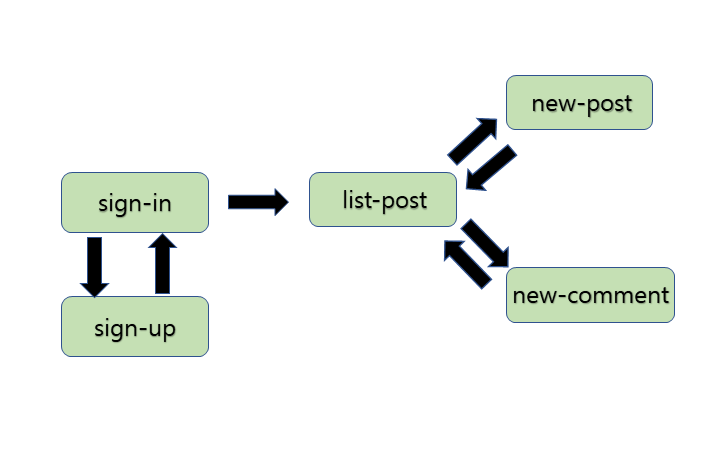
This demonstrates Flutter App of a social application such as a forum. GUI is similar to Firebase Database Quickstart. Posting, Commenting and Favorites are supported. And it stores them at Cloud Firestore of Google.
- Add Firebase to your Android Project
- Get started with Cloud Firestore as test mode
- Go to Auth tab and enable Email/Password authentication.
- Run the sample on emulator, Android or iOS device

This App requires two collections, “posts” and “comments” of firestore.
<firestore.pn>
“posts” stores posts of a forum. It has title, body, user, likes, ncomments, remarks field. remarks is an array of documents from “comments”. “comments” records comments of posts, which is composed of text and user.
Below is a python program which adds a post and a comment.
from firebase_admin import credentials
from firebase_admin import firestore

cred = credentials.Certificate('./withpython-c29b6-firebase-adminsdk-6jnss-307e85805f.json')
firebase_admin.initialize_app(cred)

db = firestore.client()

c1 = db.document('comments/comm04')
c1.set({
    'user': "admin",
    'text': "welcome again"
})

p1 = db.collection('posts').document('post01')
p1.set({
    'user': "admin",
    'title' : 'Welcome!',
    'body' : 'This a test post',
    'timestamp' : firestore.SERVER_TIMESTAMP,
    'ncomments' : 0,
    'likes' : 0
})

p1.update({'remarks' : firestore.ArrayUnion([c1])})
p1.update({'ncomments' : firestore.Increment(1)})
Refer to Add the Firebase Admin SDK to your server