This is an exercise part of a technical interview. The API lets you manage (access, create, edit and delete) cities with their coordinates and gives you the possibility to calculate the distance between them.
| Url path | Method | Authentication | Description | Form Body | Form headers |
|---|---|---|---|---|---|
| /api/cities/ | GET | Not required | Listing des villes | / | { Accept:'application/json' } |
| /api/cities/ | POST | Required | Création d'une ville | name, long, lat | { Accept:'application/json', Authorization: 'Bearer <token>' } |
| /api/cities/{city}/ | GET | Not required | Affichage du détails d'une ville | / | { Accept:'application/json' } |
| /api/cities/{city}/ | PUT | Required | Mise à jour des informations d'une ville | name, long, lat | { Accept:'application/json', Authorization: 'Bearer <token>' } |
| /api/cities/{city}/ | DELETE | Required | Suppression d'une ville | / | { Accept:'application/json', Authorization: 'Bearer <token>' } |
| /api/cities/distance/{origin}/{destination}?unit={unit} | GET | Required | Calcul de la distance entre deux villes | / | { Accept:'application/json', Authorization: 'Bearer <token>' } |
| /api/login | POST | Not required | Authentification | email, password | { Accept:'application/json' } |
| Parameter name | Type | Validation | Description |
|---|---|---|---|
| {city} | GET | Required, UUID | Identifiant unique de l'entité city, de type UUID |
| {origin} | GET | Required, UUID | Identifiant unique de l'entité city, de type UUID |
| {destination} | GET | Required, UUID | Identifiant unique de l'entité city, de type UUID |
| {unit} | GET | Not required, kilometers or miles | L'unité de mesure, kilometers par défaut |
| name | POST/FORM | Required, string, min = 1, max = 255 | Nom de la ville à créer ou modifier |
| long | POST/FORM | Required, regex | Longitude de la ville à créer ou modifier |
| lat | POST/FORM | Required, regex | Latitude de la ville à créer ou modifier |
| POST/FORM | Required, email | Adresse email de l'utilisateur | |
| password | POST/FORM | Required | Mot de passe de l'utilisateur |
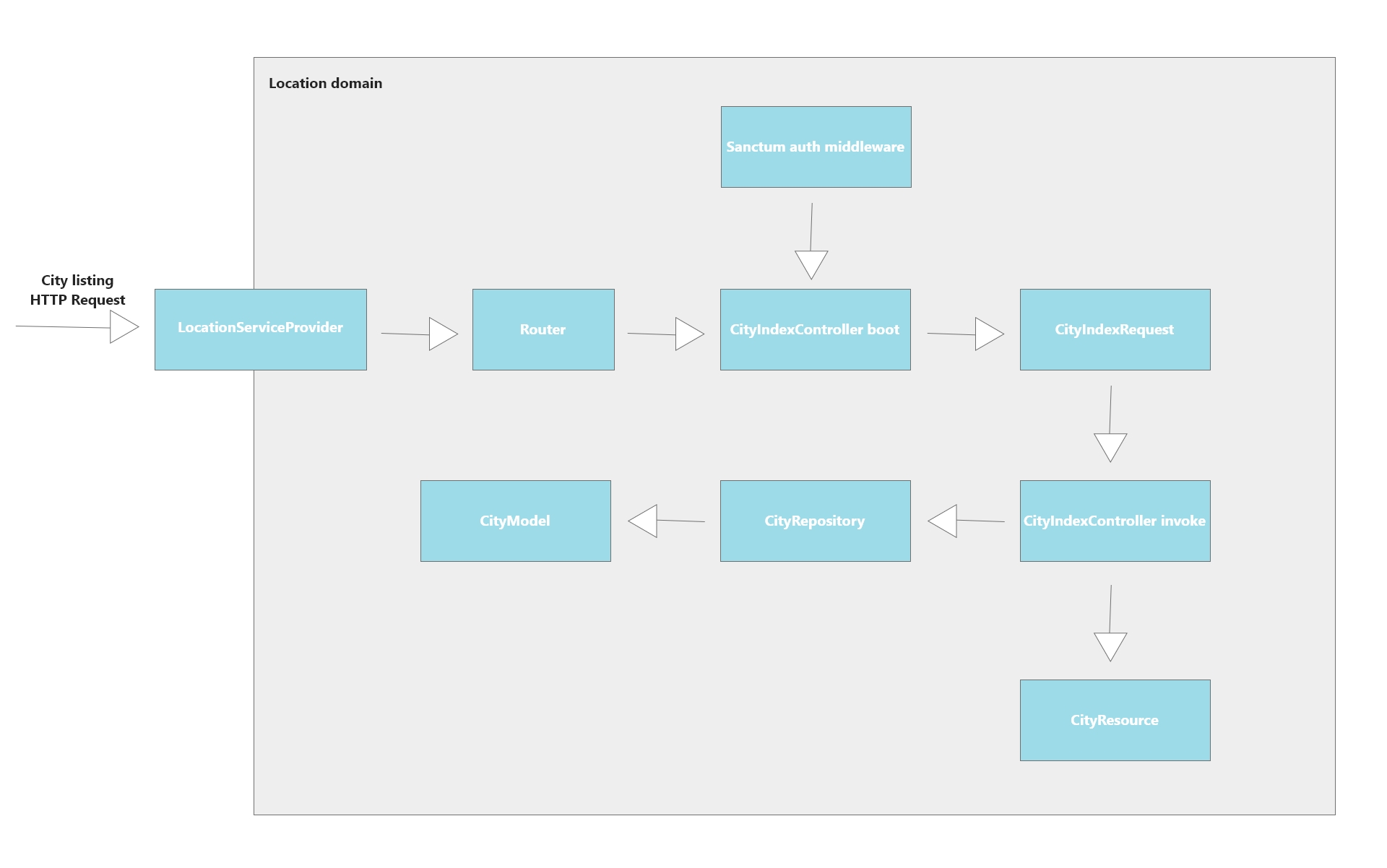
- The location domain is booted by the framework when a coming request is intercepted.
- The location router matches the coming request signature with a controller, so it matches with CityIndexController.
- The CityIndexController is booted (an instance is created which runs its constructor, so in case of an API with a required authentication, the constructor uses the sanctum package auth middleware in order to verify if the user is authenticated, otherwise, it returns a 401 HTTP response code).
- If ok, an instance of CityIndexRequest is injected and its logic executed (form validation rules, request preprocessing, etc.).
- If successful validations, the controller's logic is executed.
- Most of the time, the controller uses a repository to interacts with the data source (database), so an instance of the CityRepository is injected into the CityIndexController invoke action.
- The CityResource is used to return a formatted json response to the user. In some non model resource based API (like /api/distance), a simple json response is returned.
- Docker
- Docker compose
git clone git@github.com:yooslim/project-x.git
cp .env.example .env
docker-compose -f docker-compose.build.yml build
docker-compose -f docker-compose.local.yml up -d
git clone git@github.com:yooslim/project-x.git
cp .env.example .env
A version of the docker image is already hosted on docker hub, so you can pull it directly without pulling and building the project locally
APP_TAG_NAME=v1.0.1 docker-compose -f docker-compose.test.yml up -d
Once the services up, you need to migrate the database and run the seeders in order to have some fake data to display
docker exec -it project_x_app php artisan migrate --seed
http://localhost:9778/api/cities/
Demo user:
Email: test@live.fr
Password: test