


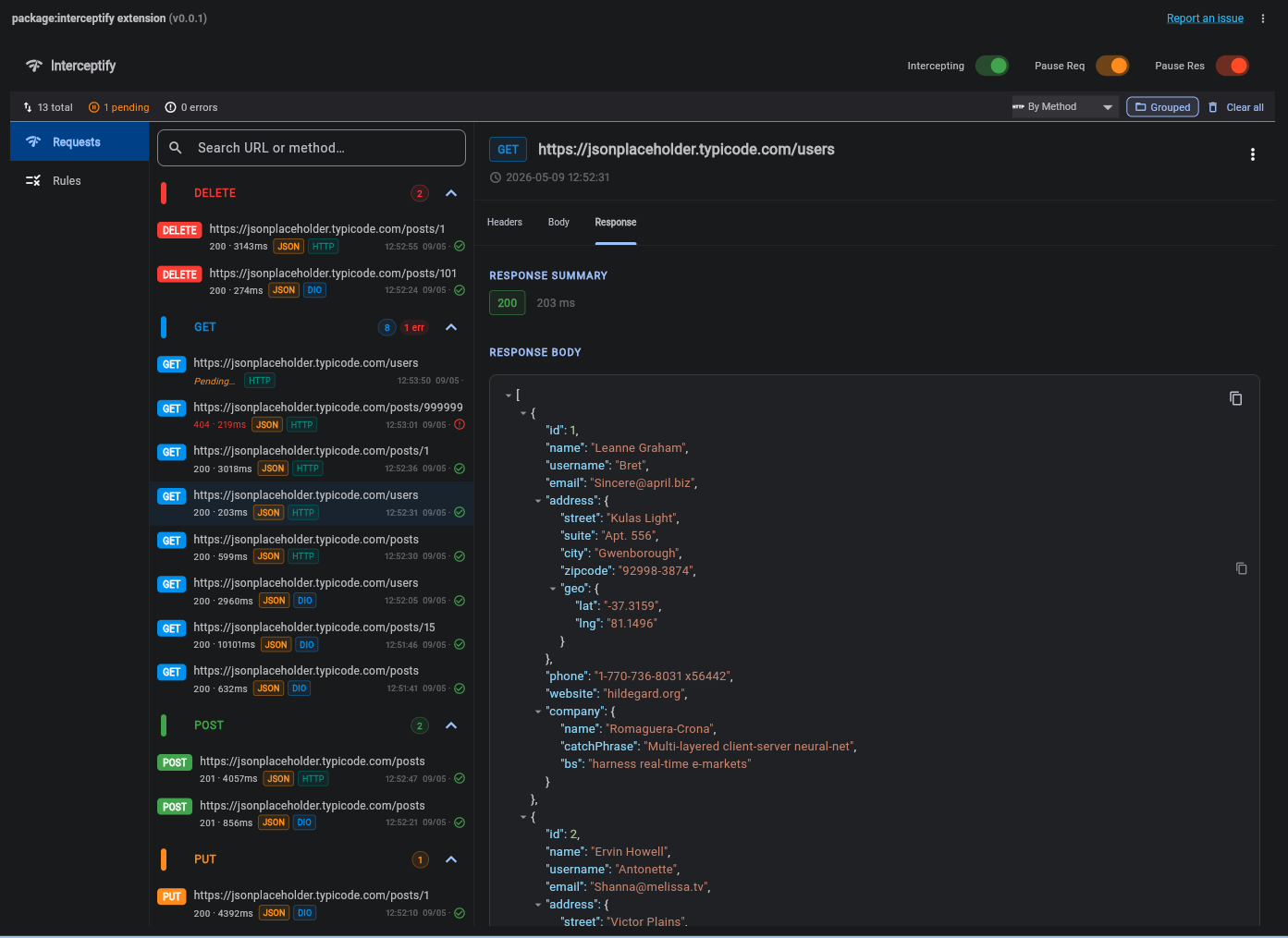
Interceptify is a Flutter DevTools extension that gives you full visibility and control over your app's network layer. You can intercept, inspect, filter, modify, and group HTTP traffic in real-time, right inside your DevTools.
| Package | Status | Notes |
|---|---|---|
dio |
✅ Supported | Full support including FormData |
http |
✅ Supported | via InterceptifyHttpClient wrapper |
graphql_flutter |
❌ Planned | Coming soon |
chopper |
❌ Planned | Coming soon |
grpc |
❌ Planned | Coming soon |
Safe by design. Interceptify is completely inactive in release builds (
kDebugModeguard). No performance overhead, no data leaks in production.
- Features at a Glance
- Installation
- Quick Start
- Using the DevTools Panel
- Rules Engine
- API Reference
- Tips & Tricks
| Category | What it does |
|---|---|
| Multi-client | Works with Dio and package:http |
| Live inspection | See every request and response as it happens |
| Advanced filters | Regex search, method filter, status code, duration, failed-only |
| Smart grouping | Group traffic by domain, path, method, client, or status — like Charles Proxy |
| Pause & modify | Freeze any request/response, edit its headers/body, then resume |
| Response mocking | Change status codes and bodies without touching your backend |
| Retry | Re-send any captured request with one click |
| Copy as cURL | Instantly export any request for use in Postman or your terminal |
| Rules engine | Define rules to auto-pause requests matching URL patterns or HTTP methods |
Add interceptify to your pubspec.yaml, along with the HTTP client(s) you use:
dependencies:
  interceptify: ^0.0.1+4

  dio: ^5.9.2              # if you use Dio
  http: ^1.6.0             # if you use package:http
Then run:
flutter pub getAll integrations share the same first step: call Interceptify.initialize() once before runApp(). Everything else depends on which HTTP client you use.
import 'package:dio/dio.dart';
import 'package:interceptify/interceptify.dart';

void main() {
  Interceptify.initialize(); // must be called first

  final dio = Dio();
  dio.interceptors.add(Interceptify.dioInterceptor);

  // Register the instance to enable the Retry feature in DevTools
  Interceptify.registerDioInstance(dio);

  runApp(MyApp(dio: dio));
}
That's it — use dio as you normally would. Every request will appear in the DevTools panel automatically.
Instead of creating http.Client() directly, wrap it with Interceptify.httpClient():
import 'package:http/http.dart' as http;
import 'package:interceptify/interceptify.dart';

void main() {
  Interceptify.initialize();

  // Drop-in replacement for http.Client()
  final client = Interceptify.httpClient();

  runApp(MyApp(client: client));
}
Use client exactly like a regular http.Client:
// GET
final response = await client.get(
  Uri.parse('https://api.example.com/users'),
  headers: {'Authorization': 'Bearer $token'},
);

// POST with JSON body
await client.post(
  Uri.parse('https://api.example.com/posts'),
  headers: {'Content-Type': 'application/json'},
  body: jsonEncode({'title': 'Hello', 'userId': 1}),
);

// Always close the client when you're done
client.close();
Requests made with this client appear in DevTools with an HTTP badge and can be separated from other traffic using the "By HTTP Client" grouping.
- Run your app in Debug Mode (
flutter run). - Open Flutter DevTools in your browser or IDE.
- Click the Interceptify tab.
The panel is split into two areas:
- Left panel — the request list with filter and grouping controls.
- Right panel — the detail view for the selected request, with tabs for Headers, Body, and Response.
Click the filter icon (🔽) to the right of the search bar to expand the filter panel.
| Filter | How it works |
|---|---|
| Search | Type any text to search by URL or HTTP method |
| Regex mode | Click .* in the search bar to switch to regex. The icon turns red if the pattern is invalid. |
| Method | Click any method chip to include it. Multiple selections are supported. |
| Status Code | Filter by status family: Any / 2xx / 3xx / 4xx / 5xx |
| Duration | Filter by response time: Any / < 100ms / 100–500ms / > 500ms |
| Failed Only | Show only requests with an error or a status code ≥ 400 |
Active filters appear as dismissible chips below the filter panel. Click Clear filters to reset everything at once.
By default, requests are shown as a flat list. Click List / Grouped in the summary bar to switch to grouped mode.
When grouped, a strategy dropdown appears next to the toggle:
| Strategy | Groups requests by |
|---|---|
| By Domain | Hostname — e.g., api.example.com, cdn.assets.com |
| By Path Prefix | First path segment — e.g., /users, /auth, /products |
| By Method | HTTP method — GET, POST, etc. |
| By HTTP Client | The client that made the request — Dio or HTTP |
| By Status Code | Status family — 2xx Success, 4xx Client Error, 5xx Server Error |
Each group header shows a request count badge and a red error count badge when failures are present. Click any group to expand or collapse it.
This is where Interceptify becomes a real debugging superpower.
- Create a rule in the Rules tab (or enable Pause All Requests in the toolbar) (Optional).
- When a matching request is made, it appears in the list as PENDING with an orange indicator.
- Select the request to open the detail view.
- Edit any field — headers, query parameters, request body, or response body.
- Click Continue to send it with your modifications, or Cancel to abort the request.
Rules let you target specific requests for pausing, without affecting the rest of your traffic.
Go to the Rules tab → click Add Rule → configure the condition and value.
| Toggle | Effect |
|---|---|
| Intercepting | Master switch — disables all interception when off |
| Pause Req | Pauses every outgoing request, regardless of rules |
| Pause Res | Pauses every incoming response before it reaches your app |
| Condition | Matches when the request… |
|---|---|
urlContains |
URL contains the given string |
urlEquals |
URL is exactly equal to the given string |
urlStartsWith |
URL starts with the given string |
methodEquals |
HTTP method matches (e.g., POST) |
// ── Initialization ────────────────────────────────────────────────────────
Interceptify.initialize({bool debugLogging = true});

// ── Interceptors ──────────────────────────────────────────────────────────
Interceptify.dioInterceptor                           // add to dio.interceptors
Interceptify.httpClient({http.Client? inner})         // wrap http.Client()

// ── Dio Retry Support ─────────────────────────────────────────────────────
Interceptify.registerDioInstance(Dio dio);            // enables Retry in DevTools

// ── Rules ─────────────────────────────────────────────────────────────────
Interceptify.addRule(InterceptRule rule);
Interceptify.removeRule(String ruleId);
Interceptify.clearRules();
List<InterceptRule> rules = Interceptify.getRules();

// ── Global Control ────────────────────────────────────────────────────────
Interceptify.enableInterception();
Interceptify.disableInterception();

// ── Diagnostics ───────────────────────────────────────────────────────────
bool initialized    = Interceptify.isInitialized;
int  pendingCount   = Interceptify.getPendingRequestCount();

// ── Cleanup ───────────────────────────────────────────────────────────────
Interceptify.dispose();- Combine filters: use regex
^/users/\d+$together with the Failed Only toggle to isolate broken user-detail endpoints instantly. - Group by HTTP Client: when debugging an issue that might be client-specific, this grouping separates Dio and HTTP traffic into distinct sections.
- Copy as cURL: every request can be exported as a ready-to-run cURL command — paste it straight into your terminal or Postman.
- Increase the timeout: if you need more time to inspect or edit a request before it auto-resumes, go to Rules → Settings and raise the interception timeout.
- Retry without re-triggering: use the Retry button in the detail view to resend a request without having to tap through your UI again — great for testing a fix immediately.
Interceptify is open source. Bug reports, feature requests, and pull requests are welcome on GitHub.
License: MIT