Ensure rich CLI displays full text and wraps table text
#577
Conversation


 strickvl
added
enhancement
strickvl
added
enhancement

|
I still get this when I use the branch on Windows WSL. I am unable to click using the new Windows Terminal application, even though im sure its capable to support link clicks
|
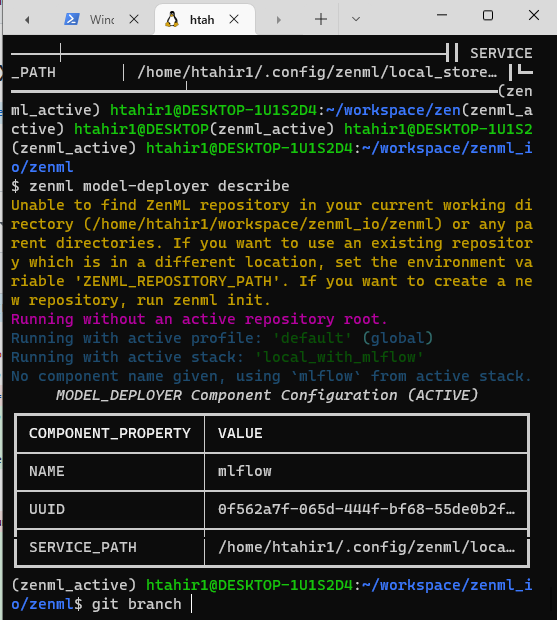

|
@htahir1 you're totally right. That was the one CLI command I hadn't addressed. I also took the opportunity to handle where tests were failing in the case when a dependency list has spaces or the |
|
@strickvl Cool! Ok now it seems to work but Cntrl+Copy on the links gives me this error.. I think that interpreting these as links does not really make sense as then the terminal wants to open it as a link in the browser |

|
@htahir1 It's the only way to allow users to access the details of a cell when it wraps to a new line, unfortunately. I found that CTRL-clicking and copying, and then pasting it, worked for me. Happy to brainstorm other suggestions, but this seems to be the only way with |

 htahir1
left a comment
htahir1
left a comment
htahir1
left a comment
There was a problem hiding this comment.
Alright, actually im happy with this one. LGTM!


Describe changes
I've solved the issue were
richwas shortening text inside tables. Also, the text of almost all the contents of these tables should now be accessible as a 'link', so if your terminal supports in-terminal links (by holding down CTRL or CMD, i.e.) then users will be able to do that to copy the text inside a specific cell.The one caveat that doesn't work right now is when a cell's text contains a space. So far, the two things this affects is JSON values and path values coming from Mac or Windows environments (both of which often have spaces). It wouldn't be trivial to solve and for those two specific items there isn't a great deal lost in not being able to click-select them as a link. They will still all be visible and behave like the rest of the tables in terms of wrapping as columns.
Pre-requisites
Please ensure you have done the following:
Types of changes