
Draw on your website. Your AI agent sees it.
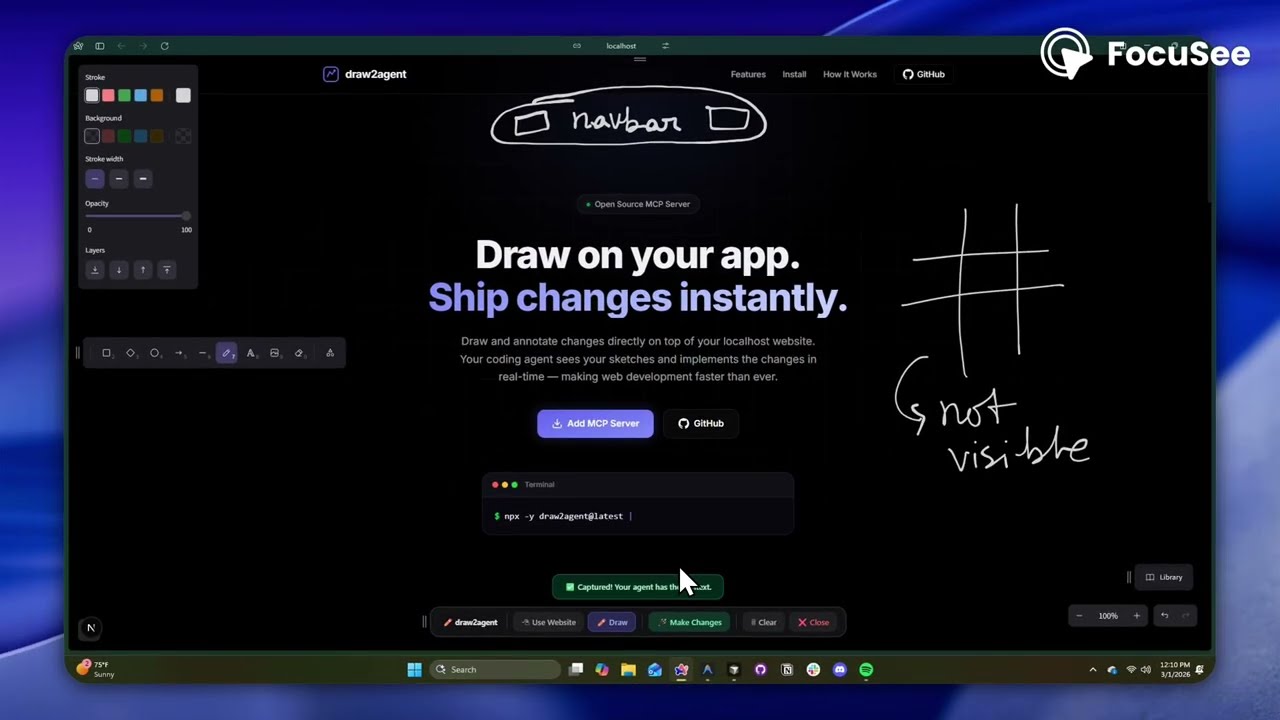
draw2agent is an MCP server that lets you draw annotations directly on top of your local dev page. When you submit, your IDE agent receives a screenshot, structured DOM data, and annotation context to make precise code edits.
👉 Try it out at: draw2agent.vercel.app
Cursor (~/.cursor/mcp.json):
{
  "mcpServers": {
    "draw2agent": {
      "command": "npx",
      "args": ["-y", "draw2agent"]
    }
  }
}Tell your agent:
"Use draw2agent to fix the navbar"
- 🌐 Agent opens your browser with drawing tools on your page
- ✏️ Draw circles, arrows, text directly on your website
- 📸 Click Submit
- 🤖 Agent reads the visual context and applies code changes
Your Dev Page (proxied)
├── Your original page content
└── Excalidraw overlay (transparent, on top)
    ├── Draw mode: annotate directly on the page
    ├── Select mode: interact with the page normally (Esc)
    └── Submit: screenshot + DOM + annotations → agent
The MCP server exposes two tools:
| Tool | Description |
|---|---|
launch_canvas |
Opens your dev page with the drawing overlay |
get_drawing_state |
Returns screenshot, DOM nodes, and annotations |
MIT