This is a sample application for CAP JAVA demo with UI/DB/SRV. This app can be deployed to BTP directly and run locally.
- Main branch: contains basic code which only have one service and one app
- Dev branch: travel service demo
In the root folder of your project run
npm ci
mvn spring-boot:run
To start the middleware, in another console execute
cd app\travel_processor
npm start
Open this link in your browser: http://localhost:8080/index.html
Note: If you access the CAP Java server directly without middleware, you will have to enter mock user credentials admin / admin which are maintained in file application.yml.
- XS-APP : this file is used to route backend service
- ui5.yaml: this file contains customMiddleware which is used to route locally
- mountPath: it is used in manifest
- baseUri: this one should be the backend service url which is routed to
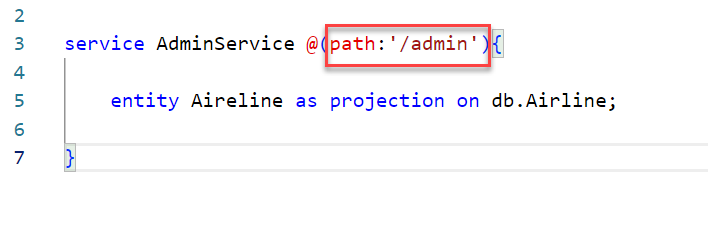
- @(path:'/admin'): the service path should be contained in service cds file
- XS-APP: this file is used to route backedn service with the destination name
- ui5-deploy.yaml: this file is used to zip fiori content with xs-app file
- package.json: contains scripts using ui5-deploy.yaml file
- service path
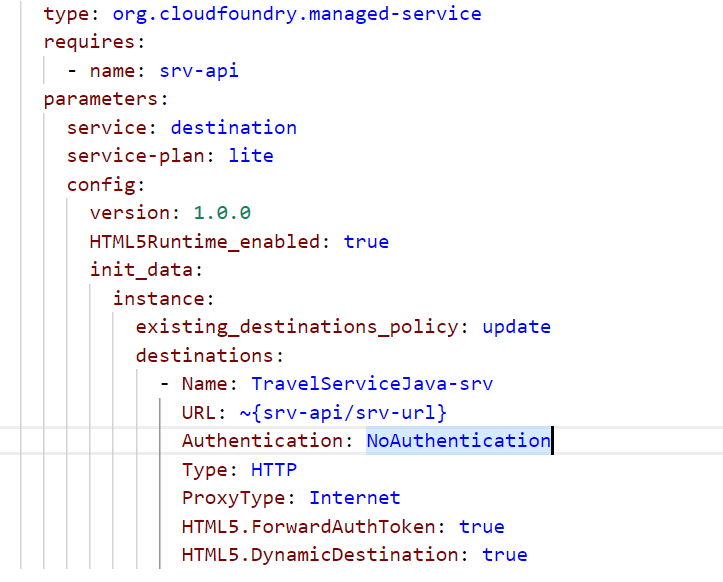
- mta.yaml: this will create destination service for backend on BTP
The project contains a configuration for deploying the CAP services and the SAP Fiori app to the SAP Business Technology Platform (SAP BTP) using a managed application router. The app then becomes visible in the content manager of the SAP Launchpad service.
Build the project from the command line:
mbt buildThe build results will be stored in the directory mta_archives.
- Log in to the target space.
- Deploy the MTA archive using the CF CLI:
cf deploy mta_archives/****.mtar
You need to have access to a HANA Cloud instance and SAP BTP.
- Deploy the HDI content to a HANA HDI container (which is newly created on first call):
cds deploy --to hana. - Start the application with the Spring Profile
cloud.- From Maven:
mvn spring-boot:run -Dspring-boot.run.profiles=cloud - From your IDE with the JVM argument
-Dspring.profiles.active=cloudor env variablespring.profiles.active=cloud
- From Maven:
The running application is now connected to its own HDI container/schema. Please keep in mind that the credentials for that HDI container are stored locally on your filesystem (default-env.json).