Pretty terminal utilities wrapped around Rich: colorful progress bars, dict-to-table printing, colored logging, and more.
pip install prettytermA clean, colorful progress bar wrapper around Rich's progress module. Drop-in replacement for tqdm with enhanced formatting.
Features:
- Progress bar with completion percentage
- Elapsed and remaining time
- Iteration speed (it/s)
- Dynamic postfix updates (string or dict)
- Auto-detects sequence length
from prettyterm import track

# Basic usage
for i in track(range(100), desc="Processing"):
    # Your code here
    pass

# With dynamic postfix
pbar = track(range(100), desc="Epoch 3")
for i in pbar:
    pbar.set_postfix({"loss": f"{0.5}", "acc": f"{95}%"})
Output:

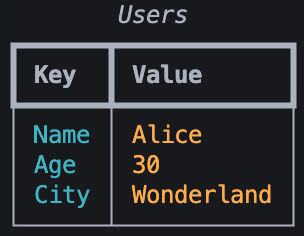
Display dictionaries as colorful, formatted tables. Great for configuration display, stats output, or debugging.
Features:
- Automatic column sizing
- Color-coded columns (cyan keys, orange values)
- Optional table title
- Optional row dividers
from prettyterm import print_table

data = {
    "Name": "Alice",
    "Age": 30,
    "City": "Wonderland",
    "Role": "Developer"
}

print_table(data, title="User Info", show_lines=True)
Output:
Get a pre-configured logger with colored output and a custom SUCCESS logging level (sits between INFO and WARNING).
Features:
- Color-coded log levels
- Custom
SUCCESSlevel (green) - Auto-configured on import
- Clean, piped format:
timestamp │ level │ name │ message
from prettyterm import get_logger

logger = get_logger("my_app")

logger.debug("Detailed debug info")
logger.info("Application started")
logger.success("Operation completed!")  # Custom level
logger.warning("Resource usage high")
logger.error("Connection failed")
logger.critical("System shutting down")
Output:

Log Colors:
DEBUG- CyanINFO- WhiteSUCCESS- Green (custom)WARNING- YellowERROR- RedCRITICAL- Red on white
Custom Log Level:
By default, logging is set to INFO level. You can change this by importing and calling setup_colored_logging:
from prettyterm import get_logger, setup_colored_logging
import logging

# Set to DEBUG level to see all messages
setup_colored_logging(log_level=logging.DEBUG)

logger = get_logger("my_app")
logger.debug("This will now be visible")# Install in editable mode
pip install -e .
# Run examples
python src/prettyterm/pbar.py
python src/prettyterm/table.py
python src/prettyterm/logger.pyMIT