Getting Started
Here I will show you basic usage of the framework so you can grasp some sort of workflow.
At the core of Evolve is the module loader. You should require it at the beginning of every script.
local require = require(game:GetService("ReplicatedStorage"):WaitForChild("Evolve"))It's not the prettiest line of code but it allows us to then require our modules very easily.
local CO = require("CustomObjects")The first thing you need to do is make a class. You can easily do this by using the Create Class button in the plugin.
With this opened, we can see a field to name our class and designate specific modules to be visible on Server, Client or both(Shared). Parent to selection can be used for creating subclasses.
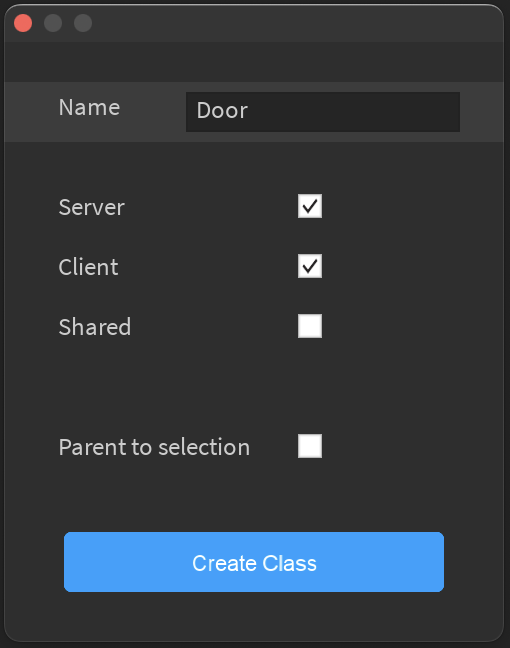
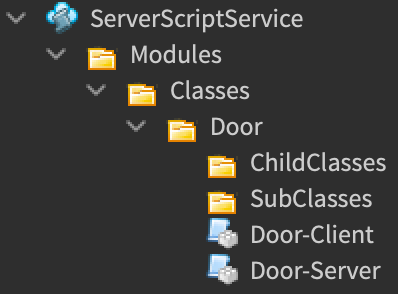
Once clicking Create Class, your selection will be automatically placed on the new class. This operation will create a new Folder and two modules(since we only selected two of the three code visibility types).

--Door Class Server Module Script
local Door = {}

local require = require(game:GetService("ReplicatedStorage"):WaitForChild("Evolve")) --Require module loader

function Door.new(Color) --This function is only called when 'new' function through Custom Objects module.
   local newDoor = Instance.new("Part")
   newDoor.BrickColor = Color --Parameters are passed through to this constructor from 'new' function of Custom Objects module.
   return newDoor --Returns an Instance of which wrapper will be applied to.
end

function Door:Initialize() --Called every time Custom Object is created using this class after 'new' function. Also runs when 'Clone' is called on a CustomObject.
   self.Opened = false
end


--Below are user defined functions of the class--

function Door:Open()
   self.Opened = true
end

function Door:Close()
   self.Opened = false
end

function Door:IsOpen()
   return self.Opened
end

return Door
--Door Class Server Module Script
local Door = {}
local require = require(game:GetService("ReplicatedStorage"):WaitForChild("Evolve")) --Require module loader
function Door:Initialize() --Called every time Custom Object is created using this class after 'new' function.
--Also runs when 'Clone' is called on a CustomObject.
print("Door client initialized")
end
function Door:ClientFunction()
print("Door client function called")
end
return Door
You are half way there! Now we just need to create our Door using the class module we created.
--Some script

local require = require(game:GetService("ReplicatedStorage"):WaitForChild("Evolve")) --Require module loader
local CO = require("CustomObjects") --Require "CustomObjects" module

local redDoor = CO.new("Door",BrickColor.new("Bright Red")) --Returns new Part that is red wrapped with our class!
--This is when 'Initialize' within our class is called.

print(redDoor:IsOpen()) --prints 'false' since we initialized the variable as false in our class.

redDoor:Open()

print(redDoor:IsOpen()) --prints 'true' since variable is set to true in code above.

redDoor.Opened = false --since the variable is assigned as a property of the Door we can skip using the function and set the value ourselves.

print(redDoor:IsOpen()) --prints 'false'Since the above code creates a new Custom Object with our Door class, it's currently parented to nil. Thus, we must parent it to a replicated directory such as workspace to allow the client to synchronize with its state.
--Continuation of script block above

Door.Parent = workspace --Parenting Door to workspace(replicated directory) will trigger replication of state to the client

wait(1)
Door.Test = true
-- Value used in `Await` function in script block below
Now let's get into how we reference our replicated Custom Object on clients.
--Some localscript

local require = require(game:GetService("ReplicatedStorage"):WaitForChild("Evolve")) --Require module loader
local CO = require("CustomObjects") --Require "CustomObjects" module

local Door = CO.Wrap(workspace:WaitForChild("Door")) --Without a specific class specified as the second argument, yields
					--until Custom Object finished replicating onto client
                    --prints `Door client initialized`

Door:ClientFunction() --prints `Door client function called`

print(Door:Await("Test")) --after yield, prints `true`
This