Modules
Modules that come with the Evolve Framework.
This module creates Custom Objects defined by classes you create within the Classes folder under Modules.
new( instance Object, string Class, ... )Returns instance, ... alongside any additional variables returned from class defined new constructor.
Creates new CustomObject based on new constructor defined in the class specified by the second argument in Wrap. Any additional arguments will be passed to the user defined new constructor.
Wrap( instance Object, string Class )Returns customobject
Wraps passed Object into CustomObject. Allows you to transform existing instances into CustomObjects to retain properties and explorer hierarchy.
Await( instance Object )Returns customobject
Yields until instance Object is wrapped via another thread.
Exists exclusively to sync the asynchronous processes of replication and client's independant creation of CustomObjects.
Ex: Replicated CustomObject relies on UI which is made on client. No way to know if UI has been created yet, so must Await its creation.
Initialize( customobject CustomObject )Returns nil
Calls Initialize function as defined in class for the given CustomObject. Should be only called once either within class defined new function or by another script.
Clone( customobject CustomObject )Returns customobject
Forwards Clone function call to base instance, duplicates all custom properties assigned, calls Initialize method within class of Cloned CustomObject (if defined), and generates new UUID.
NOTE: Do NOT call Clone function within an Initialize function. A safety is in place to error in this case, without it, an infinite loop of cloning would occur.
GetUUID( customobject CustomObject )Returns number
Returns unique ID assigned to all CustomObjects.
GetObject( customobject CustomObject )Returns instance
Returns base instance that the CustomObject wrapper is applied to.
GetClassName( customobject CustomObject )Returns string
Returns name of Class that the CustomObject was created from.
GetPropertyChangedSignal( customobject CustomObject, string Property )Returns RBXScriptConnection
Returns Signal that is invoked when CustomObject with index string Property gets new value assigned.
Replication was by far the most challenging aspect to design for this framework. Here's how it works:
It parallels rules existing Roblox instance state replication follows. Specifically, it only occurs when the base instance is parented to a replicated directory.
| Replicated Directories | Non Replicated Directories |
|---|---|
| Workspace | ReplicatedFirst |
| Players | NetworkClient |
| ReplicatedStorage | ServerScriptService |
| StarterGui | ServerStorage |
| StarterPack | nil |
| StarterPlayer |
If your CustomObject is parented to a Replicated Directory here's what you need to keep in mind:
- If a property assigned to
CustomObjectis of typetable- Any indices other than of type
numberor typestringare not supported. I could support this, however, I have yet to find a scenario where it is necessary. -
table.remove()andtable.insert()are not supported. Server and client tables will not be synced if you use either function to update table values. This is because neither invoke the__newindexmetamethod required to detect state change.
- Any indices other than of type
- If a property assigned to
CustomObjectis of typeinstanceor typecustomobjectthen it will be translated into aStreamableon the client side. This allows client scripts toObserve()when theValueis streamed in/out.
Because this framework is focused on ease of use with Streaming Enabled, I have employed the use of a custom UUID assignment system. This allows clients to remember the identity of streamed out Instances (and reassign CustomObject wrappers accordingly) when they are streamed back in, which is unfortunately not native behavior.
You can organize classes nested inside other classes. Just as an instance can have descendants. With a class named "Knob" in the SubClasses folder of a class named "Door", it can be referenced in a Wrap function by separating each class with a period: . .
CO.Wrap(Instance, "Door.Knob") --Initializes only the Knob class. References its location through the Door class.The above code would also work if Door was not a class folder. Being a folder comprised of only classes, it would be considered a class directory just as the SubClasses folder.
You can easily Wrap() instances adding CollectionService tag with the class path prefixed with Class.. This is made extremely simple with the Tag Editor plugin by @Sweetheartichoke.
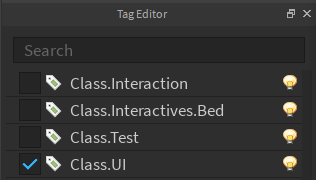
Since this instance is tagged with Class.UI it will be automatically wrapped. It is equivolent to CO.Wrap(Instance,"Class.UI").
Binders are active on both the client and server. However, in Starter directories, binding is not active because these directories clone to other directories. To avoid wrapping the same instance twice, only the cloned instance will be binded. So, a Tool in StarterPack will only be wrapped one time when it is cloned into game.Players.LocalPlayer.Backpack.
Here's an example incorporating the above functions.
--Some script

local require = require(game:GetService("ReplicatedStorage"):WaitForChild("Evolve")) --Require module loader
local CO = require("CustomObjects") --Require "CustomObjects" module


--new--
local Rain = CO.new("Rain") --Contingent on "Rain" class being created and "new" constructor must return an Instance
if not Rain.IsFalling then --Accessing "IsFalling" property of rain (Returns nil if it does not exist *DOES NOT ERROR*)
    Rain:Start() --Starts rain if it was not already falling. Contingent on "Start" function defined within the "Rain" class
end


--Wrap--
local Ground = CO.Wrap(workspace.Baseplate,"Ground") --Contingent on "Ground" class existing
Ground.Hardness = 100 --Setting "Hardness" as a custom property with value 100
Ground.Anchored = true --You can also address properties that exist within the Instance; in this example it is BasePart property: "Anchored"
Ground:Break() --Contingent on "Break" function being defined in the existing "Ground" class


--Clone--
local newGround = Ground:Clone() --Clones base instance along with all properties and returns a new CustomObject (with new UUID)
Ground:Destroy() --Calling destroy on CustomObject will Destroy base instance and remove the CustomObject wrapper
newGround.Parent = workspace --Addressing BasePart "Parent" property of base instance
Ground = newGround


--GetUUID--
print(Ground:GetUUID()) --prints "3"


--GetObject--
local newPart = Instance.new("Part")
newPart.Parent = Ground:GetObject() --"GetObject" function was needed here since you cannot set the "Parent" of an instance to a CustomObject, or as Roblox sees it, a table


--GetClassName--
print(Ground:GetClassName()) --prints "Ground"


--GetPropertyChangedSignal--
Rain:GetPropertyChangedSignal("IsFalling"):Connect(function(newValue) --Returns when custom property changes
   print(newValue)
end)
Ground:GetPropertyChangedSignal("Parent"):Connect(function(newValue) --Also works- returns when base instance-
								     --(baseplate's) parent property changes
   print(newValue)
end)
Maid class incorporated from @Quenty's Nevermore. Read his documentation here. Maid is sent as a parameter in Initialize class function. It cleans/is destroyed whenever CustomObject is streamed out or manually removed/parented to nil.
Changes I made for Evolve:
- Accepts tables and iterates and cleans up all indices(sets to nil and Destroys values if able).
-
Works with Signals created via
Eventsmodule.\
This module streamlines acting on instances streaming in and out. Provides powerful alternative to yielding for instances commonly in the form of :WaitForChild(). Allows developer to define code to run in the event of a CustomObject or instance streaming in or out. WaitForChild only yields thread until child with specified name is added.
new( variable A , variable B )Returns streamable
Creates new streamable, one of two types:
-
customobject-
A
customobjectCustomObject -
B
numberUUID
-
A
-
instance-
A
instanceParent -
B
stringChild
-
A
Compound( table Streamables , function Handler(maid) )Returns maid
Powerful function that fires Handler with maid as parameter whenever all streamables within the Streamables table have loaded. Given maid is clean up when atleast one of the streamables within the Streamables table is removed.
Observe( streamable Streamable , function Handler(maid) )Returns RBXScriptConnection
Connects Handler to event that fires when Streamable "Value" is added.\
I will show a simple example using everything this module has to offer.
--Bed Class Client Module

local require = require(game:GetService("ReplicatedStorage"):WaitForChild("Evolve"))

local Streamable = require("Streamable")

function Bed.new(self)
   self:Initialize()
end

function Bed:Initialize(maid)

    --new--
	local pillow1 = Streamable.new(self.Pillows,"1") --Create streamable for a BasePart
	local pillow2 = Streamable.new(self.Pillows,"2") --Create streamable for a BasePart


    --Observe--
    maid:GiveTask(pillow1:Observe(function(observeMaid) --Listen for when child "1" is added to parent 'self.Pillows'
    	--Here we can run code when "1" is added
        pillow1.Value.Anchored = false --Must use .Value to reference our object within the `streamable`
    end)) --maid will clean up returned connection when Bed is removed.


    --Compound--
    local dependencies = {pillow1,pillow2,self.Interaction} --Combine into list to compound.
    							    --self.Interaction is representing a `customobject` that has been-
                                                            --replicated and has taken the form of a `streamable` on the client.

    maid:GiveTask(Streamable.Compound(dependencies,function(compoundMaid) --Compound our 'dependencies' list and provide our handler
    	--Here we can run bed-related code that requires our dependencies to be present.
        pillow1.Value.Anchored = false
        pillow2.Value.Anchored = false
        self.Interaction.Value.Anchored = false

        compoundMaid:GiveTask(function()
           --Here we can run code that runs when one of our dependencies are unloaded.
           pillow1.Value.Anchored = true
           pillow2.Value.Anchored = true
           self.Interaction.Value.Anchored = true
        end)

    end)) --Give the returned maid to our CustomObject maid.
    	  --Returned maid contains `Observe` connections for each `streamable`.
endThis module incorporates @stravant's Good Signal module. It offers a very performant alternative to BindableEvents using the new Task Library. Passing "Signal" to this function will create a custom RBXScriptConnection and return it.
new( string ClassName )Returns instance or Returns RBXScriptConnection
Creates new Event of type ClassName. Handles parenting and naming if it is an instance.\
I will show a simple example of a car being purchased. A purchase "Signal" event is defined in the "Car" class. It is then Fired within the Car class' "Purchase" function and the firing event is connected to and acted upon in a third script.
--Car Class Module Script
local Car = {}

local require = require(game:GetService("ReplicatedStorage"):WaitForChild("Evolve")) --Require module loader
local Events = require("Events") --Require "Events" module

Car.Purchased = Events.new("Signal")

function Car:Purchase()
   self.Purchased:Fire()
end

return Car--Some script
local require = require(game:GetService("ReplicatedStorage"):WaitForChild("Evolve")) --Require module loader
local CO = require("CustomObjects") --Require "CustomObjects" module
local Car = CO.Wrap(workspace.Car,"Car")
Car:Purchase()--Some other script
local require = require(game:GetService("ReplicatedStorage"):WaitForChild("Evolve")) --Require module loader
local CO = require("CustomObjects") --Require "CustomObjects" module
local Car = CO.Wrap(workspace.Car)
Car.Purchased:Connect(function()
print("Car was purchased!")
end)Although this example lacks practicality, you can see the custom "Signal" Event being initialized, connected to, and fired, displaying the cross script functionality available with the new bindable event alternative, "Signal".
This use case does not cover all possible event types being created but they follow the same construction procedure as displayed in the first script example.
new ( string Type )Returns table
| Type | Description |
|---|---|
CountedDictionary |
# Operator works on the returned table. Allows to easily get length of non-array. |
--Some script

local require = require(game:GetService("ReplicatedStorage"):WaitForChild("Evolve"))
local Table = require("Table") --Require "Table" module

local tbl = {["One"]=1,["Two"]=2,["Three"]=3} --Made a dictionary
print(#tbl) --prints "0"

local tbl = Table.new("CountedDictionary") --Made counted dictionary
tbl["One"]=1,tbl["Two"]=2,tbl["Three"]=3 --Inputting values
print(#tbl) --prints "3"
Returns string
This module returns a function. It is designed to expand on what is returned from the existing typeof function to allow identifying CustomObject and RBXScriptConnection.
--Some script

local require = require(game:GetService("ReplicatedStorage"):WaitForChild("Evolve"))
local Signal = require("CustomObjects") --Require "CustomObjects" module


local Signal = Events.new("Signal") --Contingent on "Ground" class being created


print(typeof(Signal)) --Using the original 'typeof' function, 'print' outputs "table"
---
local typeof = require("typeof") --Overwrites existing 'typeof' function with our extended version.
---
print(typeof(Signal)) --Using our extended 'typeof' function, 'print' outputs "RBXScriptConnection"