Skip to content

Add StackStorm st2 CLI shell plugin#172

Open
mamercad wants to merge 5 commits into1Password:mainfrom
mamercad:st2
Open

Add StackStorm st2 CLI shell plugin#172
mamercad wants to merge 5 commits into1Password:mainfrom
mamercad:st2

Conversation

@mamercad
Copy link
Copy Markdown

@mamercad mamercad commented Feb 2, 2023

Add StackStorm st2 CLI shell plugin.

❯ make st2/example-secrets
go run cmd/contrib/main.go st2/example-secrets
Auth Token:
  Token: 0ctjp196jl9mruhozt6js1ch1example

Here are the ST2 authentication docs (I can't find a permalink, search for ST2_AUTH_TOKEN).

@mamercad mamercad marked this pull request as ready for review February 2, 2023 10:44
@mamercad mamercad changed the title Add StackStorm shell plugin Add StackStorm st2 CLI shell plugin Feb 2, 2023
@mamercad mamercad marked this pull request as draft February 2, 2023 10:58
@hculea
Copy link
Copy Markdown
Member

hculea commented Mar 29, 2023

Hey @mamercad , thank you for your contribution! I noticed that your PR has been in draft for a while.

Is there a specific reason it is not yet ready for review? Feel free to reach out to us, if you think we could help!
You can either:

Let us know! We'd love to get this rolling 😄

@mamercad
Copy link
Copy Markdown
Author

Hey @mamercad , thank you for your contribution! I noticed that your PR has been in draft for a while.

Is there a specific reason it is not yet ready for review? Feel free to reach out to us, if you think we could help! You can either:

Let us know! We'd love to get this rolling 😄

Ah, I can't quite remember, I've been busy with $work 😦 I'll set a reminder to get back to this.

@mamercad mamercad marked this pull request as ready for review March 29, 2023 22:18
@mamercad
Copy link
Copy Markdown
Author

Hey @mamercad , thank you for your contribution! I noticed that your PR has been in draft for a while.
Is there a specific reason it is not yet ready for review? Feel free to reach out to us, if you think we could help! You can either:

Let us know! We'd love to get this rolling 😄

Ah, I can't quite remember, I've been busy with $work 😦 I'll set a reminder to get back to this.

I've marked it ready for review.

Copy link
Copy Markdown
Member

@hculea hculea left a comment

Choose a reason for hiding this comment

The reason will be displayed to describe this comment to others. Learn more.

Thank you for your contribution! ❤️

@AndyTitu
Copy link
Copy Markdown
Contributor

AndyTitu commented Apr 26, 2023

This PR seems pretty close to the finish line actually!

What I would propose we do is:

  1. make sure we always provision cache_token: false to the tool so we make sure the retrieved token does not get spilled to disk. However, I am wondering whether the toke, which gets written to disk and which seems to be actually used for performing the authentication, is the actual token that you have in 1Password, or is a temporary one as hinted by the Expiry field that follows it.
  • if that's a temporary token we need to find out how to retrieve that, maybe using an already existing SDK.
  • if that temporary token cannot be retrieved we should stick to the username/password approach with the file provisioner. However, if possible, I'd prefer to sticking with the env var approach since that's less prone to changes/errors in the future.
  1. If we go for the token, given that we are not caching it anymore, let's use the shell-plugin built in cache to store that.

Let me know if this makes sense @mamercad !

@AndyTitu AndyTitu added the in-progress this PR is being worked on/comments are in the process of being addressed by the contributor label Apr 26, 2023
@mamercad
Copy link
Copy Markdown
Author

This PR seems pretty close to the finish line actually!

What I would propose we do is:

  1. make sure we always provision cache_token: false to the tool so we make sure the retrieved token does not get spilled to disk. However, I am wondering whether the toke, which gets written to disk and which seems to be actually used for performing the authentication, is the actual token that you have in 1Password, or is a temporary one as hinted by the Expiry field that follows it.
  • if that's a temporary token we need to find out how to retrieve that, maybe using an already existing SDK.
  • if that temporary token cannot be retrieved we should stick to the username/password approach with the file provisioner. However, if possible, I'd prefer to sticking with the env var approach since that's less prone to changes/errors in the future.
  1. If we go for the token, given that we are not caching it anymore, let's use the shell-plugin built in cache to store that.

Let me know if this makes sense @mamercad !

It does, though, I think I'd like to try switching to username and password (pushed). But, I'm not having much luck:

❯ op plugin init st2
####################################################################
# WARNING: 'st2' is not from the official registry.                #
# Only proceed if you are the developer of 'st2'.                  #
# Otherwise, delete the file at /Users/mark/.op/plugins/local/st2. #
####################################################################

StackStorm CLI [test build]
Authenticate with StackStorm Username and Password.

? Locate your StackStorm Username and Password: StackStorm (Homelab)

op: The "StackStorm (Homelab)" item does not follow required item structure for credential type Username and Password:
    username    Username used to authenticate to StackStorm.
    password    Password used to authenticate to StackStorm.
    website     StackStorm base URL.

To continue, you'll have to update the field names. This can be done interactively. Proceed? [Y/n] y
[ERROR] 2023/04/29 16:40:07 cannot edit item: "StackStorm" has fewer fields than the Username and Password credential type requires. Edit your item to include at least 3 fields with non-empty labels or select another item

Feels like I have the right labels:

❯ op item get "StackStorm" --format=json | grep label
      "label": "website",
      "label": "username",
      "label": "password",
      "label": "notesPlain",
      "label": "base_url",

Any ideas?

@AndyTitu
Copy link
Copy Markdown
Contributor

AndyTitu commented May 8, 2023

username

@mamercad I understand the confusion. I think what the CLI complains about is the item not having the proper amount of fields to be representative for such a credential type. The label here refers to the name of the field rather than the label type. This should be fixed by creating an item with fields (they can just be text fields) matching the names of the secrets/configs username, password, website.

@mamercad
Copy link
Copy Markdown
Author

mamercad commented May 9, 2023

creating an item

What kind of item?

@mamercad
Copy link
Copy Markdown
Author

mamercad commented May 9, 2023

with fields

I have the required fields already:

❯ op item get "StackStorm" --format=json  | jq -r '.fields[] | .label'
username
password
notesPlain
base_url
username
password

@AndyTitu
Copy link
Copy Markdown
Contributor

AndyTitu commented May 9, 2023

@mamercad Oh, my bad, I got confused. I think I found the problem. Are these fields inside sections or do they have a specific designation (is the item a login type and the username and password fields are an actual main username and password of the item)? This will cause the error you are seeing. username and password should be flat mapped inside the item (they shouldn't be part of any section) and they should not have any designation for them to be valid candidates for renaming. I understand this is a bit weird. I'll look into creating an issue for this.

@mamercad
Copy link
Copy Markdown
Author

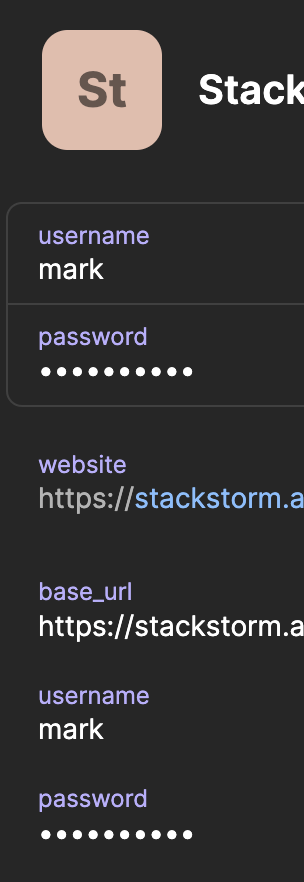
@mamercad Oh, my bad, I got confused. I think I found the problem. Are these fields inside sections or do they have a specific designation (is the item a login type and the username and password fields are an actual main username and password of the item)? This will cause the error you are seeing. username and password should be flat mapped inside the item (they shouldn't be part of any section) and they should not have any designation for them to be valid candidates for renaming. I understand this is a bit weird. I'll look into creating an issue for this.

It looks like this:

image

@AndyTitu
Copy link
Copy Markdown
Contributor

@mamercad Oh, my bad, I got confused. I think I found the problem. Are these fields inside sections or do they have a specific designation (is the item a login type and the username and password fields are an actual main username and password of the item)? This will cause the error you are seeing. username and password should be flat mapped inside the item (they shouldn't be part of any section) and they should not have any designation for them to be valid candidates for renaming. I understand this is a bit weird. I'll look into creating an issue for this.

It looks like this:

image

The error could appear because of the duplicate field names in the item as the CLI doesn't know which one to choose. Could you try removing the designated fields (the ones on top) and only keep the regular ones? That said, I checked and we are tracking internally the improvement of how we are looking for matching fields, as this was a recurrent point of feedback.

The MR seems ready imo, so if we could resolve this last issue, I'd say it would be close to merging

Sign up for free to join this conversation on GitHub. Already have an account? Sign in to comment

Labels

in-progress this PR is being worked on/comments are in the process of being addressed by the contributor

Projects

None yet

Development

Successfully merging this pull request may close these issues.

4 participants