This repository was archived by the owner on Sep 22, 2023. It is now read-only.
SubSystems (Overview)
This is a guide for subsystems and how they work!
Wpilib has a basic tool for creating new subsystems. All you need to do is...
-
Create the root folder of the subsystem (For naming conventions please visit the style guide)
-
Right-click on the root folder (two fingers on a Chromebook or Linux-based machine)
-
Select Create new class/command
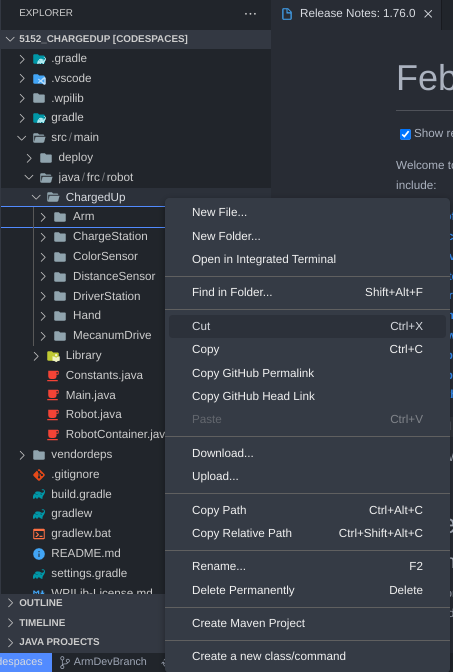
-
Select Subsystem (New)
-
Enter Name (Check style guide)
Here is what you will get
// Copyright (c) FIRST and other WPILib contributors.
// Open Source Software; you can modify and/or share it under the terms of
// the WPILib BSD license file in the root directory of this project.

package frc.robot.ChargedUp.Arm;

import edu.wpi.first.wpilibj2.command.SubsystemBase;

public class <YOUR SUBSYSTEM NAME> extends SubsystemBase {
  /** Creates a new <YOUR SUBSYSTEM NAME>. */
  public <YOUR SUBSYSTEM NAME>() {}

  @Override
  public void periodic() {
    // This method will be called once per scheduler run
  }
}