Releases: 8syncdev/zus-releases
Release list
ZUS v1.1.0


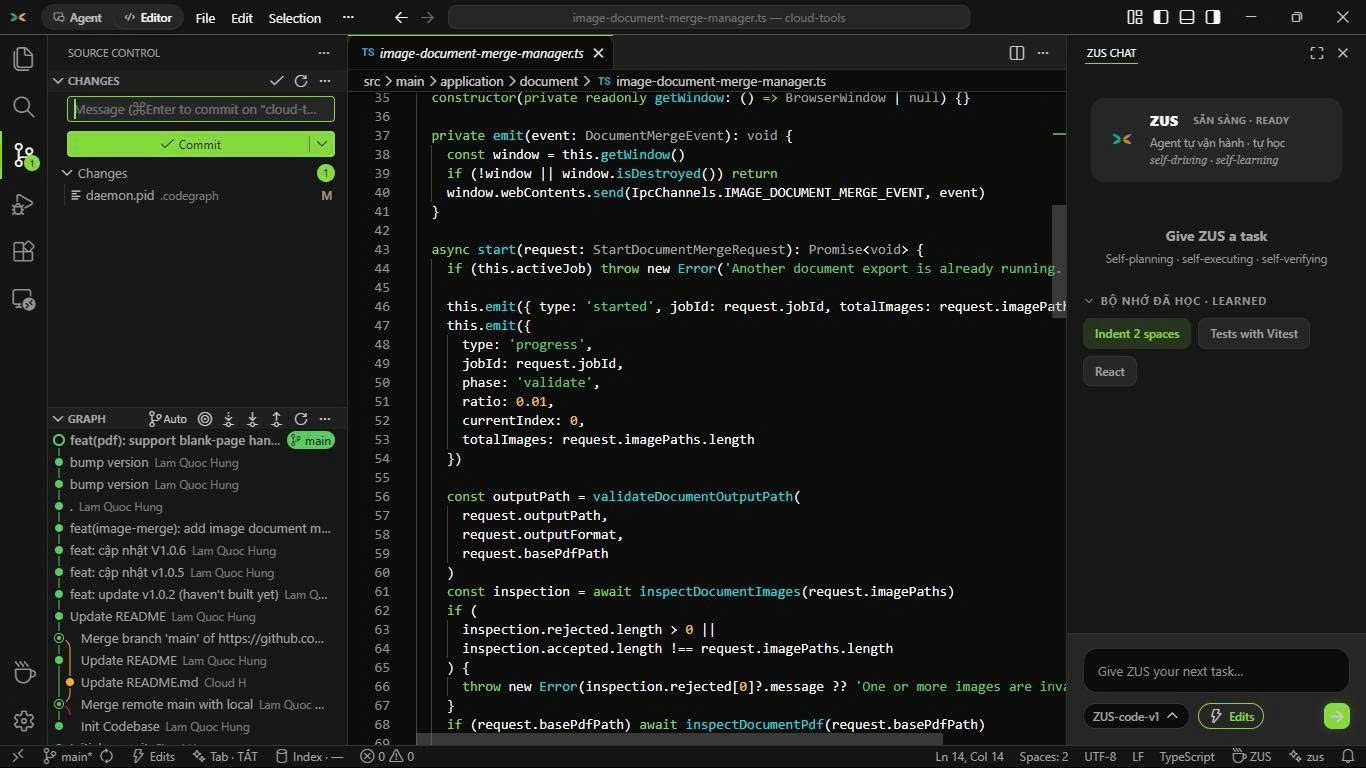
🇬🇧 ZUS v1.1.0 — fast, lightweight AI IDE
The full VS Code workbench with a built-in AI agent, in a ~22 MB Windows installer (no bundled Chromium — Tauri 2, OS WebView + Rust core).
Highlights
- 🤖 AI agent: self-planning · self-executing · self-verifying — 3 autonomy levels (Ask first / Edits / Autopilot) + command allowlist
- 🔒 Local-first: your codebase is indexed on your machine; free tier with daily quota, zero API keys
- 🧩 Full workbench: Monaco editor, terminal, Git graph, extensions via Open VSX
- 🎨 5 native themes · Vietnamese-first UI (English supported)
Install (Windows — avoids SmartScreen prompt)
winget install 8syncdev.ZUSscoop bucket add zus https://github.com/8syncdev/scoop-zus && scoop install zusmacOS (Apple Silicon): ZUS_1.1.0_aarch64.dmg — first open: right-click → Open → Open.
Linux: .deb / .rpm / .AppImage below.
Verify — sha256sum -c --ignore-missing SHA256SUMS.txt. Manually downloaded .exe is not code-signed yet: verify checksum, then More info → Run anyway. Auto-update is built in — every update is signature-verified (minisign) before install.
🇻🇳 ZUS v1.1.0 — AI IDE nhẹ, nhanh
Đầy đủ workbench VS Code + AI agent có sẵn, installer Windows ~22 MB (không chở Chromium).
- 🤖 Agent tự lập kế hoạch · tự thực thi · tự kiểm chứng — 3 mức tự chủ + allowlist lệnh
- 🔒 Local-first: code được index ngay trên máy bạn; miễn phí theo quota ngày, không cần API key
- 🧩 Monaco, terminal, Git graph, extensions Open VSX · 🎨 5 theme riêng, UI tiếng Việt first
Cài Windows: copy lệnh winget hoặc scoop ở trên (không dính SmartScreen). Tải tay .exe thì verify SHA256SUMS.txt trước rồi More info → Run anyway. Cài 1 lần — app tự update, mọi bản đều xác thực chữ ký số trước khi cài.
8 Sync Dev — Nguyễn Phương Anh Tú (Alex Dev / Kevin Nguyễn) · 8syncdev.com · atus@8syncdev.com — Sync is a loop: two systems, one link.