Repository navigation
Audiobooks and Read Aloud
Listening on Kindles with a speaker or headphone jack (Kindle 2, 3, DX, Touch): Grimmory audiobooks, and any book read aloud in the Kindle's own voice. Music from Plex: Music. Audiobooks can also have a tab of their own: the Audiobooks tab.
Catalog tab → Audiobooks page (swipe left from Books, or the page-turn button). It's laid out like the Books page: Search audiobooks… at the top (titles, authors and series, audiobooks only), two shelves with covers face out, Continue listening (what you've listened to on this Kindle, latest first, then what Grimmory has in progress, with a ribbon and how far you are) and Recently added, each ending in a bundle that opens the whole list, then a bookcase with All audiobooks, Authors, Shelves, Series (the cards count what's known) and the Grimmory card (your account). Audiobooks on the Kindle are in the Downloads tab. Not signed in to Grimmory, the page's shelves are empty and it says to sign in.
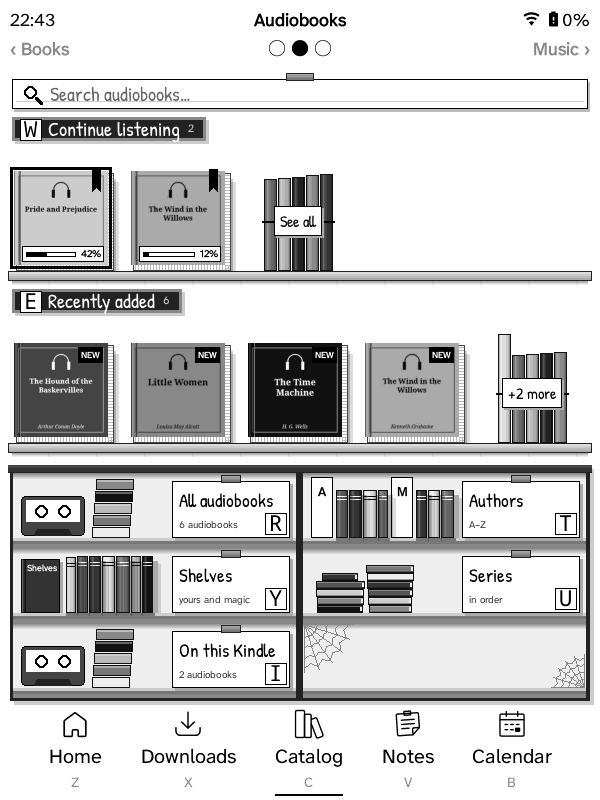
- Authors and Series list only the authors and series that have audiobooks, with how many. The first time, GZreader fetches the list of every audiobook in the background (kept on the Kindle like the other saved lists, and fetched again each time you open them).
- Shelves: your shelves and smart shelves; each opens to the audiobooks on it. Once your shelves and the audiobooks are known, shelves with no audiobook on them are left out (smart shelves are always listed).
- An author's, a series' or a shelf's list has Search in … at the top.
Pick one to download it to Grimmory/Audiobooks/<id>/ (single M4B file,
converted for the Kindle, or one file per track for folder audiobooks), then the player opens:
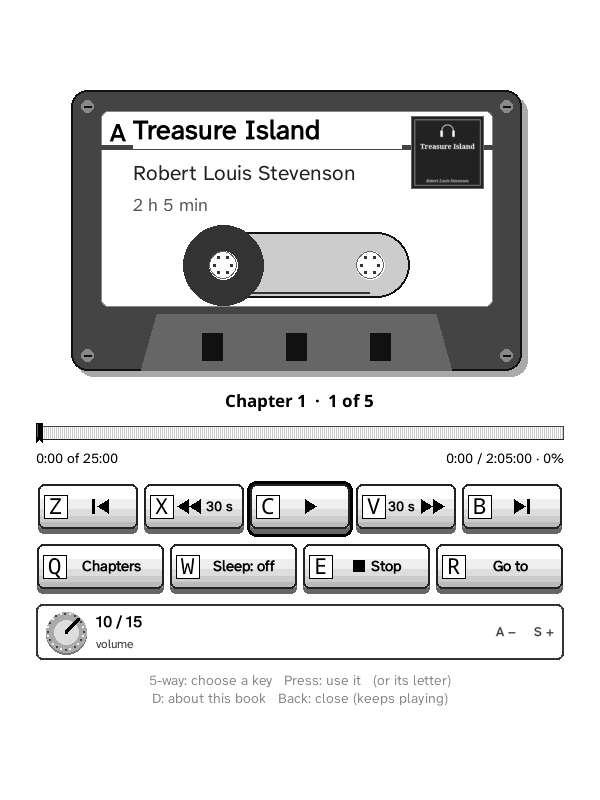
a cassette walkman with headphones. The cassette's label has the book's title,
chapter and cover written on it, the tape moves from the left reel to the
right one through the chapter, and the counter shows the minutes into the
book. Under it, the book's progress as its page edges with a ribbon where you
are (as on Home).
| Key | Does |
|---|---|
| 5-way press / Space | Play / pause |
| Left / Right | Back / forward 30 s |
| Up / Down | Previous / next chapter |
| Q / W / E | Chapters / sleep timer (15–60 min, end of chapter) / stop |
| A / S | Quieter / louder |
| D | About this book: Grimmory's description, narrator, length |
| Menu | About, chapters, sleep timer, stop |
| Back | Close the screen (keeps playing; reopen from Home or Downloads → Audiobooks) |
| Home | Home (keeps playing) |
| Volume buttons | Volume, here and anywhere in GZreader (a note shows the level) |
In Downloads → Audiobooks (the Bookshelf view) each downloaded audiobook is a cassette facing out, its cover on the label and its title on a plate on the shelf under it; tap one to open the player.
Pause stops the player process and remembers the place; play starts it again from there (MP3: to the nearest 4 KB; M4B: from the AAC frame playing when paused). The Kindle 3's sound pipeline doesn't come back from a suspended process, and a stopped one also frees the sound device for read aloud. Sleep (the power switch) pauses; leaving GZreader (Exit to the Kindle's menu, a restart) stops the audiobook and read aloud.
Position syncs with Grimmory's audiobook progress (same fields as its web player: position in the track and track index), every minute while playing, on pause and on stop; offline updates are queued. The Kindle doesn't go to sleep while audio plays; pressing the power button pauses. The book's description comes from Grimmory with the download (and, for audiobooks downloaded before 1.6.2, the next time the player opens online); Home's featured book shows it too.
Audiobooks can come from a library on your Plex server instead of Grimmory: Settings → Connections → Plex → Audiobooks (or Plex in the Music tab) lists Grimmory and the server's music libraries; Plex keeps audiobooks in a music library, an album per book with the author as its artist. With a Plex library picked, the Catalog's Audiobooks page shows it: Search audiobooks…, Continue listening (what you've listened to on the Kindle, then what Plex players played last), Recently added, All audiobooks, Authors and the Plex card (the library and server; it opens the Plex settings, where Audiobooks goes back to Grimmory). Covers come from Plex. Grimmory isn't needed for these: they show signed in to Grimmory or not.
A Plex audiobook downloads like Grimmory's, one file per track (MP3 and AAC as they are, M4B/M4A converted on the Kindle, other formats converted to MP3 by Plex at the Music quality setting); a single-file book keeps Plex's chapters, a book in tracks has a chapter per track. Its place goes to Plex (the track and the time in it) every few minutes while playing, on pause and on stop, with Wi‑Fi on; opening it offers the place where any Plex player (Plexamp, Prologue, the web app) left it. Audiobooks already on the Kindle stay and play whichever you pick. Kindles that sync through a computer choose Plex audiobooks on the sync page (Content → Audiobooks: the library the Kindle uses, or Audiobooks from…); they come with the next sync. Their place isn't sent back to Plex from those Kindles.
Playback uses what the Kindle 3 has: GStreamer 0.10 (gst-launch-0.10)
with Freescale's hardware decoders mfw_mp3decoder and mfw_aacdecoder,
into ALSA. MP3 starts anywhere (the file is fed from the right byte offset).
There is no MP4 demuxer on the Kindle, so an M4B is converted once after
download (gzreader_mp4.lua: each AAC frame gets an ADTS header; no
re-encoding) into ~15-second pieces in <file>.chunks/ (audio brought by
the sync page comes already converted, the same pieces made by Mp4 in
gzsync.js); playback starts at
the piece holding the position and feeds the following ones to the AAC
decoder. Test audio playback tries the pipelines with a short MP3 and an
AAC tune (converted from the bundled M4A, which also tests the converter),
asks which you heard and remembers it.
Downloads use Grimmory's audiobook stream endpoints and resume with HTTP Range after a dropped connection or timeout.
The conversion runs as a separate luajit gzreader_mp4.lua <in> <dir> <progress> process at nice 19 (~8 MB for a long book; sample tables are
read in 64 KB blocks), with a progress bar fed from its progress file. A
fork of KOReader isn't used for it: the fork's copy of KOReader's heap gets
duplicated page by page as its garbage collector runs, which ran the
Kindle 3 out of memory in 1.0.21.
Uses the Kindle's own voice (Amazon's speech service, reached over lipc
with the Kindle's lipc-hash-prop tool, run in the background so the screen
never waits; KOReader's lipc library doesn't load on the Kindle 3).
Shift + Sym (or the quick panel → Read aloud, in a book) starts and stops. The sentence
being read is highlighted and pages turn by themselves. EPUB/FB2/MOBI/AZW3
and text only.
Amazon never documented the request format. The speech daemon (ttsd)
writes which field it's missing to the system log ("unable to read id"), so
Settings → General → Audio → Read aloud → Find the Kindle voice (test) adds the missing
fields one by one until ttsd accepts the request, plays "Voice test" and
asks whether you heard it; the request shape is then saved. Text goes to the voice a
sentence at a time (split only when a sentence passes 30 words at a comma,
semicolon, colon or dash, or 80 words; paragraph and heading ends always end
a piece); web addresses are left out. When a sentence runs onto the next
page, the page turns part-way through, at the share of the sentence's
characters already said. The speech
service doesn't report when a sentence ends, so the next sentence starts
after a time computed from its length and the speed setting (Read-aloud
settings: Settings → General → Audio → Read aloud → Slower / Faster). The diagnostic log records every step.
Kindle 2 and DX (firmware 2.x): there's no lipc-hash-prop and the speech
service has an older interface (com.lab126.tts: playFile). Find the Kindle
voice tries that too, one sentence at a time: first through the Kindle's own
speech pipe (/var/tmp/ttsUSFifo, made if it's missing: playFile gets the
pipe's path and the sentence is written into it; this is what works on a
Kindle DX), then as a small text file in /tmp (or /var/tmp) whose path
goes to playFile. If none works, the diagnostic log lists the files and
paths the speech service knows about.
Kindle 3: it shows headphones nowhere GZreader can look; its hardware
service sends a message instead when they go in or out (audioHS from
com.lab126.hal). Find the headphone jack (below) listens for it, and the
headphone test: line in the log lists the messages heard. When that's what
it found, one small listener waits for the message while something plays.
When headphones are unplugged while music, an audiobook or read aloud plays, GZreader pauses it (Settings → General → Audio → Pause when headphones are unplugged), so it doesn't carry on out of the speaker. Kindles don't all say where they show the jack: GZreader looks for a headphone switch the way Linux reports one; if this Kindle doesn't have that, Settings → General → Audio → Find the headphone jack asks you to plug in and unplug headphones and keeps the place that changed. If nothing changes, the Kindle doesn't tell, and nothing is paused (send the log: it lists what was looked at).
While something plays, GZreader looks once a second. When the place it found
is a property of the Kindle's audio service, it's read through KOReader's own
lipc library, without starting a program; if that library can't be used on
this Kindle, it asks with lipc-get-prop every 4 seconds instead (each ask
starts a program, which costs the Kindle 3 a moment of CPU).
Settings → General → Audio (the Kindle 2, 3, DX and Touch: the Kindles with a speaker or a headphone jack) has Read aloud (volume, speed, the Kindle voice), Test audiobook playback, Pause when headphones are unplugged and Find the headphone jack. They were at the end of Settings → Reader before; they are for music and audiobooks too.