Repository navigation
v1.9.0

Published to PyPI: https://pypi.org/project/videokidnapper/1.9.0/
macOS: *-macos-arm64.dmg (Apple Silicon) · *-macos-x86_64.dmg (Intel). Signed and notarized by Apple; FFmpeg bundled.
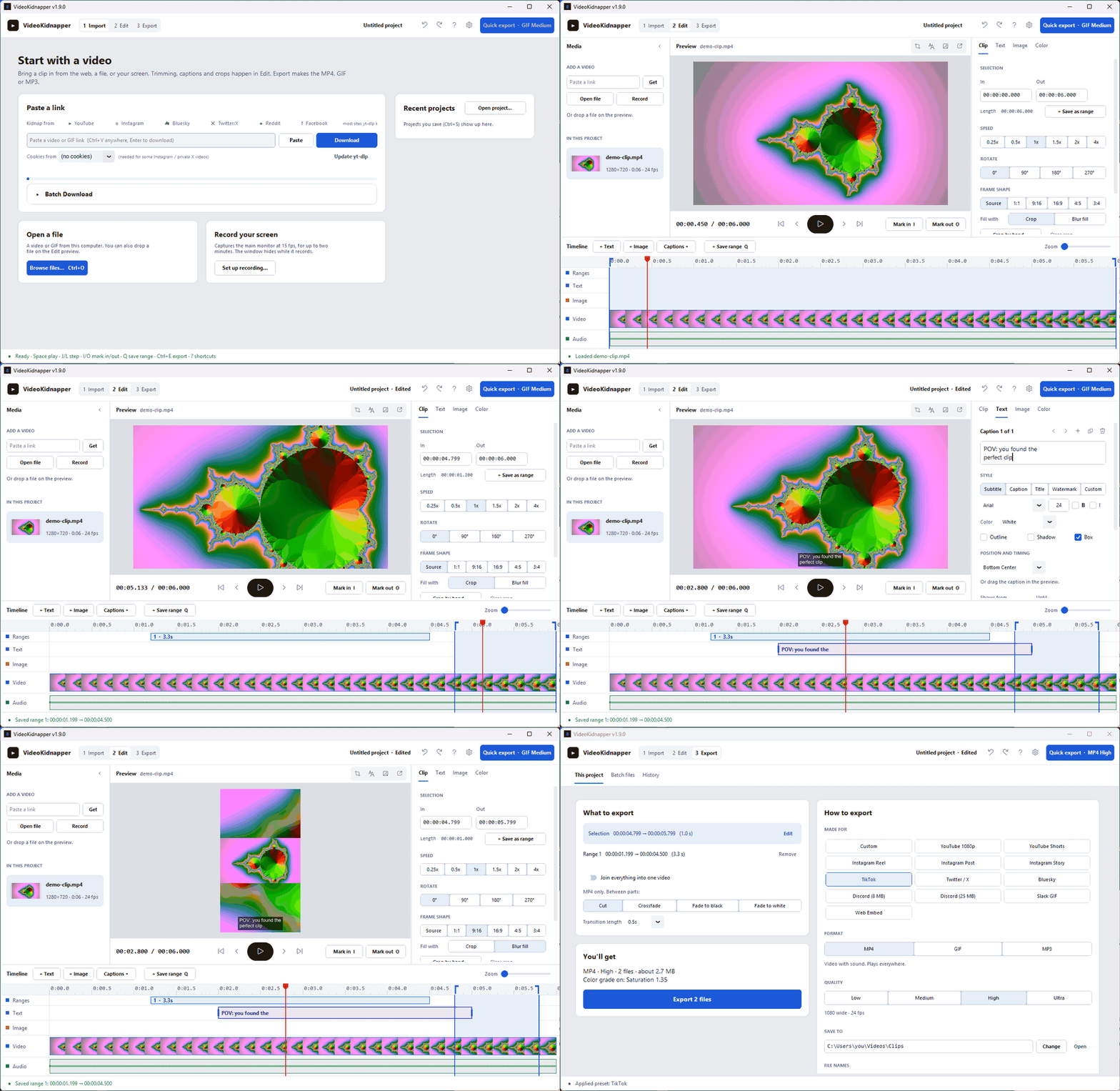
A new layout: Import, Edit, Export. The editor fits on one screen with no scrolling, every export setting lives on one page, and a light Studio look replaces the old default.
Added
- Studio layout. The app is organized as three steps across the top: Import, Edit and Export. Edit fits on one screen with no scrolling: media on the left, the preview with transport controls in the middle, an Inspector on the right (Clip, Text, Image and Color tabs that edit one selected thing at a time), and a track timeline underneath.
- Track timeline. Ruler, saved ranges, caption clips, image-overlay clips, a filmstrip and the waveform share one playhead. Click to seek, drag the in/out edges, drag a caption or overlay to move it, drag its edge to retime it, Ctrl+wheel to zoom.
- Color in the preview. The preview applies brightness, contrast, saturation and gamma the same way the export does, so a forgotten slider can no longer fade an export with nothing on screen to show it.
- Q saves the selection as a range.
- Batch files, redesigned. A queue table with per-row platform, plain-English status and a progress bar, plus a side panel for quality, MP4 or MP3, and the save folder. Speed, rotate, frame shape and color come from Edit instead of a second copy of the options, and finished files are added to History.
- History with thumbnails. Exports are grouped under Today, Yesterday and Earlier, each with a thumbnail, and missing files are greyed out.
- Collapsible media panel. Fold it to a thin rail (open, link and record stay one click away) for a bigger preview; the choice is remembered.
Changed
- Studio is the new default theme. A neutral light look where the video is the most colorful thing on screen. Installs still on an earlier default (Dark, or Cream since 1.8.2) move to it once; Fallout, Retro and Light choices are kept. Dark is now Graphite, a neutral grey instead of navy. Every theme is under Settings → Theme, and all five carry the new timeline track colors.
- Export settings live in the Export workspace. Format, quality, platform presets, the save folder, file names, joining ranges and GIF options are on one page instead of a collapsed panel. Saved ranges can be reordered and removed there, and the file-name picker shows an example built from the loaded video's title. Batch files and History moved there too, and the debug log moved to the settings menu.
- J and L move the playhead. They used to move the in point. I and O now mark the in and out points at the playhead.
- Setup and winget installs update from the GitHub release. The update prompt opens the release, whose installer updates the app in place and keeps your settings, instead of running winget. Microsoft Store installs keep updating through the Store.