ALYBH‐REnchantment Glints
✨ALYBH‐REnchantment Glints (ALY式‐附魔光效)
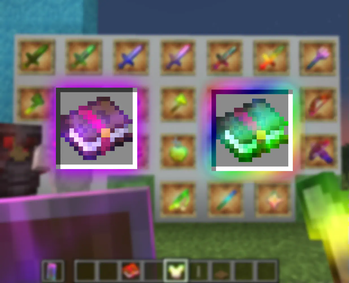
A resource pack series for changing Glint effects. Contains dozens of colors/styles, of your choice! Compatible with Minecraft: Java Edition 1.15 and newer.
改变光效效果的资源包系列。内含数十种配色与款式,任你挑选!兼容《Minecraft》Java版 1.15 及以上的版本!
- Modrinth: https://modrinth.com/collection/lR5x3kC0
- Planet Minecraft: https://www.planetminecraft.com/texture-pack/alybh-re-enchant-glints/
- KLPBBS: https://klpbbs.com/thread-150701-1-1.html
English
This resource pack series refreshes Minecraft's Glint by replacing the original Glint textures, delivering a fresh visual experience while preserving the vanilla-like aesthetic, all without requiring any mods. In addition to the default effect, the collection includes a variety of alternative Glint styles, allowing you to customize the appearance to suit your personal preference.
All effects are implemented entirely through resource packs, with no changes to the game's mechanics. Easy to install and highly compatible, these resource packs serve as a seamless visual enhancement to the vanilla Glint, giving enchanted items and equipment a more vibrant, dynamic, and visually appealing appearance.
中文(简体)
本资源包系列通过 替换游戏内的光效(Glint)纹理,为《Minecraft》带来焕然一新又不失原版风格的光效,无需安装任何模组即可直接使用。此外,本资源包系列还提供了多种不同风格的光效替代方案,方便玩家根据个人喜好自由搭配,打造更加个性化的视觉体验。
所有效果均基于资源包实现,不会修改游戏机制,安装简单、兼容性良好,可作为原版光效的美化替换,为装备、物品等带来更加鲜艳、生动且富有层次感的视觉表现。
The download links are listed below. Expand the section and click the corresponding text to open the release page for the selected resource pack.
以下为下载链接列表,展开后直接点击文本即可跳转至所指向的资源包项目发布链接。
Pack list (English)
资源包列表(简体中文)
| 编号 | 颜色、样式名 | 备注 |
|---|---|---|
| 000 | 彩虹色 | 来自 ALYBH-RE |
| 001 | 红色 | - |
| 002 | 橙色 | - |
| 003 | 黄色 | - |
| 004 | 黄绿色 | - |
| 005 | 绿色 | - |
| 006 | 碧绿色 | - |
| 007 | 青色 | - |
| 008 | 湛蓝色 | - |
| 009 | 蓝色 | - |
| 010 | 紫色 | - |
| 011 | 品红色 | - |
| 012 | 玫红色 | - |
| 013 | 霓虹色 | 更鲜艳的 '彩虹色' (000) |
| 014 | 薄荷绿 | - |
| 015 | 灰色 | - |
| 016 | 粉色 | - |
| 017 | 棕色 | - |
| 018 | 薰衣草紫 | - |
| 019 | 白色/银色 | - |
| 020 | 白色光点 | 斑点图案 |
| 021 | 彩虹光点 | 斑点图案 |
| 022 | 彩虹过渡 | - |
| 023 | 霓虹过渡 | 更鲜艳的 '彩虹过渡' (022) |
| 024 | 红橙黄渐变 | 红色、橙色、黄色 |
| 025 | 黄绿渐变 | 黄色、黄绿色、绿色 |
| 026 | 青湛蓝渐变 | 青色、湛蓝色、蓝色 |
| 027 | 蓝紫品渐变 | 蓝色、紫色、品红色 |
| 028 | 青品黄渐变 | 青色、品红色、黄色 |
| 029 | 铜渐变 | 金属风格渐变 |
| 030 | 铁渐变 | 金属风格渐变 |
| 031 | 金渐变 | 金属风格渐变 |
| 032 | 钻石渐变 | 金属风格渐变 |
| 033 | 绿宝石渐变 | 金属风格渐变 |
| 034 | 红玉渐变 | 金属风格渐变 |
| 035 | 紫水晶渐变 | 金属风格渐变 |
| 036 | 青金石渐变 | 金属风格渐变 |
| 037 | 下界合金渐变 | - |
| 038 | 迪斯科光点 | 红、蓝、绿大光点 |
| 039 | 铬黄渐变 | 铬金属风格渐变 |
| 040 | 彩虹过渡方框 | - |
| 041 | 紫红渐变方框 | 💜🔴 |
| 042 | 粉紫过渡方框 | 💜✨ |
| 043 | 红橙过渡方框 | - |
| 044 | 黄绿过渡方框 | - |
| 045 | 青蓝过渡方框 | - |
| 046 | 青品黄过渡方框 | - |
| 047 | 红青渐显方框 | - |
| 048 | 红粉爱心 | - |
| 049 | 铜绿沙尘 | - |
| 050 | 彩虹脉冲符文 | - |
| 051 | 紫色脉冲符文 | - |
| 052 | 白色脉冲符文 | - |
| 053 | 湛蓝渐显符文 | - |
| 054 | 金黄渐显符文 | - |
| 055 | 彩虹二进制代码 | - |
| 056 | 绿色二进制代码 | - |
| 057 | 青色二进制代码 | - |
| 058 | 红色二进制代码 | - |
| 059 | 红绿渐显二进制代码 | - |
| 060 | 彩虹星点粉尘 | - |
| 061 | 金沙粉尘 | - |
| 062 | 红沙粉尘 | - |
| 063 | 雪花粉尘 | - |
| 064 | 青色灵魂粉尘 | - |
| 065 | 燧石粉尘 | 不是很好笑 |
| 066 | 彩虹电路走线 | - |
| 067 | 紫色电路走线 | - |
| 068 | 绿色电路走线 | - |
| 069 | 青色电路走线 | - |
| 070 | 绿色反相电路走线 | - |
Compatible with Minecraft: Java Edition 1.15 and newer.
A small number of resource packs may also work on other game versions, but with reduced visual fidelity (see below for details).
适用于《Minecraft》Java 版 1.15 及以上的版本。
少部分资源包也能兼容其他游戏版本,但效果欠佳(详见下文细节)。
Due to changes in how the game renders the Glint, the visual effects of these resource packs may vary slightly in Minecraft versions before 1.19.4. In Minecraft 1.19.4 and newer, you can further customize the Glint's intensity and animation speed through the in-game Accessibility settings, and these settings also affect this resource pack series.
由于游戏对附魔光效渲染方式进行了调整,该资源包的视觉效果会在 1.19.4 以下的版本出现部分差异。在 《Minecraft》Java 版 1.19.4 及以上 ,可以通过修改游戏内的 辅助功能设置 来进一步自定义游戏内显示的光效强度以及动画速度,这同样也会适用于此类资源包。
Details (English)
On older versions of Minecraft: Java Edition (Before 1.15) and on Minecraft: Bedrock Edition, resource packs in this collection can still be loaded, but their visual effects are degraded. Only a few color substitutions—most notably blue → purple → red—can produce results that are reasonably close to the intended appearance.
This limitation cannot be resolved simply by modifying the texture files, as these versions use a fundamentally different Glint rendering pipeline. Achieving comparable results on those versions generally requires the use of mods, shader modifications, or changes to the game's internal files.
When these resource packs are used directly on unsupported versions, the recoloring effect is significantly weakened and the intended texture patterns can no longer be rendered correctly. In practice, only transitions between blue, purple, and red preserve the desired appearance reasonably well. Using other colors, or drawing detailed patterns on the texture, will usually produce results that are barely noticeable or significantly different from the intended design.
This is because, in these versions, the Glint color is determined by the game's internal rendering pipeline and is fixed to a purple tint. Instead of being rendered directly as an image, the Glint texture is used as a color multiplier during the blending process. Its RGB channels only influence the intensity of each color channel in the final output, rather than defining the final colors themselves. As a result, the original colors and fine details of the texture cannot be faithfully reproduced. Since the fixed Glint color consists primarily of red and blue with only a very small amount of green, blue, purple, and red are preserved relatively well, while colors such as green, yellow, and cyan suffer from noticeable color shifts and brightness loss.
Additionally, Minecraft: Bedrock Edition applies further sampling to the Glint during rendering, making fine texture details more prone to blurring or pixelation and further reducing the visibility of custom patterns.
细节 (简体中文)
在 较低版本的《Minecraft》Java 版(低于 1.15) 以及 《Minecraft》基岩版 中,本系列资源包虽然可以正常加载,但视觉效果会有所受损,仅有少数情况下能够实现较为符合预期的颜色替换效果 (例如蓝色 -> 紫色 -> 红色之间的换色) 。
这一问题无法仅通过修改资源包中的纹理文件解决,因为这些版本采用了与支持版本不同的光效渲染管线。如需在这些版本中获得类似效果,通常需要借助模组、修改着色器或修改游戏内部文件等方式实现。
直接在这些版本中使用此类资源包时,光效的换色效果会明显减弱,难以达到预期,而绘制在纹理上的图案也无法正常显示。实际上,仅蓝色、紫色与红色之间的颜色替换能够较好地保留效果;若使用其他颜色,或在纹理中绘制复杂图案,则最终呈现的效果往往不明显,甚至与预期完全不符。
这是因为这些版本中的光效颜色由游戏内部渲染管线决定,为固定的紫色。光效纹理不会像支持的版本那样直接作为最终显示的图像,而是作为颜色乘数参与颜色混合,其 RGB 通道仅用于影响各颜色通道的最终强度,因此无法忠实还原纹理本身的颜色和细节。由于该固定紫色主要由红色与蓝色组成,仅包含极少量绿色,因此蓝色、紫色与红色能够相对较好地保留,而绿色、黄色、青色等其他颜色则会发生明显偏色或亮度损失。
此外,《Minecraft》基岩版的光效渲染流程还会对最终的光效纹理进行进一步的采样处理,使纹理细节更容易出现模糊或像素化现象,因此图案的表现效果会进一步下降。
Effective Date: 2026-06-23 (GMT+8)
生效日期:2026 年 6 月 23 日(GMT+8)
Prior to June 23, 2026 (GMT+8), this Work was distributed without an explicit license and was therefore considered All Rights Reserved (ARR). Effective June 23, 2026 (GMT+8), the Author relicensed this Work under this License, including previously released versions, unless otherwise stated. This change affects licensing only and does not indicate that any previously released version has been modified or republished.
在 2026 年 6 月 23 日(GMT+8)之前,本作品发布时未明确指定许可协议,因此默认适用“保留所有权利(All Rights Reserved,ARR)”。自 2026 年 6 月 23 日(GMT+8)起,除非另有说明,作者已将本作品(包括此前已发布的版本)重新许可(relicense)为适用本许可证。本次变更仅涉及许可协议,不应解释为任何此前发布版本已被修改、重新发布或重新分发。